
 Need help?
Do you have a question about the Philips GoGear SA1102 and is the answer not in the manual?
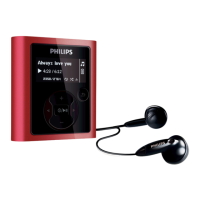
Detailed explanation of player buttons, ports, display, and their functions.
Guide to transferring music files between your player and computer using USB connection.
Instructions on how to start, stop, pause, and save voice recordings.
Solutions for when the player freezes, shows errors, or does not power on.
Resolving problems with no sound, unsupported file formats, or corrupted audio files.
Addressing issues related to full memory or exceeding file/folder limits.
Guidelines to avoid damage, malfunction, and proper cleaning methods.
Advice on listening at safe volumes and for reasonable periods to prevent hearing damage.
 General
| Brand | Philips |
|---|---|
| Model | GoGear SA1102 |
| Category | MP3 Player |
| Storage Capacity | 1 GB |
| Display | Yes |
| Display Type | LCD |
| Audio Formats Supported | MP3, WMA |
| USB Interface | USB 2.0 |
| FM Radio | Yes |
| Voice Recording | Yes |
| Connectivity | USB |








 To Next Page