2
Register your product
We strongly recommend that you register your product in order to gain access to free updates. To register your product,
please log on to www.philips.com/register so that we can inform you as soon as new updates become available.
Your new player
With your newly purchased player, you can enjoy the following:
• MP3 and WMA playback
• Voice recording
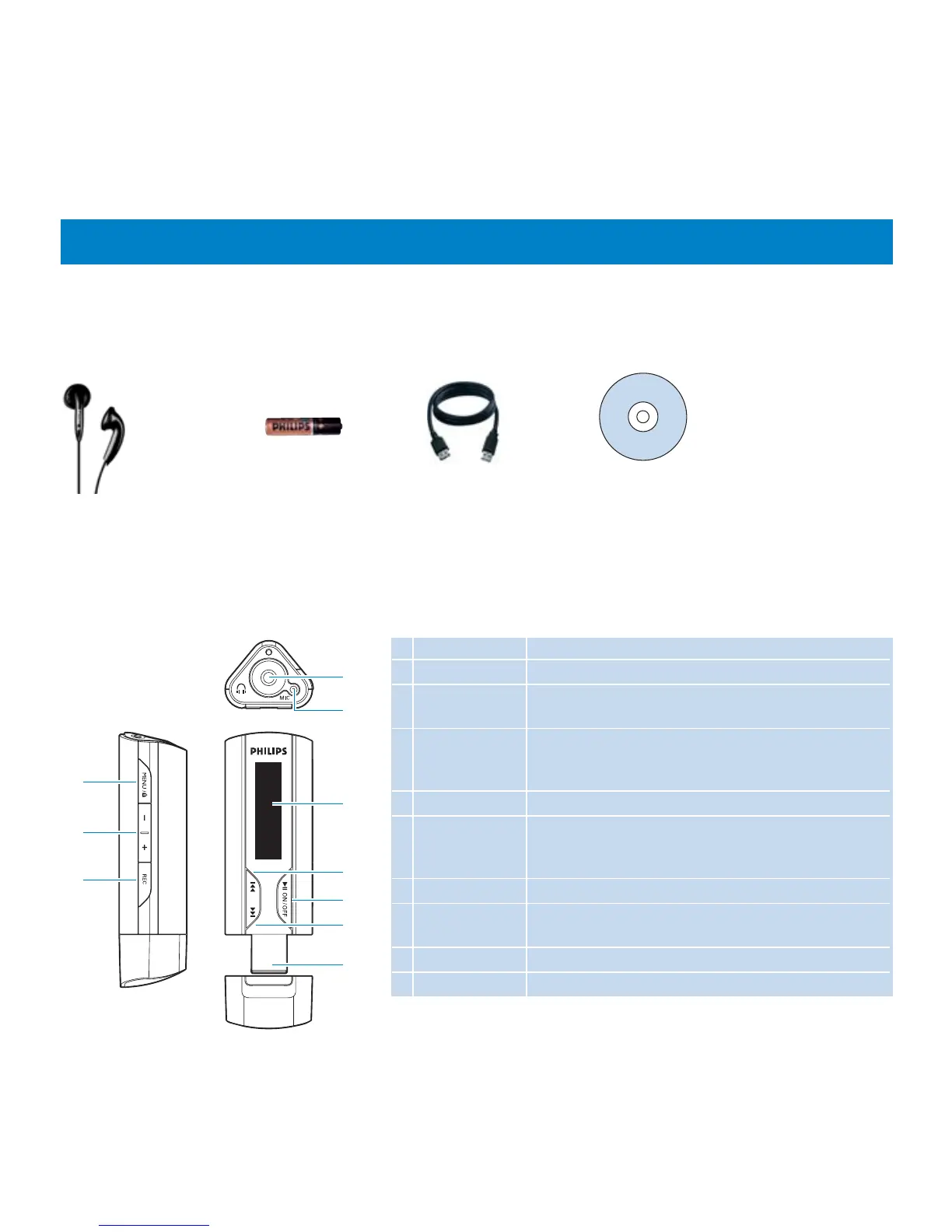
Accessories
AAA battery CD-ROM with user manual, drivers and
Frequently Asked Questions
Headphones
Overview of controls and connections
1 p Headphones jack
2 MIC Microphone
3 Display Dynamically display menu, options and track
information
4 J( Press to skip to previous song, press and hold to skip
to previous folder.
In menu mode, press to navigate through menu.
5 2; Power on/off and Play/Pause, confirm a menu setting
6 )K Press to skip to next song, press and hold to skip to
next folder.
In menu mode, press to navigate through menu.
7 USB USB connector
8 MENU/LOCK Press to access the menu
Press and hold to disable or enable the player's controls
9 + / - Volume control
10 REC Start or stop voice recording
8
9
10
1
2
3
4
5
6
7
USB Extension cable










 To Next Page