8 EN
7 Play from an
external device
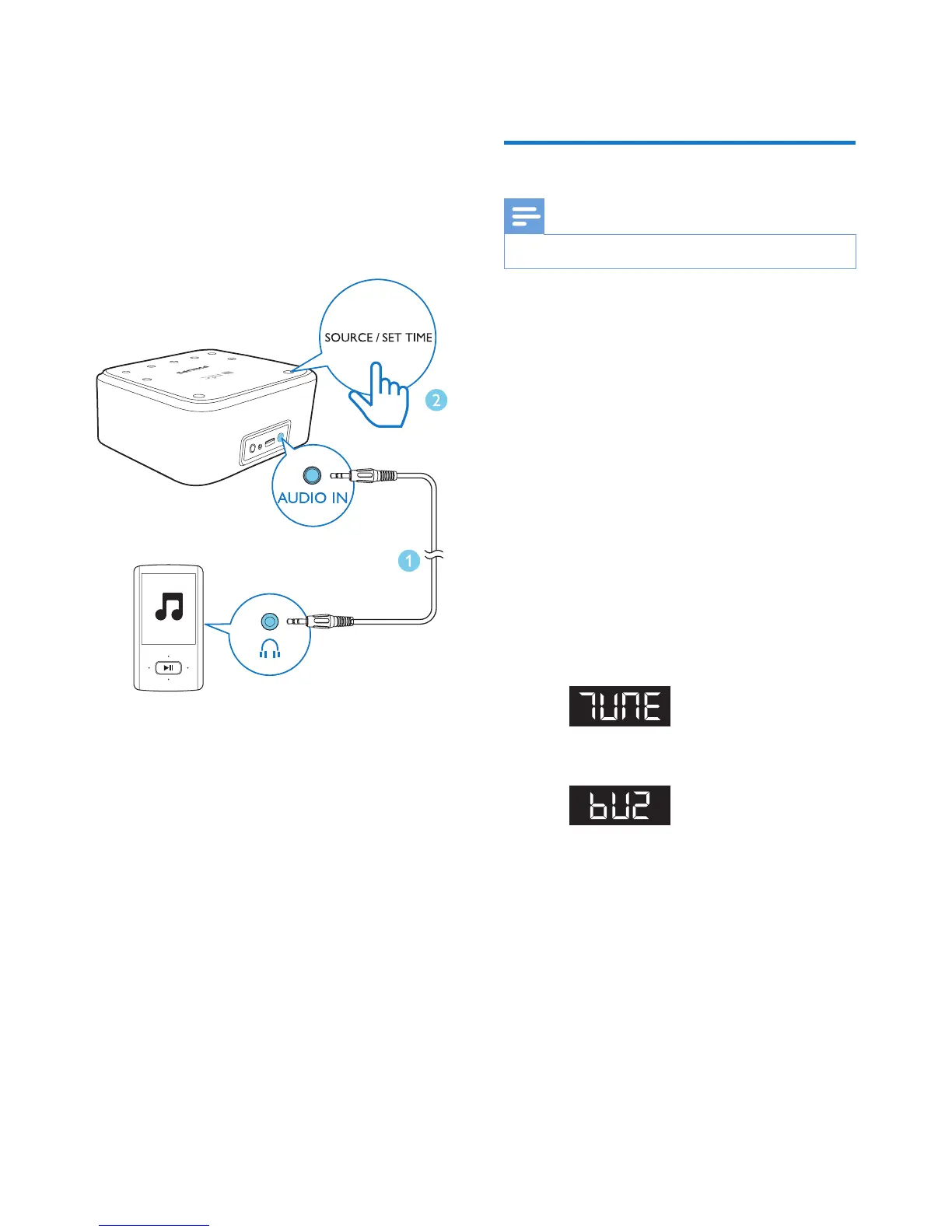
Through an audio input cable, you can play
audio that is transferred from an external audio
device, for example, an MP3 player.
1 Connect an audio input cable with a 3.5-
mm connector on both ends between
• the AUDIO IN socket on this product,
and
• the headphone socket of an external
device.
2 Press SOURCE/SET to switch the product
to the AUDIO IN mode.
3 Play audio on the external device (refer to
its user manual).
8 Other features
Set an alarm timer
Note
• Make sure that you have set the clock correctly.
1 Press and hold AL1/AL2 for 2 seconds to
activate alarm setting.
» The hour digits blink.
2 Press - TUNE/TIME or TUNE/TIME+
repeatedly to set the hour, and then press
SOURCE/SETtoconrm.
» The minute digits blink.
3 Press - TUNE/TIME or TUNE/TIME+
repeatedly to set the minute, and then
press SOURCE/SETtoconrm.
4 Press - TUNE/TIME or TUNE/TIME+ to
select an alarm source, and then press
SOURCE/SETtoconrm.
• TUNE: the last listened FM radio
station
• BUZ: the buzzer
5 Press - TUNE/TIME or TUNE/TIME+
to set the alarm volume, and then press
SOURCE/SETtoconrm.
» The alarm time and icon are displayed.


 To Next Page