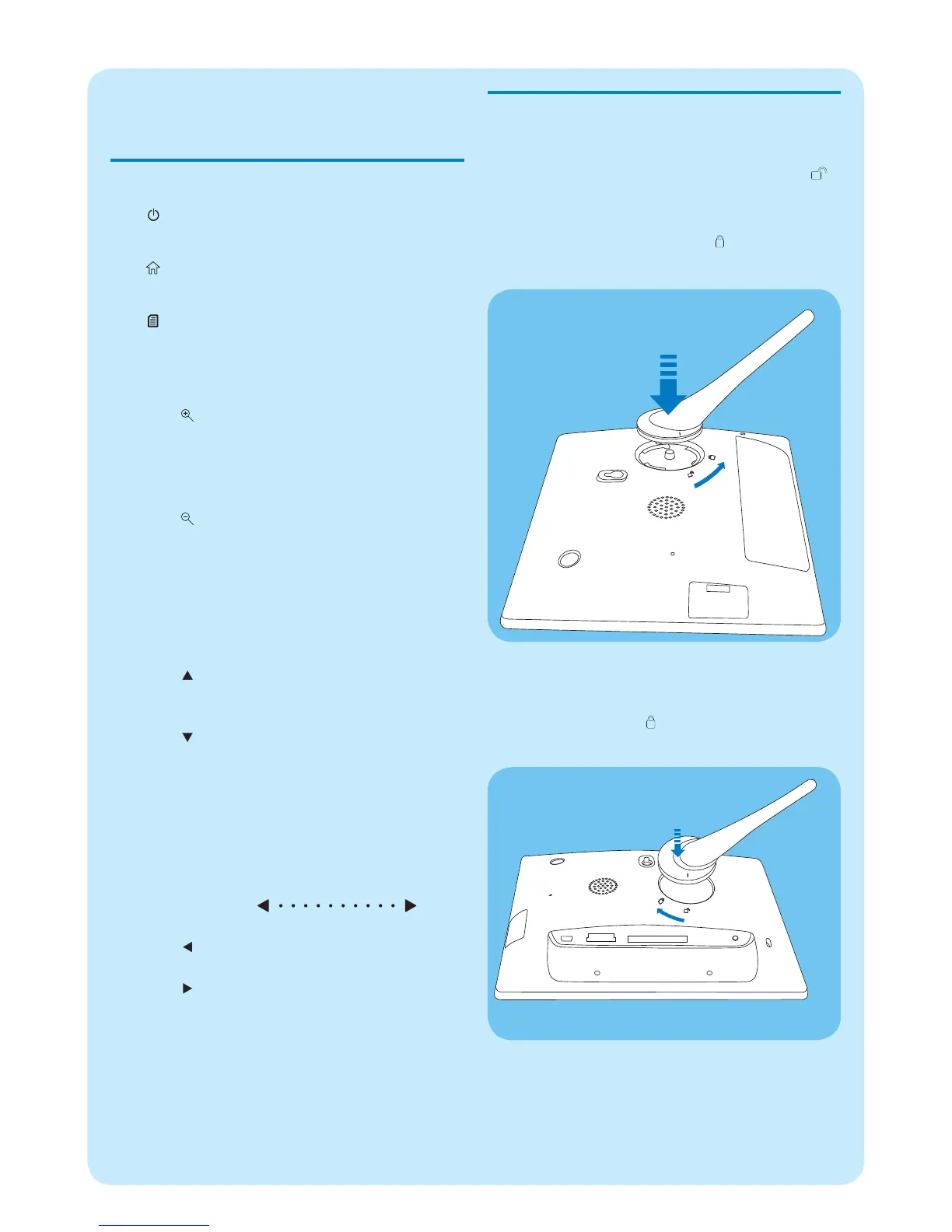
Install the stand
1 Insert the stand into the PhotoFrame.
2 Position the indication on the stand to the
position.
3 ( SPF5008/SPF5208 ) Turn the stand anti-
clockwise 45 degrees to the position and
lock it to the PhotoFrame fi rmly.
( • SPF5010/SPF5210/SPF7008/SPF7208/
SPF7010/SPF7210 ) Turn the stand clockwise
45 degrees to the position and lock it to the
PhotoFrame fi rmly.
1 Get started
Control buttons
a
Turn on/off the PhotoFrame•
b
Access the home screen•
c
Access the quick menu•
Access option menu•
d Zoom in/out
•
Zoom in an image
Switch modes: Album mode → thumbnail
mode → slideshow mode → zoom in 2
times → zoom in 4 times
•
Zoom out an image
Switch modes: Album mode ← thumbnail
mode ← slideshow mode ← zoom out 2
times ← zoom out 4 times
e Up/down slider
Scroll up/down at high speed
•
Select the upper item
Increase the volume
•
Select the item below
Decrease the volume
f OK
Display slideshow
•
Play/Pause slideshow/video•
Confi rm a selection•
g Left/right slider
Scroll left/right at high speed
•
Select the left item
•
Select the right item



 To Next Page