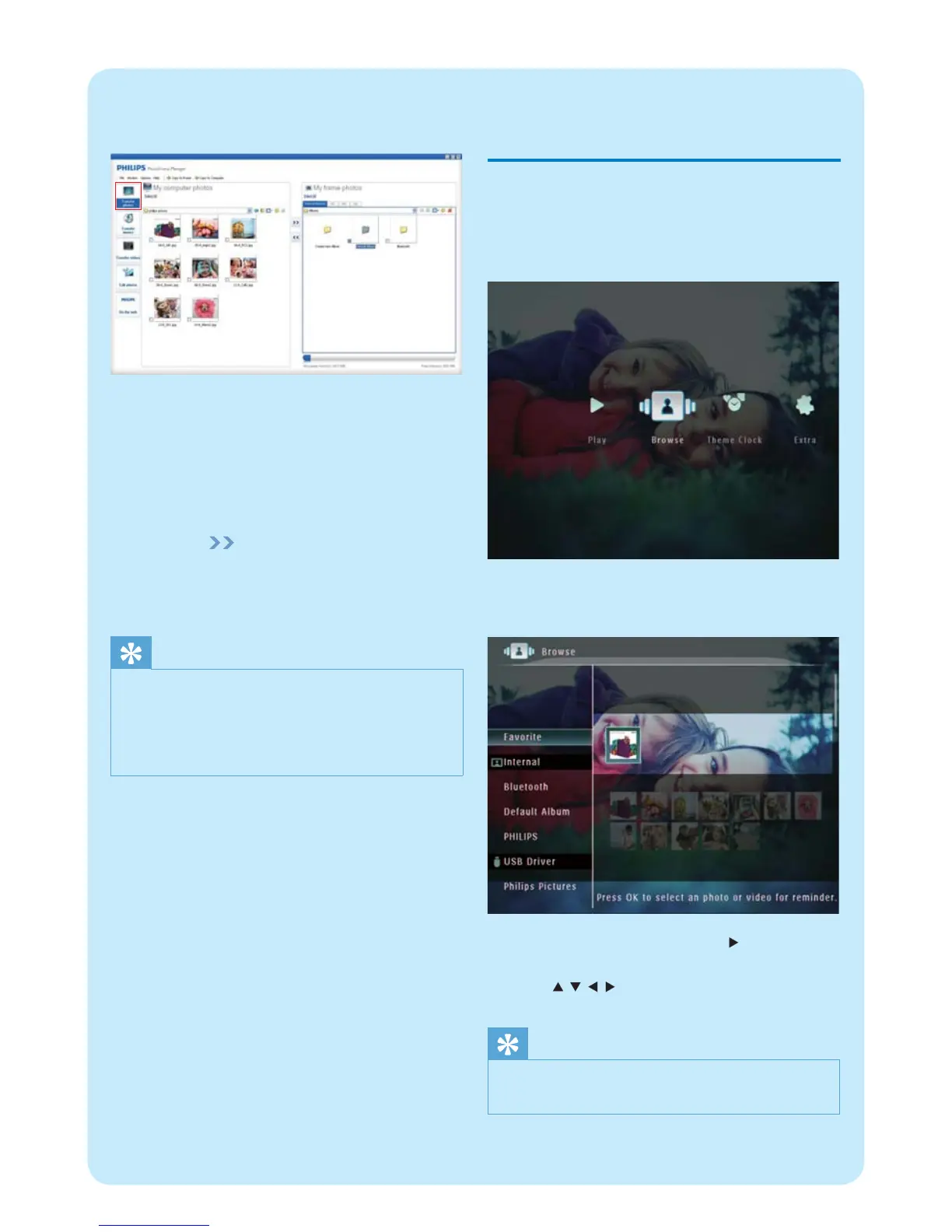
2 Select [Transfer Photos] / [Tranfer Music] /
[Transfer Video].
3 Under [My frame photos] / [My frame music] /
[My frame videos], select a destination album/
folder.
4 Under [My computer photos] / [My computer
music] / [My computer videos], select photos
or video/music fi les.
5 Click the icon to start transfer.
6 After all transfer actions are complete,
disconnect the USB cable from the PC and the
PhotoFrame.
Tip
If Philips PhotoFrame Manager does not start •
automatically, you can double click its icon on the
desktop of your PC to start it.
You can also drag and drop photos from the
•
PhotoFrame to a PC.
2 Play
Browse photos/video fi les in
album mode
1 In the home screen, select [Browse] and then
tap OK to confi rm.
Photos/video fi les are displayed in album »
mode.
2 Select an album, and then tap to access the
album.
3 Tap / / / to browse photos/video fi les in
the album.
Tip
If you select an album and then tap • OK , photos/video
fi les in the selected album are displayed in slideshow.


 To Next Page