
 Need help?
Do you have a question about the Philips SRP6013 and is the answer not in the manual?
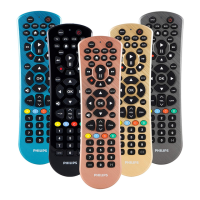
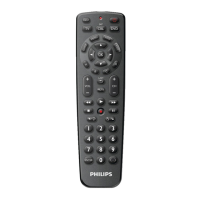
The Philips SRP6013 is a universal remote control designed to operate up to three different devices, offering a streamlined control experience for your home entertainment system. This remote aims to simplify your setup by consolidating the functions of multiple remotes into one, reducing clutter and enhancing user convenience.
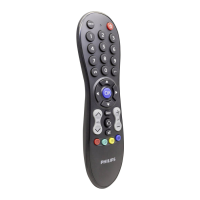
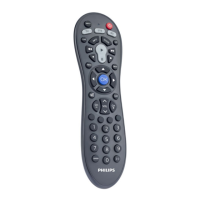
The SRP6013 serves as a central control unit for various electronic devices, including televisions (TV, DTV), Blu-ray players, DVD players/recorders (BD), sound bars, home theater systems, and audio systems (AUDIO). It features dedicated device selection buttons (TV, BD, AUDIO) at the top, allowing users to quickly switch between the devices they wish to control.
At its core, the remote provides essential playback controls, including play, pause, stop, record, fast forward, rewind, next track, and previous track. These are conveniently located in a central cluster for easy access during media consumption. Beyond basic playback, the remote offers a comprehensive set of functions for navigating menus and adjusting settings. The directional pad (up/down/left/right) and an "OK" button facilitate menu navigation and selection. "EXIT" allows users to leave menus, while "MENU" toggles the main menu on or off. The "OPTIONS" button provides access to device-specific options, further expanding the remote's utility.
For television control, the SRP6013 includes "CH+" and "CH-" buttons for channel navigation, as well as a "LAST" button to return to the previously tuned channel. Volume control is managed through dedicated volume up, volume down, and mute buttons. Source input selection is available via a specific button, allowing users to switch between antenna, cable, and other inputs. The remote also supports teletext functions with buttons for teletext off/on, hold, expand, and mix. Information display is handled by the "INFO" button, which shows on-screen channel information, and a "GUIDE" button for accessing the program guide.
Audio-specific controls include "I/II" for selecting the audio channel and various sound modes like "MOVIE SOUND," "MUSIC," and "VOICE," along with "AUTO VOL ON/OFF," "SURROUND ON/OFF," and "NIGHT ON/OFF" for customized listening experiences. The remote also features "BASS" and "TREBLE" adjustments for fine-tuning audio output. For direct channel or input selection, a numeric keypad (0-9) is provided, along with a "-/--" button for selecting between one and two-figure channel numbers. A "STREAM" button offers a convenient shortcut to Netflix, catering to modern streaming habits. The "DIM" button is available for adjusting display brightness.
The SRP6013 is designed for ease of setup and use. Before operation, users must insert batteries (not included) into the battery compartment, ensuring correct polarity to prevent damage. The remote supports two primary methods for device setup: manual registration and auto registration.
Manual registration involves a few straightforward steps. First, the user switches on the device they wish to control. Then, they press and hold the corresponding device selection button (e.g., "TV") on the remote for 5 seconds until a red LED indicator illuminates. Next, the user consults a provided code list to find the 5-digit code for their device's brand and type. The codes are organized by device type and brand, with the most popular code listed first. Once the code is identified, it is entered using the remote's digit buttons. If the red LED turns off after code entry, it indicates that a valid code has been saved. The user can then test the remote's functionality with their device. If the device responds correctly, the setup is complete. If only some buttons work, or if the device doesn't respond, the user is advised to try the next code on the list.
Auto registration offers an alternative, more automated setup process. Similar to manual registration, the user first switches on the device. They then press and hold the device selection button for 5 seconds until the red LED is on. The key difference here is that instead of entering a code, the user points the universal remote at their device and presses and releases the power button. The remote then begins searching for the correct code by sending a different infrared signal every 2 seconds, indicated by a red flash. Once the device turns off, the user must immediately press and release the "OK" button to save the code. If the "OK" button is not pressed within 2 seconds, the auto registration process can be reversed by pressing and releasing the power button again. This method is particularly useful if the user cannot find their device's code in the list or prefers a hands-off approach.
The remote's memory retains user settings for up to 5 minutes when batteries are replaced, ensuring that setup information is not lost during battery changes. This feature adds to the convenience of maintenance.
Maintaining the Philips SRP6013 primarily involves proper battery handling and care. The remote requires batteries (not included) for operation. Users are cautioned to check battery polarity carefully during insertion to prevent damage to the product. It is also important to keep batteries away from heat, sunshine, or fire, and never to discard them in fire, as this poses a risk of explosion. To ensure optimal battery life and performance, users should avoid mixing different brands or types of batteries. If the battery level is low, the batteries should be replaced.
The product is designed with environmental considerations in mind. It is manufactured with high-quality, recyclable materials and components. The packaging is also designed to be easily separable into cardboard, polystyrene foam, and polyethylene for recycling. The product itself contains batteries that are covered by European Directive 2013/56/EU, meaning they should not be disposed of with normal household waste. Users are encouraged to inform themselves about local separate collection systems for electrical and electronic products and batteries and to follow local rules for disposal. Correct disposal of old products and batteries helps prevent negative consequences for the environment and human health. Instructions for removing disposable batteries are provided in the "Insert batteries" section of the manual. The presence of a specific logo on the product indicates that a financial contribution has been made to the associated national recovery and recycling system.
 General
| Brand | Philips |
|---|---|
| Model | SRP6013 |
| Type | Universal Remote Control |
| Connectivity | Infrared |
| Battery Type | 2 x AAA |
| Learning Function | Yes |
| Backlight | No |
| Infrared Range | Up to 8 meters |
| Compatible Devices | TV, DVD |


 To Next Page