5
TSU9400 Starter’s Guide
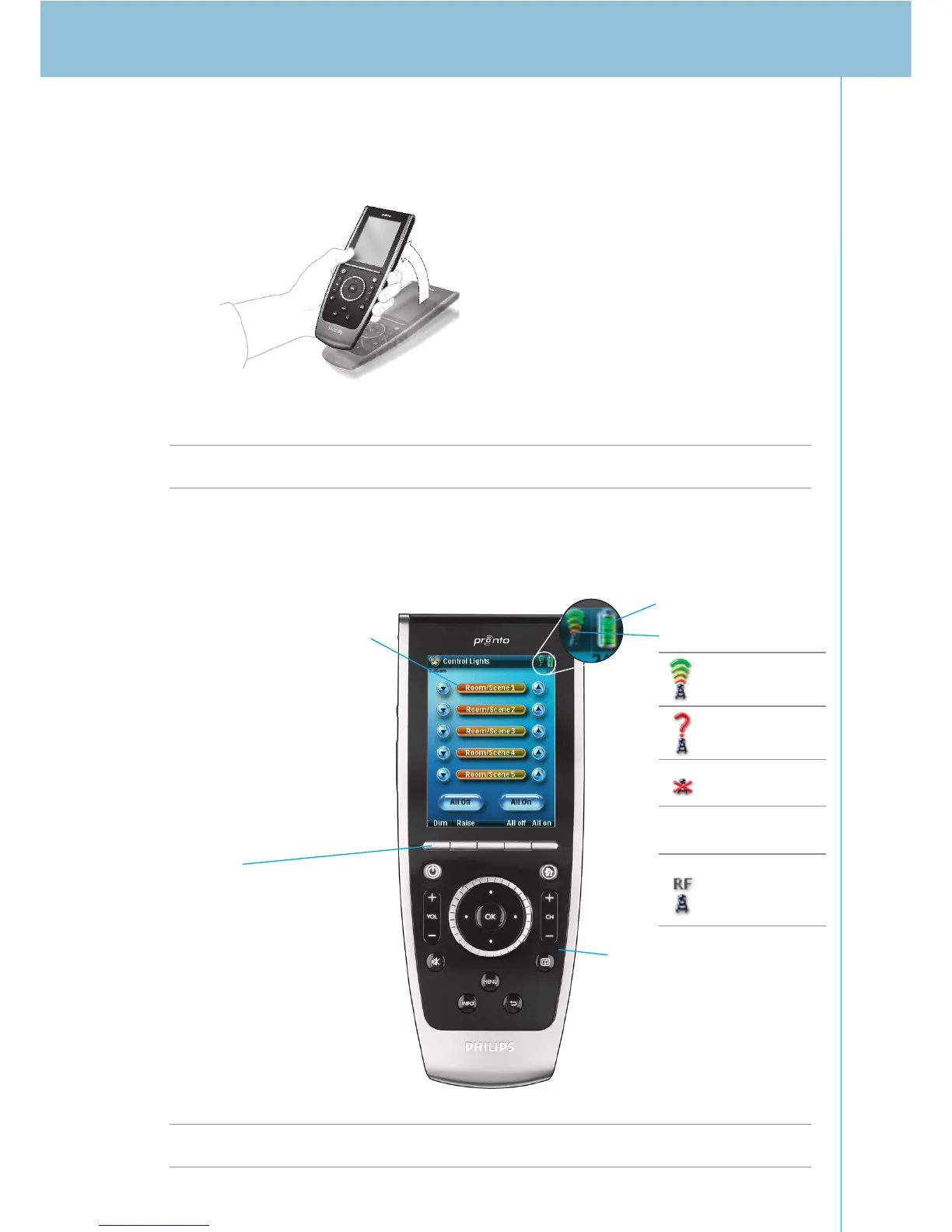
Depending on the settings entered in the Screen Settings page, the screen will also activate if you:
• Tilt the Control Panel sufficiently towards you.
-or-
• Press one of the 5 firm keys below the screen or one of the hard keys.
Note The following hard keys send commands to your equipment without activating the screen:
Channel Up/Down, Volume Up/Down, Menu, Guide, Power, Mute, Info, Back.
Operating the Control Panel
Note The screens on your Control Panel are customised by your installer and may differ in
appearance from that shown above.
≥
50°
Buttons on the touch screen
These buttons are used to
• Start an activity in the
Home Theater
• Control the individual
devices in the Home
Theater
Firm keys
The actions for the firm keys
are activity related and can
differ depending on the page
visible on the screen.
Battery level
WiFi activity
Hard keys on the
Control Panel
The hard keys on the Control
Panel have fixed functions in
the different activities of the
Home Theater.
No
icon
WiFi strength
(4 levels)
No identification
No connection
No network
Wireless
Communication
present










 To Next Page