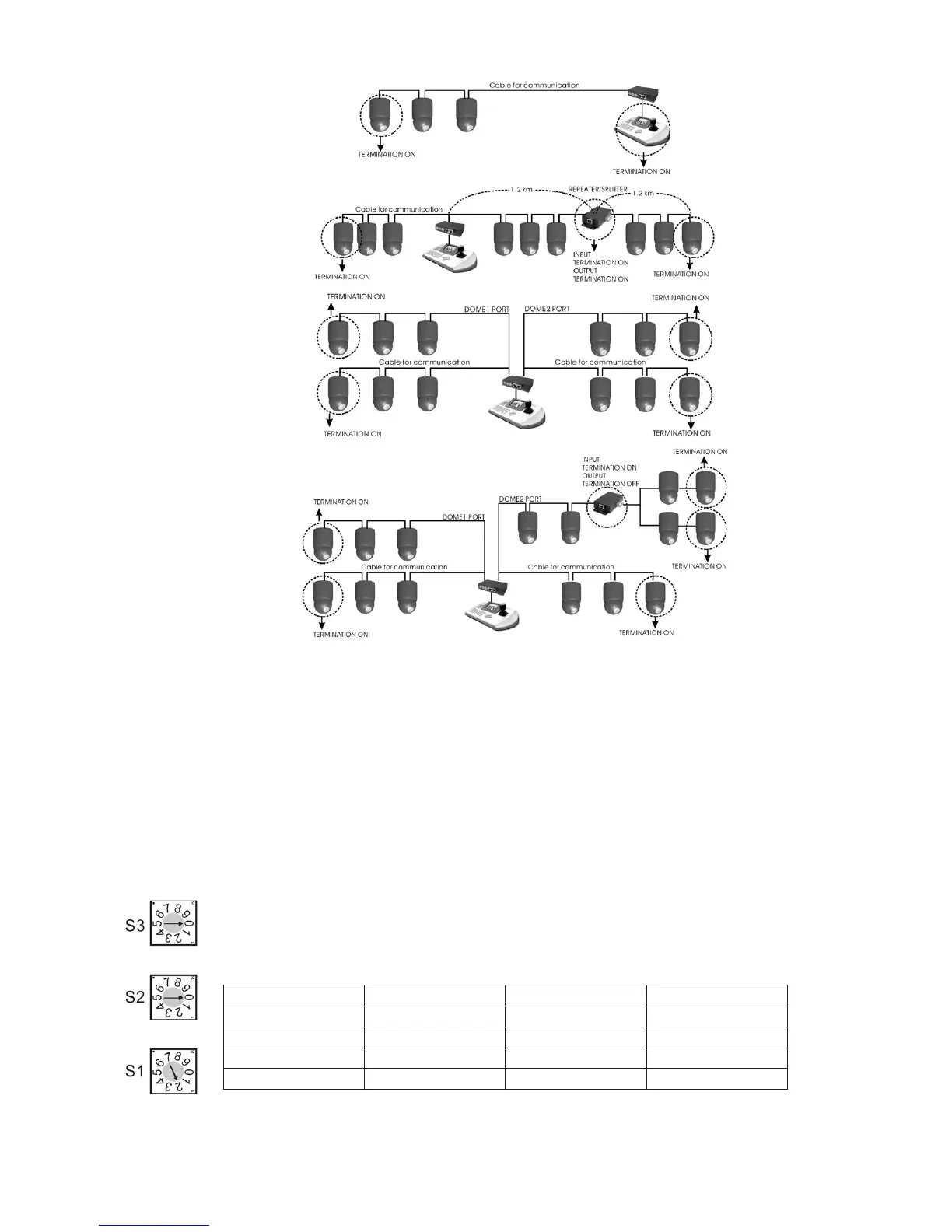
2.4 Setting Address (ID) of Dome Camera
To prevent damage, each dome camera must have a unique address (ID). When installing multiple dome cameras using a multiplexer, it is suggested that the
dome camera address matches the multiplexer port number.
If you wan to set the address more than 999, you should connect the service provider.
Example: Port 1 = Dome 1, Port 2 = Dome 2 ... Port 16 = Dome 16. If more than 16 dome cameras are installed using two or more multiplexers, ID of the
dome camera should be ID of MUX x No. of camera IN. (e.g. multiplexer ID= n, Camera IN= m then ID of Dome =16x(n-1)+m )
Refer to Figures 4-5 for setting the dome camera address (ID) and protocol selection.
Figure 12 - Setting Address (ID) of Dome Camera
Beyond ID 999, contact your service provider.
Figure 11 - Termination Diagram
Dome ID S3 S2 S1
1
0 0 1
2
0 0 2
…
… … …
999
9 9 9



 To Next Page