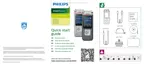
Need help?
Do you have a question about the Philips VoiceTracer DVT6110 and is the answer not in the manual?
General safety guidelines for device operation, including exposure, heat, cables, maintenance, and wireless interference.
Covers medical device interference, hearing aids, and vehicle interaction concerns.
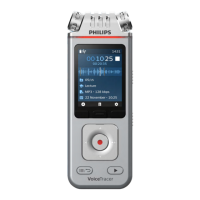
Identifies and describes all physical buttons, ports, microphones, and indicators on the device.
Instructions on how to charge the built-in battery, charging time, and battery status indicators.
Steps to connect the device to a computer for file transfer and storage.
Step-by-step guide on how to start and stop recording audio files.
Methods for appending or overwriting parts of existing audio recordings.
How to play back audio recordings, including fast forward/rewind functionality.
Configuration options for recording quality, scenes, mic sensitivity, and noise reduction.
Steps to transfer audio files from the VoiceTracer to a computer via USB.
Table listing common issues, their causes, and solutions for the VoiceTracer.
The Philips VoiceTracer is an audio recorder designed for high-quality sound capture and versatile usage. It offers a range of features for recording, playback, and data management, making it suitable for various scenarios from lectures and interviews to music and personal notes. The device is compact and portable, featuring a large color display for easy navigation and control.
The primary function of the VoiceTracer is to record audio. It supports superior recording quality and offers different audio scenes (e.g., Lecture, Interview, Music, Video, Custom) to optimize settings for specific situations. Users can choose between MP3 and PCM recording formats, with options for various bitrates and sampling frequencies. The device includes both 360° and directional microphones, allowing for flexible sound capture depending on the environment. For specialized recording needs, the DVT8110 model comes with a meeting microphone, ideal for multi-participant conferences, while the DVT7110 model can connect to a video or DSLR camera as an external microphone for enhanced audio in videos.
Voice-activated recording is a key feature, allowing the device to automatically start recording when speaking begins and pause after three seconds of silence, conserving memory and battery. Pre-recording ensures that no important moments are missed by starting recording a few seconds before the event. The device also includes a timer function for scheduled recordings and an auto-divide feature to split long recordings into smaller, manageable files at preset intervals.
Beyond recording, the VoiceTracer offers robust playback capabilities. Users can play back files, adjust volume, and navigate through recordings with fast rewind and fast forward functions. Bookmarks can be set automatically or manually to easily jump to specific parts of a recording. Playback can be customized with various play modes (Repeat file, Repeat all, Random) and an equalizer (Classic, Jazz, Pop, Rock). The ClearVoice function enhances playback quality by dynamically emphasizing quiet passages, improving the intelligibility of voices.
Data management is facilitated by 8 GB of internal memory and a MicroSD card slot for expansion up to 32 GB. Files can be easily transferred to a computer via a USB Type-C port, where the device is recognized as a mass storage device without requiring additional software. The VoiceTracer also supports file editing, allowing users to append new audio to existing recordings or overwrite parts of a recording.
Connectivity extends to a dedicated Philips VoiceTracer App, available for Android and iOS smartphones. This app enables remote control of the VoiceTracer via Wi-Fi, allowing users to start/stop recordings, adjust settings, and transfer recordings directly to their smartphone for sharing. The Wi-Fi connectivity uses IEEE 802.11 b/g/n/e/i (2.4 GHz only) with WPA/WPA2-PSK, WPS security.
The VoiceTracer is designed for intuitive operation. It features a clear button layout with dedicated buttons for record, play/stop, file list/back, and navigation (up, down, backward, forward). Three function buttons (left, middle, right) provide context-sensitive options displayed on the screen. A Power/Lock switch allows users to turn the device on/off and lock buttons to prevent accidental operations. The Wi-Fi on/off switch controls wireless connectivity.
The device's settings menu is comprehensive, allowing users to customize almost every aspect of its operation. This includes adjusting microphone sensitivity, activating noise cut and wind filter features for clearer recordings, and selecting storage locations (internal memory or MicroSD card). Users can also set the device language, adjust screen brightness and backlight time, and configure system date and time. Device sounds, such as key tones and power on/off sounds, can be enabled or disabled.
For the DVT8110, the meeting microphone is positioned to capture sound optimally from participants within two meters, and its range can be extended by connecting up to three meeting microphones. For the DVT7110, connecting to a video camera involves screwing a hot shoe adapter onto the VoiceTracer, slipping it into the camera's hot shoe, and connecting an audio cable to the headphones jack. In this "Video scene" mode, the VoiceTracer acts as an external microphone, and audio is recorded directly onto the video camera.
The device's built-in rechargeable Li-polymer battery provides long-lasting power, with a full charge taking approximately 3 hours. A battery low icon prompts users to charge the device, and recordings are automatically saved if the battery runs out.
Maintenance of the VoiceTracer focuses on ensuring its longevity and optimal performance. The device is designed for durability, but users are advised to protect it from rain, liquids, and excessive heat. Cables should be protected from damage.
For cleaning, the device should be disconnected from all cables. A soft dry cloth is recommended for general cleaning. For disinfection, surface disinfectant wipes suitable for clinical areas and patient care equipment can be used. Harsh chemicals, strong detergents, and abrasive materials should be avoided to prevent damage to the surface. Care should also be taken to prevent moisture from entering openings.
The built-in Li-polymer battery is not user-replaceable and should only be serviced by authorized Philips service centers or partners. To prevent deep discharge, the device should be charged every 6 months, even when not in use. Used batteries must be disposed of at an official collection point.
Data backup is strongly recommended, as the manufacturer's warranty does not cover data loss resulting from user actions. The device offers a "Format storage" function to delete all data from internal memory or a memory card, which is useful for a complete data reset. However, formatting memory on a computer is discouraged as it may cause incompatibilities.
In case of software issues like freezing or slow performance, the device can be reset by pressing a dedicated reset button using a small, pointed object. This restarts the device without deleting menu settings or data. Menu settings can also be reset to their default factory state if desired.
Firmware updates are provided as part of ongoing product maintenance to correct errors and improve functionality. Users can download firmware update files from the Philips VoiceTracer website and transfer them to the device via USB. It is crucial to ensure the device has at least 30% battery power before updating to prevent interruptions.
Troubleshooting information is provided in the manual to address common issues such as the device not turning on, inability to record, playback problems, or poor audio quality. Solutions often involve charging the battery, deleting files to free up memory, resetting the device, or adjusting settings like microphone sensitivity or volume.
 General
| Recording Format | MP3, WAV |
|---|---|
| Memory | 8 GB |
| Supported File Formats | MP3, WAV |
| Expandable Memory | Yes, microSD card slot |
| Microphone | Stereo microphone |
| Display | LCD |
| USB Connectivity | Yes, USB 2.0 |
| Connectivity | USB |
| Bit rate | 320 kbps |
| Playback Features | Variable speed playback |
| Weight | 90 g |






 To Next Page