— 5 —
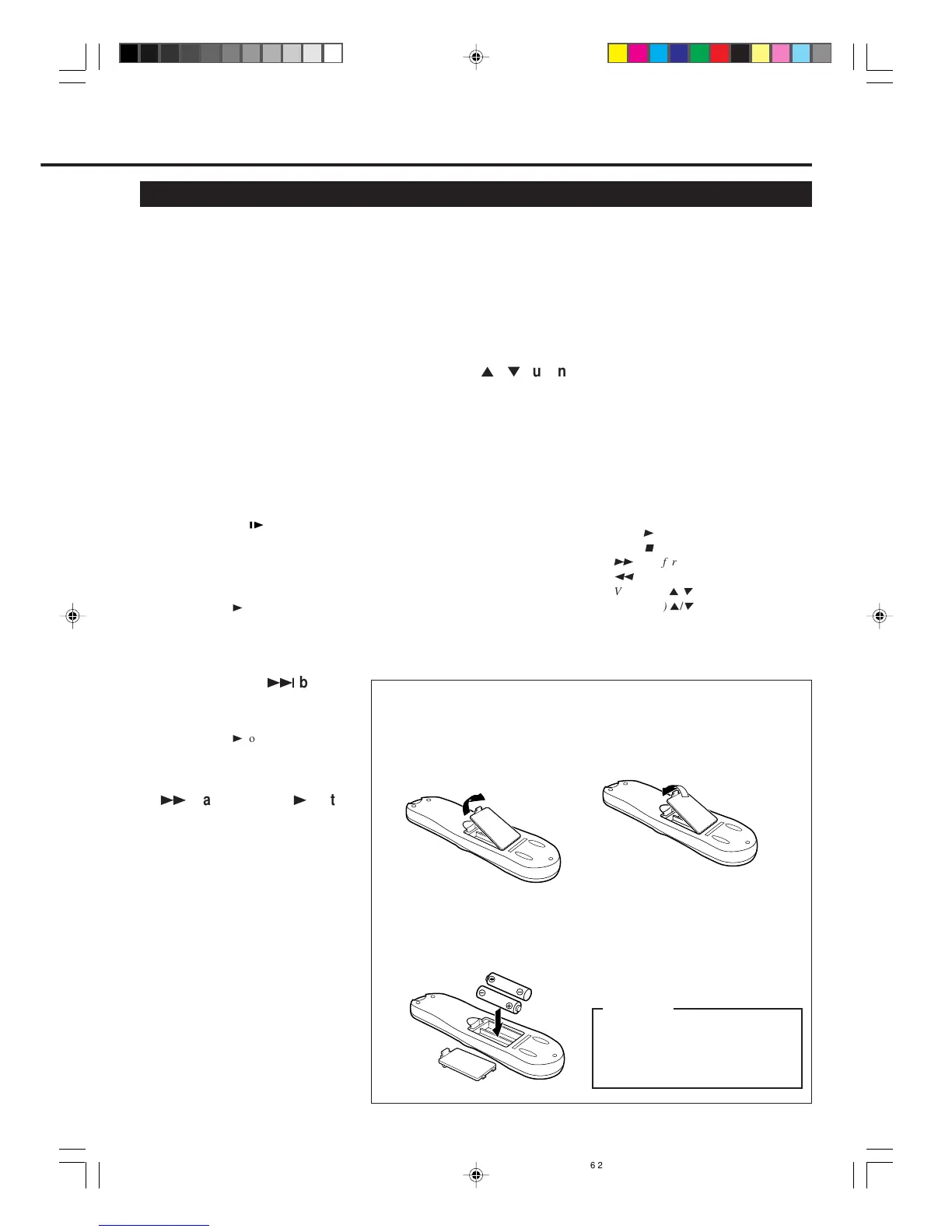
To insert the batteries:
Note:
This remote control and batteries are
supplied accessories.
Check to make sure they are included.
Also, check “Specifications” to see what
other accessories are included.
3 Replace the lid.
2 Install two AA batteries —
R6(SUM-3)/AA — matching
polarity indicated inside the battery
compartment.
CAUTION
On Battery Replacement
Do not mix old and new batteries.
(Also never mix alkaline batteries
with manganese batteries.)
1 Remove the battery compartment lid
from the bottom of the remote
control.
17 SMARTPICTURE button
Selects the SmartPicture mode. (✈P.21)
18 Number buttons
(0, 1, 2, 3, 4, 5, 6, 7, 8 and 9)
Before using these buttons, press VCR
or TV to select your target component.
• Press to select a channel on the VCR
or TV.
To select channels 1 to 9, press 0 then
the channel you want. For example, for
channel 4, press 0 then 4.
• Press to enter characters in the
"EDIT TITLE" screen. (✈P.15)
• Also used to programme the Timer
Recordings. (✈P.25)
19 CLEAR button
• Erases unwanted timer programmes.
(✈P.25)
• Resets counter to 0:00:00.
20 STILL/SLOW button
• Stops the tape during recording
(pause) or playback (still picture).
(✈P.13, P.19)
Press again to resume normal
recording.
Press PLAY
3
to resume normal
playback.
• Activates slow motion picture when
pressed for more than 2 seconds
during playback. (✈P.19)
21 STILL/SLOW + /
¢
button
• During a slow motion picture, adjusts
the playback speed in the forward
direction. (✈P.19)
Press PLAY
3
to resume normal
playback.
• Locates an index marked at the
beginning of every recording. (✈P.19)
22
¡
(Fast Forward) /
3
button
Before using this button, press VCR or
TV to select your target component.
• After pressing VCR:
– Fast forwards the tape. Also during
playback, starts rapid forward
visual search. (✈P.13)
– Changes the setting of a menu item
when using the menus. (✈P.10)
• ONLY FOR SOME PHILIPS TVs:
After pressing TV, operates the TV’s
menus.
23 OK/STATUS button
Before using this button, press VCR or
TV to select your target component.
• After pressing VCR:
– Goes to the next item on the VCR
menu. (✈P.10)
– Displays the time counter, present
time, channel number, and
remaining tape length. (✈P.20)
• After pressing TV:
For some PHILIPS TVs:
– Displays the TV’s on-screen
information.
For other manufacturers’ TVs:
Functions as the ENTER button if
your TV requires pressing ENTER
after selecting a channel number.
24 CH (channel)
5
/
∞
button
Before using this button, press VCR or
TV.
• After pressing VCR, changes the
channels on the VCR. Release at a
desired channel.
• After pressing TV, changes the
channels on the TV. Release at a
desired channel.
25 TIMER button
Displays the Timer Recording menu.
(✈P.24)
26 TAPE MANAGER
Press to access the Tape Manager
directory screen. (✈P.14)
27 SKIP SEARCH button
Press during tape playback to fast
forward 30 seconds of a tape. (✈P.19)
28 REC (record)/OTR button
• Start recording when pressed once.
(✈P.13)
• Starts a recording for 30 minutes to 6
hours long. When pressed more than
once, the shut-off time increases in
30-minute intervals. (✈P.20)
29 Jog Dial
Advances or reverses the picture frame
by frame in the still picture mode.
(✈P.19)
Note:
The following buttons will glow when you
use or place the remote control in the dark
area.
• PLAY
3
• STOP
7
•
¡
(Fast forward)
•
1
(Rewind)
• VOL (ume)
5
/
∞
• CH (annel)
5
/
∞
vr1010/75 00.6.29, 4:53 PM5



 To Next Page