— 7 —
LP
20917-003
VHF/UHF
IN
ANT.
OUT
TV
VIDEO
L
R
AUDIO
(MONO)
OUT
IN
INOUT
S-VIDEO
LP
20917-003
VHF/UHF
IN
ANT.
OUT
TV
VIDEO
L
R
AUDIO
(MONO)
OUT
IN
INOUT
S-VIDEO
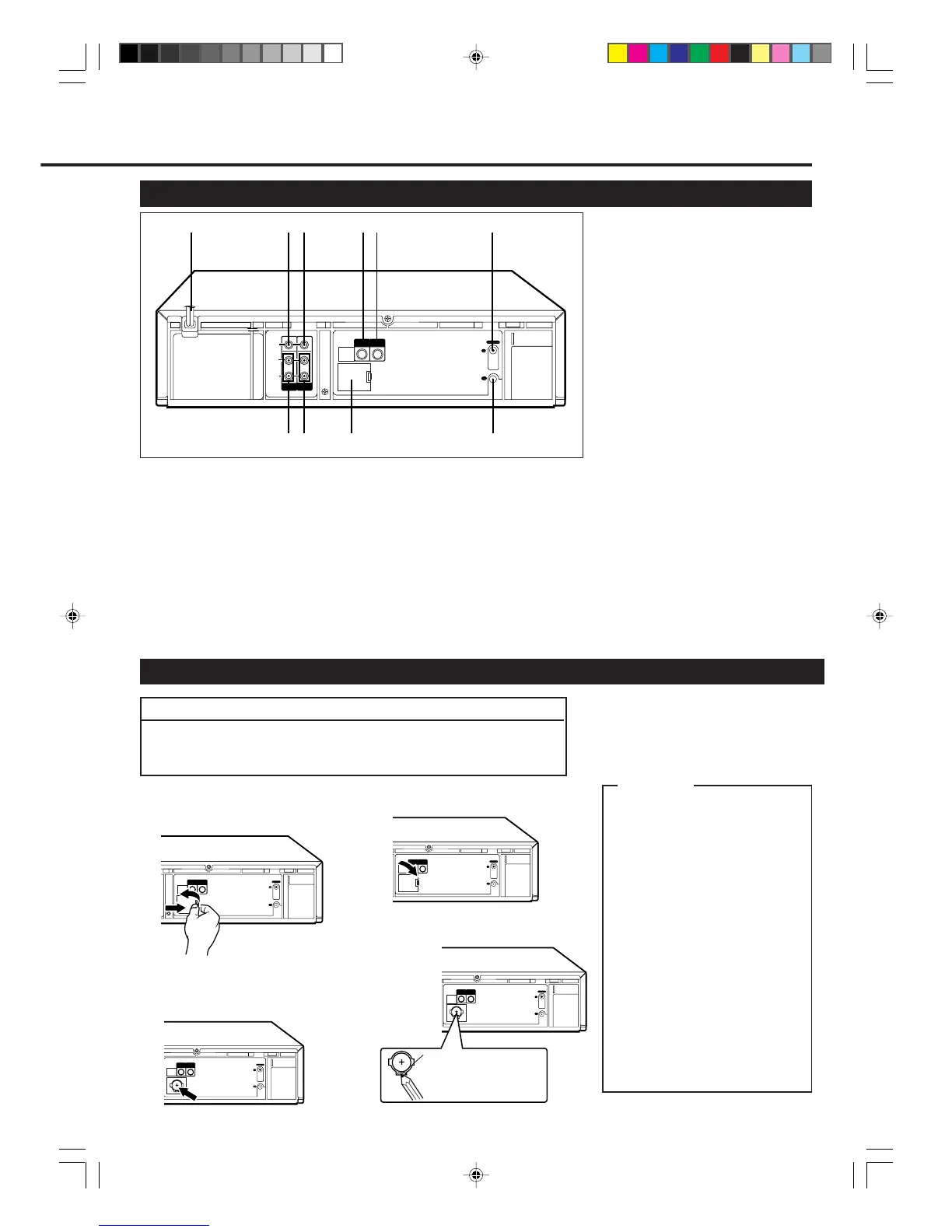
1 AC (alternating current)
power cord
Connect the AC power cord to an AC
outlet.
2 VIDEO OUT (output) jack
For connecting to the video input jack
on a TV or another VCR. (✈P.8)
3 VIDEO IN (input) jack
For connecting to the video output jack
on another VCR or a camcorder.
(✈P.23)
LP
20917-003
VHF/UHF
IN
ANT.
OUT
TV
VIDEO
L
R
AUDIO
(MONO)
OUT
IN
INOUT
S-VIDEO
Rear Panel
1 Open the battery compartment lid
for the lithium battery.
2 Install the battery —CR2025 —
matching polarity indicated inside
the battery compartment.
3 Replace the lid.
To remove the battery:
Note:
Without this lithium battery, this VCR can keep
the memorized timer recording contents and
clock time only for a few minutes if a power
interruption occurs.
CAUTION
On Replacable Lithium Battery
The lithium battery used in this
device may present a fire or
chemical burn hazard if mis-
treated. Do not recharge, disas-
semble, heat above 100˚C or
incinerate.
Replace battery with Panasonic
(Matsushita Electric), Sanyo,
Sony or Maxell CR2025.
Danger of explosion or risk of fire
if the battery is incorrectly
replaced.
• Dispose of used battery
promptly.
• Keep away from children.
• Do not disassemble and do not
dispose of in fire.
Depress this part with a soft
object like a pencil and so
on. (Do not use a metallic
object.)
Before inserting the lithium battery, plug the AC power cord into an AC
outlet (✈P.8). Without connecting the AC power cord, the lithium battery
will be used up immediately.
Installing/Removing the Lithium Battery
IMPORTANT
4 S-VIDEO OUT (output) jack
For connecting to the S-Video input
jack on a TV or another VCR. (✈P.9,
P.23)
5 S-VIDEO IN (input) jack
For connecting to the S-Video output
jack on a TV or another VCR. (✈P.9,
P.23)
6 ANT. IN (input) terminal
(from Antenna)
Connect your antenna or Cable to this
terminal. (✈P.8)
7 AUDIO OUT (output) jacks
For connecting to the audio input jacks
on a TV or another VCR. (✈P.8)
8 AUDIO IN (input) jacks
For connecting to the audio output jacks
on another VCR or a camcorder.
(✈P.23)
9 Lithium battery
compartment
Place the lithium battery. (see below)
10 TV OUT (output) terminal (to
TV)
Use the supplied RF coaxial cable to
connect this terminal to the UHF/VHF
input terminal on the TV. (✈P.8)
LP
20917-003
VHF/UHF
IN
ANT.
OUT
TV
VIDEO
L
R
AUDIO
(MONO)
OUT
IN
INOUT
S-VIDEO
1
2
3
6
8
4
5
7 9 10
LP
20917-003
VHF/UHF
IN
ANT.
OUT
TV
VIDEO
L
R
AUDIO
(MONO)
OUT
IN
INOUT
S-VIDEO
vr1010/75 00.6.29, 4:53 PM7



 To Next Page