On-Screen Display
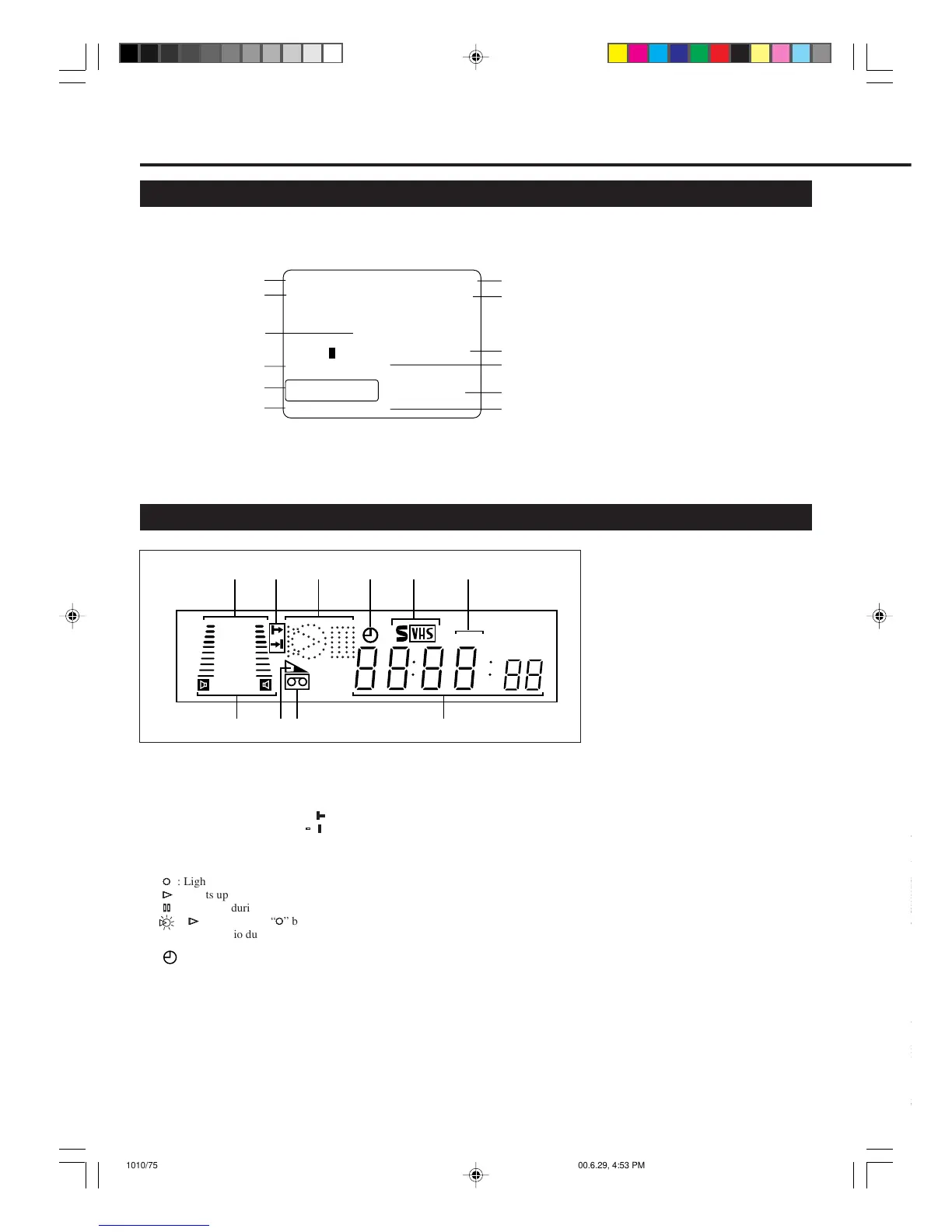
The following information (VCR operating status) appears on the TV screen. (✈P.14)
Current time
Note on the displayed information
• The time counter and remaining
tape length will not be correct
when playing back an NTSC tape.
• When you playback a thin tape like
an
E-240 cassette tape or compact
video cassette tape (VHS-C), the
remaining tape length will flash.
Remaining tape length
Tape speed
Index no.
Channel no.
Tape position indicator
PLAY 10:00AM
NICAM STEREO CH12
AUTO
B-----+-----+-----+-----+-----+-----E
AUTO HIFI
REMAIN 2:30
INDEX -1
LP
0:00:00
Sound output mode
D
ESCRIPTION
OF
C
ONTROLS
(CONTINUED)
Display Window
Time Counter
Operation mode
Receiving
broadcast
SmartPicture
setting
Colour mode
4
1
3
2
7
8
+8
4
0
6
-
15
dB
NORM
SP SLP
5
6
910
1 Sound level indicator
Indicates the audio signal level.
2 Programme Time Indicators
Show the programme start time ( )
and the programme stop time ( ) for
Turbo Timer. (✈P.23)
3 Operation mode indicators
‡‡
‡‡
‡
: Lights up during recording.
##
##
#
: Lights up during playback.
**
**
*
: Lights up during a pause.
:“
##
##
#
” lights up and “
‡‡
‡‡
‡
” blinks
during audio dubbing.
4 (Timer) indicator
Lights up when the VCR is set for an
unattended recording (timer recording).
(✈P.25)
5 S-VHS indicator
Lights up while playing back a tape
recorded in S-VHS format or with
S-VHS ET function, while recording on
an S-VHS tape using S-VHS format or
while recording with S-VHS ET
function.
6 Speed indicator
Indicates the tape speed.
SP – Standard Play
LP – Long Play
SLP – Super Long Play
(For NTSC signal only)
7 Sound output mode indicator
Indicates audio output mode currently
selected. (✈P.19)
8 Tape Remaining Time
indicator
Displays the time remaining on tape
after pressing OK/STATUS.
9 ] (Cassette-in) indicator
Lights up when there is a cassette in the
VCR.
4
4
10 Digital clock/counter/
Channel indicator
• Normally the present time appears.
• When a tape is inserted, the time
counter appears (and is reset to
00:00:00).
If you always rewind your tapes
completely, you can use this counter
reading as an index to find where a
programme starts.
• A channel position number selected
with the TV tuner built in the VCR
appears.
When the external line input is
selected, the following display
appears:
• “F-1” for the front panel Audio/
Video jacks.
• “F-S” for the front panel Audio/
S-Video jacks.
• “L-1” for the rear panel Audio/
Video jacks.
• “L-S” for the rear panel Audio/
S-Video jacks.
• “CL” appears blinking when child
lock mode is engaged.(✈P.20)
• Indicates START time, STOP time
and channel number during Turbo
Timer mode. (✈P.23)
• “U:01” appears when the video heads
are dirty. (✈P.30)
VIDEO
L
R
AUDIO
(MONO)
OUT
IN
vr1010/75 00.6.29, 4:53 PM6



 To Next Page