EasyManua.ls Logo

Philips VR705/02 - Page 18

Philips VR705/02
86 pages
Print Icon
To Next Page IconTo Next Page
To Previous Page IconTo Previous Page
Loading...
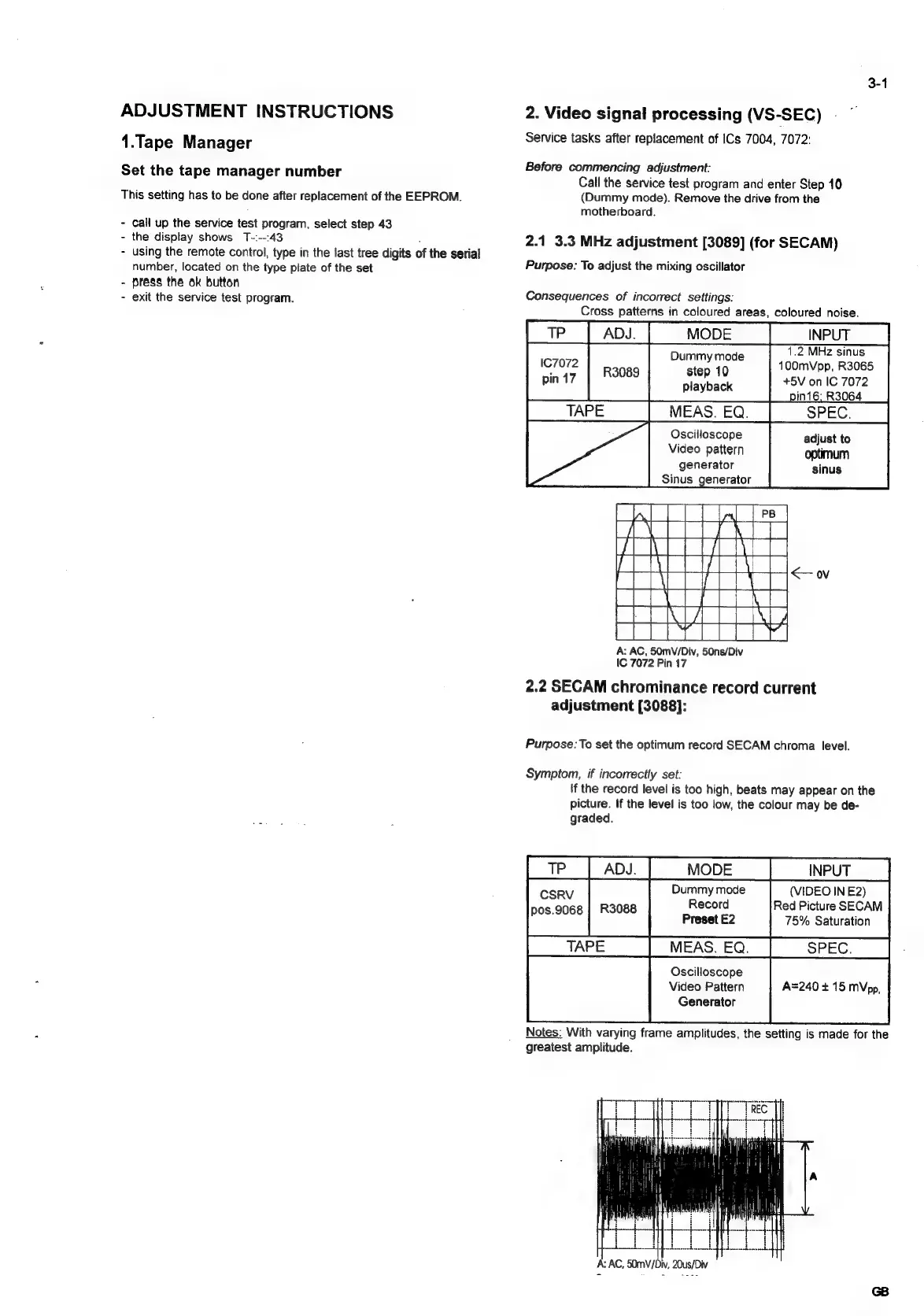
ADJUSTMENT
INSTRUCTIONS
1.Tape
Manager
Set
the
tape
manager
number
This
setting
has
to
be
done
after
replacement
of
the
EEPROM.
-
Call
up
the
service
test
program,
select
step
43
-
the
display
shows
T-:--:43
using
the
remote
control,
type
in
the
last
tree
digits
of
the
serial
number,
located
on
the
type
plate
of
the
set
press
the
ok
button
exit
the
service
test
program.
2.
Video
signal
processing
(VS-SEC)
Service
tasks
after
replacement
of
ICs
7004,
7072:
Before
commencing
adjustment:
Call
the
service
test
program
and
enter
Step
10
(Dummy
mode).
Remove
the
drive
from
the
motherboard.
2.1
3.3
MHz
adjustment
[3089]
(for
SECAM)
Purpose:
To
adjust
the
mixing
oscillator
Consequences
of
incorrect
settings:
Cross
patterns
in
coloured
areas,
coloured
noise.
1.2
MHz
sinus
D
d
167072")
naan
gia
ae
100mVpp,
R3065
pin
17
playback
+5V
on
IC
7072
6,
R3064
Oscilloscope
adjust
to
Video
pattern
optimum
generator
sinus
Sinus
generator
A:
AC,
50mV/Div,
50ns/Div
IC
7072
Pin
17
2.2
SECAM
chrominance
record
current
adjustment
[3088]:
Purpose:
To
set
the
optimum
record
SECAM
chroma
level.
Symptom,
if
incorrectly
set:
if
the
record
level
is
too
high,
beats
may
appear
on
the
picture.
If
the
level
is
too
low,
the
colour
may
be
de-
graded.
|
TP
|
Ady.
|
MODE
|
__INPUT
CSRV
Dummy
mode
(VIDEO
IN
E2)
pos.9068
|
R3088
Record
Red
Picture
SECAM
TAPE
Preset
E2
75%
Saturation
MEAS.
EQ.
SPEC.
Oscilloscope
Video
Pattern
A=240
+
15
MVpp,
Generator
Notes:
With
varying
frame
amplitudes,
the
setting
is
made
for
the
greatest
amplitude.
A:
AC,
50mV/Div,
20us/Div

Related product manuals