03.
Product Appearance Introduction
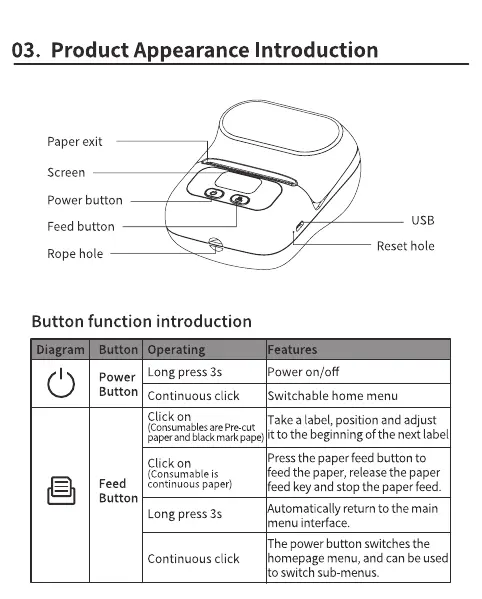
Paper exit
Screen
Power button
USB
Feed button
Reset hole
Rope hole
Button function introduction
la ram
C)
utton eratln
Long press 3s
Power
Button continuous click
Click on
eature
Power on/off
Switchable home menu
Take a label, position and adjust
(Consumablesare Pre-cut
paperandblackmarkgape)it to the beginningOfthe nextlabel
Click on
(Consumable is
Feed continuous paper)
Button
Long press 3s
Continuous click
Pressthe paper feed button to
feed the paper, releasethe paper
feed key and stop the paper feed.
Automatically return to the main
menu interface.
The power button switches the
homepage menu, and can beused
to switch sub-menus.



 To Next Page