Quick start guide Digital Wireless Earpiece
Roger for studio illustrations
On
0-10 cm
0-4 inches
2.1 Roger Earpiece 2.2 Detection paired device beep 2.3 Out of range 2.4 Inserting battery
2.5 Close battery door 2.6 Connect with Base Station 2.7 Insert Earpiece in ear 2.8 Remove Earpiece
2.9 Earpiece out of range 2.10 Pouch earpiece 2.11 Softwraps 2.12 Cleaning spray
2.13 Cleaning cloth 2.14 Wax remover tool
cinq-neuf 10.2015
C&C Spray
R
o
g
e
r
E
a
r
p
i
e
c
e
R
o
g
e
r
E
a
r
p
i
e
c
e
R
o
g
e
r
E
a
r
p
i
e
c
e
0-10 cm
0-4 inches
R
o
g
e
r
E
a
r
p
i
e
c
e
R
o
g
e
r
E
a
r
p
i
e
c
e
R
o
g
e
r
E
a
r
p
i
e
c
e
Input level
Input level
…
Roger for studio illustrations
On
0-10 cm
0-4 inches
2.1 Roger Earpiece 2.2 Detection paired device beep 2.3 Out of range 2.4 Inserting battery
2.5 Close battery door 2.6 Connect with Base Station 2.7 Insert Earpiece in ear 2.8 Remove Earpiece
2.9 Earpiece out of range 2.10 Pouch earpiece 2.11 Softwraps 2.12 Cleaning spray
2.13 Cleaning cloth 2.14 Wax remover tool
cinq-neuf 10.2015
C&C Spray
R
o
g
e
r
E
a
r
p
i
e
c
e
R
o
g
e
r
E
a
r
p
i
e
c
e
R
o
g
e
r
E
a
r
p
i
e
c
e
0-10 cm
0-4 inches
R
o
g
e
r
E
a
r
p
i
e
c
e
R
o
g
e
r
E
a
r
p
i
e
c
e
R
o
g
e
r
E
a
r
p
i
e
c
e
Input level
Input level
…
R
o
g
e
r
E
a
r
p
i
e
c
e
…
Roger for studio illustrations
On
0-10 cm
0-4 inches
2.1 Roger Earpiece 2.2 Detection paired device beep 2.3 Out of range 2.4 Inserting battery
2.5 Close battery door 2.6 Connect with Base Station 2.7 Insert Earpiece in ear 2.8 Remove Earpiece
2.9 Earpiece out of range 2.10 Pouch earpiece 2.11 Softwraps 2.12 Cleaning spray
2.13 Cleaning cloth 2.14 Wax remover tool
cinq-neuf 10.2015
C&C Spray
R
o
g
e
r
E
a
r
p
i
e
c
e
R
o
g
e
r
E
a
r
p
i
e
c
e
R
o
g
e
r
E
a
r
p
i
e
c
e
0-10 cm
0-4 inches
R
o
g
e
r
E
a
r
p
i
e
c
e
R
o
g
e
r
E
a
r
p
i
e
c
e
R
o
g
e
r
E
a
r
p
i
e
c
e
Input level
Input level
…
R
o
g
e
r
E
a
r
p
i
e
c
e
…
Roger for studio illustrations
On
0-10 cm
0-4 inches
2.1 Roger Earpiece 2.2 Detection paired device beep 2.3 Out of range 2.4 Inserting battery
2.5 Close battery door 2.6 Connect with Base Station 2.7 Insert Earpiece in ear 2.8 Remove Earpiece
2.9 Earpiece out of range 2.10 Pouch earpiece 2.11 Softwraps 2.12 Cleaning spray
2.13 Cleaning cloth 2.14 Wax remover tool
cinq-neuf 10.2015
C&C Spray
R
o
g
e
r
E
a
r
p
i
e
c
e
R
o
g
e
r
E
a
r
p
i
e
c
e
R
o
g
e
r
E
a
r
p
i
e
c
e
0-10 cm
0-4 inches
R
o
g
e
r
E
a
r
p
i
e
c
e
R
o
g
e
r
E
a
r
p
i
e
c
e
R
o
g
e
r
E
a
r
p
i
e
c
e
Input level
Input level
…
R
o
g
e
r
E
a
r
p
i
e
c
e
…
1
2
3
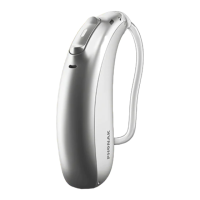
3 Roger Earpiece
3.1 Description
3.2 Battery – Important note
1 Battery compartment
2 Removal handle
3 Wax guard - Anti-cerumen filter
The Roger Earpiece uses a zinc-air battery that offers the
best performance in a reduced size. This battery uses the
ambient air to activate the chemical process and generate
electricity. The adhesive label closes the air inlet aperture
in the battery.
Once this label has been removed, it is necessary to wait
for about 2 minutes for the battery to reach its maximum
capacity.
It can then be installed in the earpiece.
Once the door of the battery compartment has been
opened, remove the battery protective foil and insert
the battery with the + side facing towards you, with the
door to the right. The earpiece is switched on by closing
the compartment.
It is recommended to open the battery compartment
door to switch off the earpiece when it is not in use; the
battery will nevertheless continue to discharge, even
the foil is put back.
The best performance is guaranteed with an original
Phonak battery.







 To Next Page
