PHONIC CORPORATION
Page 5
MQ3600/3400/3300 USER
’
S MANUAL
cabling as short as possible.
3 Check your cables regularly and label each
end for easy identification.
4 Before switching on the main power, keep
the input level control all the way down to
prevent damage or excessive noise caused
by bad level adjustment, wrong wiring,
defective cables, or bad connections.
5 Always turn on this unit before the power
amplifier; turn it off after turning off the ampli-
fier.
6 Always turn off the power before connecting
or disconnecting the unit.
7. Never use solvents to clean the unit. Clean
with a soft, dry cloth.
FRONT PANEL DESCRIPTION
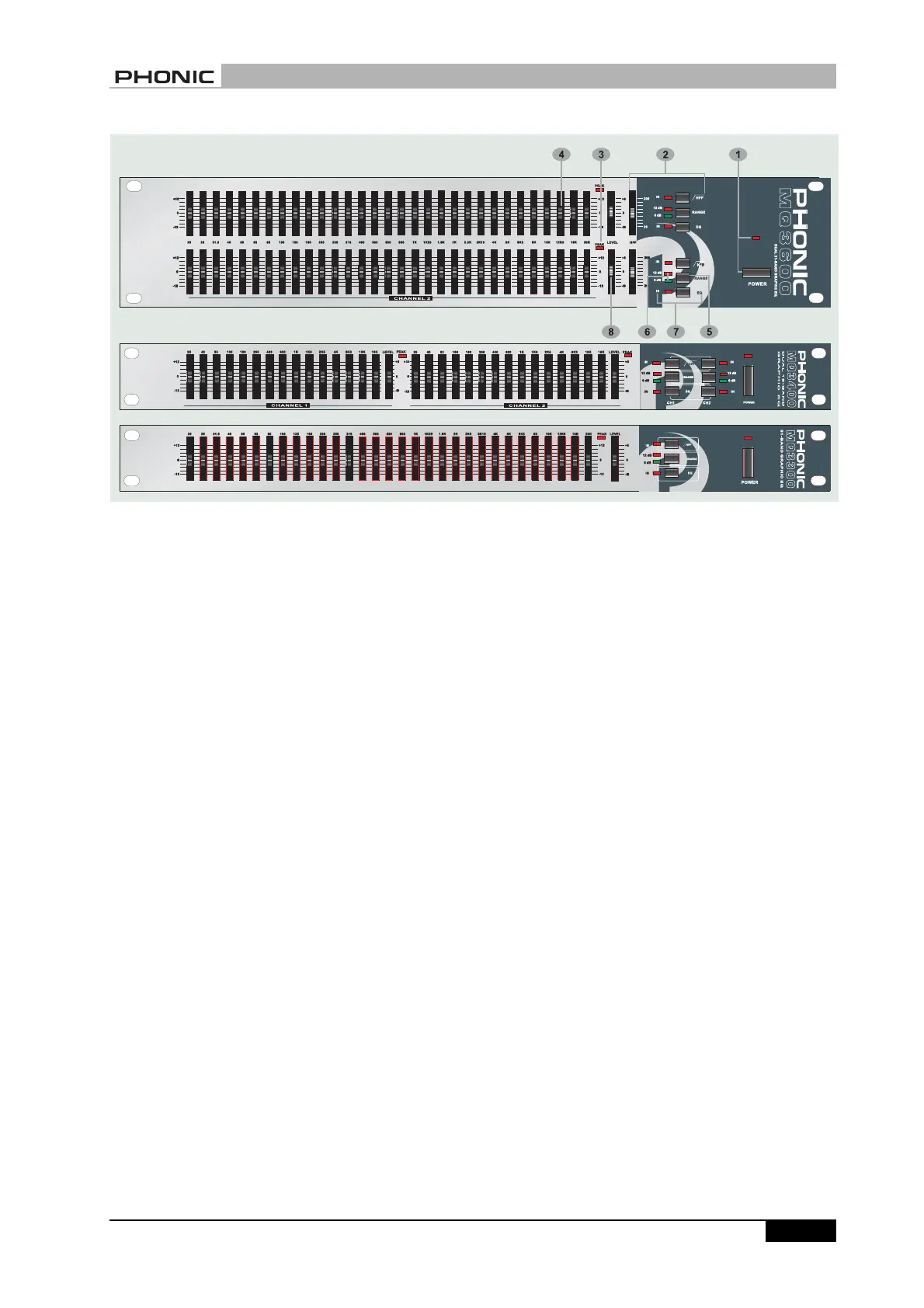
1 POWER switch with LED
Use this switch to turn the equalizer on and off. Be
sure to power-up before your power amplifier is turned
on to avoid loud transients which could damage your
speaker or annoy your audience.
2 HPF switch with LED
HPF stands for HIGH PASS FILTER which allows
the high frequencies to passthrough unchanged, while
severly attenuating (cutting) the very low frequencies.
Use this switch to protect your audio system from
damaging low-frequency transients(loud thumps).
The HPF LED will light up when the high pass filter
is working. MQ 3300 and MQ 3400 both have a 40Hz
high pass filter, while MQ 3600 has a sweepable
high pass filter from 20Hz to 200Hz.
3 PEAK LED Indicators
The LED will light up if you set too high a level for the
output and overload happens. If this LED blinks only
briefly during the very loudest parts of your program,
there is no problem. But if it stays on constantly for
more than a couple of seconds, you might have a
distorting sound. If this happens, simply turn down
the level control until this LED blinks only very briefly.
FRONT PANEL DESCRIPTION


 To Next Page