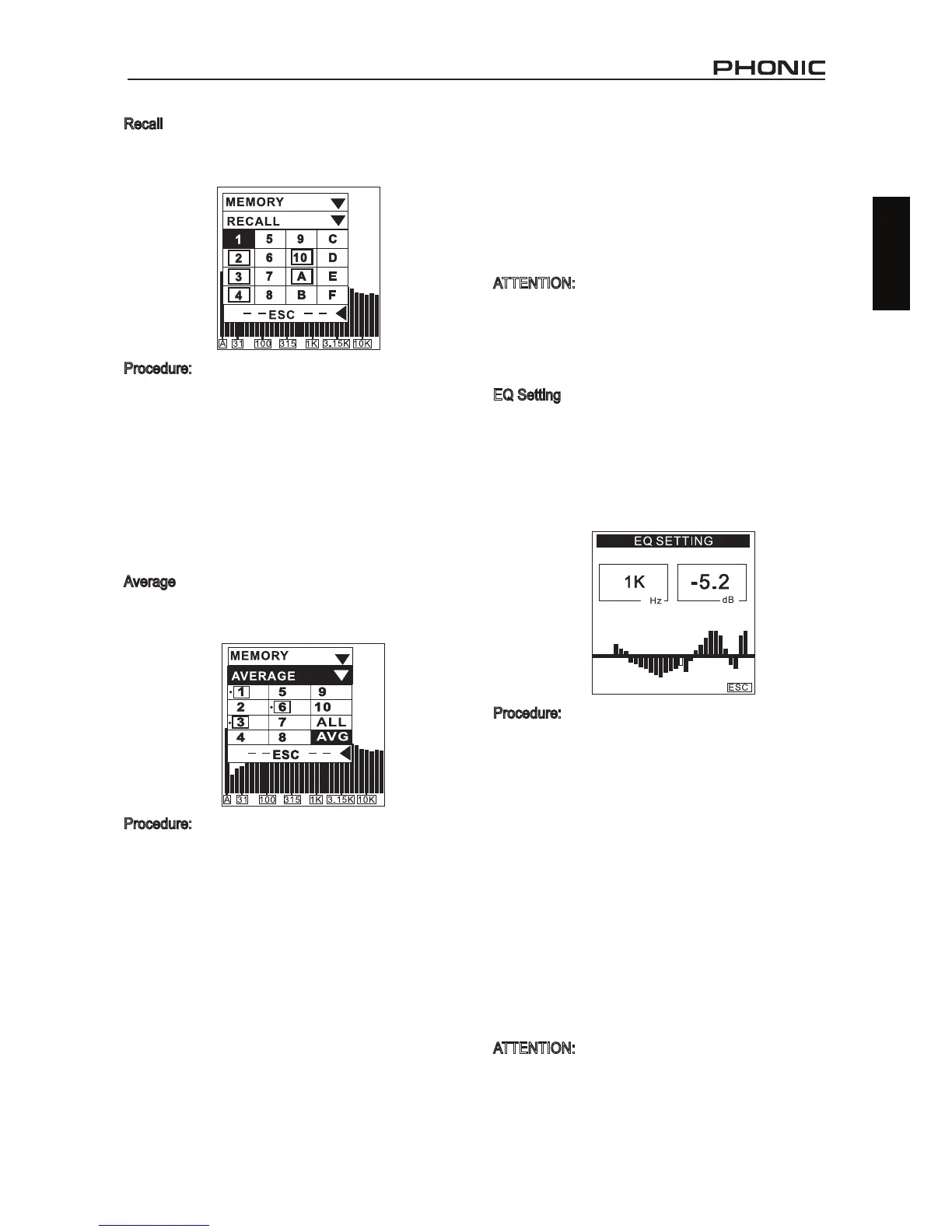
Recall
Users can recall all data saved in the memory of the
PAA3 to read the measurements.
Procedure:
1. Enter into the MEMORY menu and select
RECALL.
2. Select any of the used memory slots (indicated
by a box surrounding the slot number) from 1 to
10 or A to F.
3. Each value will be displayed under VALUE in
a 31-band center frequency value and an all
frequency value.
4. When you see a ashing ESC in the Hz column,
press ENTER to return to the MEMORY menu.
Average
The user can choose from memories 1 to 10 to compute
average calculations, which are essential for EQ setting.
Procedure:
1. Go to the MEMORY menu and select AVERAGE.
2. Select any combination of data from memories
1 to 10 by moving the cursor to that number and
pushing the ENTER key, or simply choose ALL
if you want to do the average calculation for all
ten saved measurements. Move the cursor over
selected memories and press ENTER again to
unselect.
3. A small dot will appear to the left of selected
memory slots for identication.
4. Highlight AVG and press the ENTER key after
all selections have been made. A list of selected
measurements will be shown for conrmation.
5. Press RUN and the PAA3 will automatically
calculate the average, or press ESC to cancel.
6. After running the average calculation, COMPLETE
will appear on the screen. The user may then
select from memory slots A to F (pressing
YES to confirm) to save selected average
calculations to the PAA3. Previously saved data
will be automatically over-written. The PAA3 will
automatically revert back to the EQ SETTING
menu as soon as calculations are complete.
ATTENTION:
It is not recommended to calculate average of saved
data with different weighting settings. The PAA3 will
ignore the peak value when calculating the average,
even if the peak value was activated.
EQ Setting
The EQ setting of audio system will vary from one venue
to another. The ultimate goal in setting your EQ is to
create a completely at response and to eliminate every
possible source of feedback. Though the PAA3’s EQ
SETTING function, even a novice user can successfully
accomplish this.
Procedure:
1. Play the pink noise from the included CD (or from
the PAA3 GENERATOR tool) through your audio
system.
2. Pick a number of signicant locations around the
area the audience will be situated, and take RTA
measurements, and save each into the PAA3’s
memory.
3. Enter into the MEMORY / AVERAGE menu, and
select the saved memories measured from those
locations to calculate the average.
4. Go to the MEMORY / EQ SETTING menu. You
will discover the amount of dB you need to boost
or cut in each center frequency by using the
Jog. Control or the UP/DOWN buttons to scroll.
Example shown indicates that the user should
cut -5.2 dB at 1 kHz.
ATTENTION:
Any user’s EQ setting ability is limited by the temperature
and the size of the audience at the time measurements
were taken.


 To Next Page
 Loading...