37
09004 - EN
• Anti-theft (can only be activated with optional DRIVER CARD):
Anti-theft is a function that helps the driver of the vehicle to preserve his own safety, and at the same time to ensure the security of the
vehicle, in the event of an attack while driving.
This function allows the vehicle to be used only by the user who can be recognised by the system. Recognition takes place in the following
two ways:
- In automatic mode, i.e. by means of a Driver Card paired to the system (where provided).
- Manually, by entering the rst two digits of the Pin Code on the control panel.
When the Anti-theft function is active, "recognition" (via Driver Card or via Pin Code) is necessary each time the ignition is turned on or the
driver's side door is opened and closed with the ignition on. Correct recognition allows the vehicle to be used until the next time the ignition
is turned o or the next time the driver's side door is opened/closed with the ignition on.
If the "recognition" does not take place within 60 seconds (always starting from the ignition switch or the opening/closing of the driver's
side door with the ignition switched on), the system LED starts ashing rapidly until the maximum limit of 90 seconds is reached. After
this time, the system generates a sequence of alarms by activating the combined horns (siren and/or horn) and direction indicators. The
electrical engine immobiliser will activate after the ignition is switched o, making it impossible to attempt to start the engine again. To
disarm the anti-theft system during the alarm phase, press the button on the paired driver card (if applicable) or enter the four-digit pin
code.
Note: The function is disabled at the factory in order to comply with European legislation. Its activation invalidates this compliance with
legal requirements.
• Disconnection of the high-security system (can only be activated with optional DRIVER CARD):
By activating this function and pressing the central locking release button on the original remote control, the system delays the alarm inputs
for 30 s to allow the driver to be recognised. The driver is recognised by the system in two ways: by entering the rst two digits of the Pin
Code on the control panel, or by the Driver Card if combined. Upon recognition, the system is disarmed. If the driver is not recognised within
15 s, the system remains armed and generates an alarm. Upon recognition the system switches o. If the driver is not recognised by opening
a door or the trunk, the system generates an alarm after 30 s.
8. SELF-LEARNING PROCEDURE FOR REMOTE CONTROLS AND/OR SENSORS ALARM
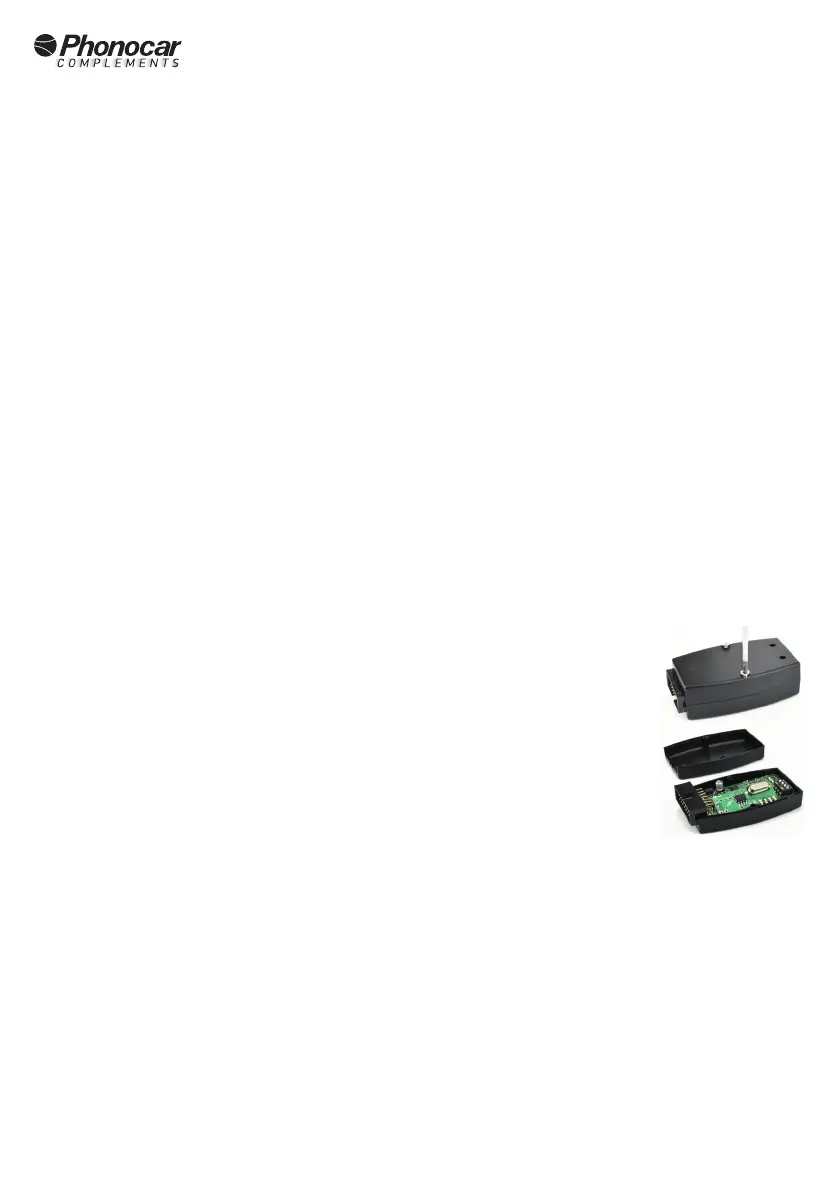
Unscrew the two screws on the plastic housing of the central module to access the board.
a. Power up the central module.
b. Check that all PIR sensors have their rear switch set to OFF.
c. Set switch no.1 to ON to store alarm sensors in zone 1.
d. Set switch no.2 to ON to store alarm sensors in zone 2.
e. Set switch no.3 to ON to store alarm sensors in zone 3.
f. Set switch no.4 to the ON position to store the RADIO CONTROLS
Close the module.
Once the switch corresponding to the desired zone has been set to ON, proceed as follows:
Magnetic contacts: insert the battery into the sensor to be stored.
In the case of a previously installed sensor, it must be transmitted by sending it "in alarm"; if the procedure is carried out correctly, the
buzzer will emit 5 beeps. Proceed in the same way for any additional sensors
PIR sensors: insert the battery and set the rear switch of the sensor to ON.
If the procedure is carried out correctly, the buzzer will emit 5 beeps. Switch the rear switch back to OFF and proceed in the same way for any
other sensors.
When you have nished storing the sensors on a zone, move the corresponding switch to the OFF position. It is possible to store further
zones by turning the corresponding switch to the ON position and turning it back to the OFF position at the end of storage. To memorise the
RADIO CONTROLS set switch 4 to the ON position and press one of the 4 buttons.
At the end of memorisation:
a. set ALL the switches of the central module to the OFF position.
b. set ALL PIR sensor switches back to ON position
*If a sensor has already been stored on a zone, the buzzer will sound 7 beeps
*It is not possible to store a sensor on dierent zones.


 To Next Page