6
AIRPLAY
SISTEMA OPERATIVO APPLE E UTILIZZO AIRPLAY.
ATTENZIONE: DalmodellodiiPhone4Snoal6coniOS9.3.3,saràpossibile
utilizzare la funzione Duplicazione per vedere in tempo reale il display del dispositivo
sulmonitor.ConiPhone3/4lafunzioneDuplicazionenonèabilitata.
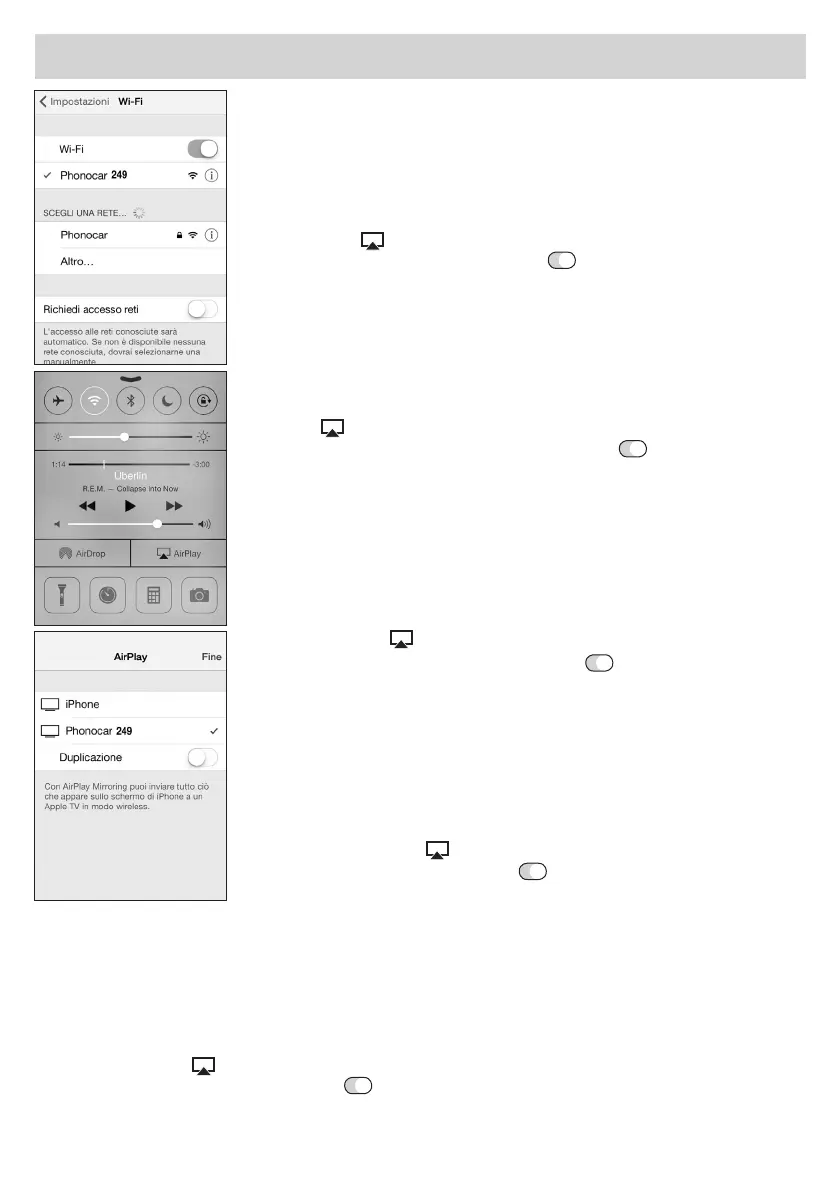
• Eseguirel’accoppiamentoWI-FI.
•DallaschermataHOMEdell’iPhonescorrereiltouchscreendalmarginebasso
versol’altoperentrarenelleimpostazionidiconnessione.
• Premereiltasto
AIRPLAYesuccessivamentePHONOCAR+trecifre.
• AttivarelaDuplicazionetrascinandoiltasto
daoffaonepremerene.
OPERATION-SYSTEM “APPLE” - USE OF “AIRPLAY”.
ATTENTION: FromthemodelofiPhone4Supto6withiOS9.3.3, you can use
the duplication-function, so that you will see the display of your device, real-time,
onthemonitor.WithiPhone3/4,theDuplication-functionisNOTactivated.
• EffecttheWI-FI-coupling.
•StartingfromtheHOME-pageofyouriPhone,slidethetouch-screen,fromthe
bottom margin upwards, to enter the connection Set-up.
• Presskey
AIRPLAY, then PHONOCAR+three figures .
• ActivatetheDuplication-functionbydraggingthekey
from OFF to ON.
Then press END.
SYSTÈME D’EXPLOITATION APPLE ET UTILISATION AIRPLAY.
ATTENTION: Apartirdumodèledel’iPhone4Sjusqu’au6aveciOS9.3.3, il sera
possible utiliser la fonction duplication pour voir en temps réel l’afficheur du dispo-
sitifsurl’écran.AveciPhone3/4lafonctionDuplicationn’estpasactivée.
• FaireleparamétrageWI-FI.
•Apartirdelapage-écranHOMEdel’iPhonedéfilerl’écrantactilepartantdu
bordbasverslehautpourentrerdanslesréglagesdeconnexions.
• Sélectionnerl’icône
AIRPLAY et successivement PHONOCAR+trois chiffres.
• ActiverlaDuplicationenfaisantglisserlatouche
de off à on et appuyer fin.
BETRIEBSSYSTEM “APPLE” und VERWENDUNG VON “AIRPLAY”.
WICHTIG: AusdemModelldesiPhone4Sbiszu6mitiOS9.3.3, kann die
Duplikat-Funktion herangezogen werden, um, Zeit-nah, auf dem Monitor, das Dis-
playderVorrichtungzuüberwachen.VerwendetmaniPhone3/4,istdieDuplikat-
Funktion NICHT ansprechbar.
•EinstellenundWI-FI-Koppelungvornehmen.
•AusgehendvonderHOME-SeiteIhresiPhones,Touch-screenvonuntennach
oben abstreifen, um die Verbindungs-Einstell-Funktionen zu betreten.
• AufdieIkone“AIRPLAY”
drücken.AnschliessendPHONOCAR+dreiZiffern.
• Duplikat-Funktionaktivieren,d.h.Taste
von OFF auf ON stellen, Dann ENDE
drücken.
SISTEMA OPERATIVO APPLE Y UTILIZACION DE AIRPLAY.
ATENCIÓN:ApartirdelmodelodeliPhone4Shasta6coniOS9.3.3, será posible utilizar la función duplicación
paraverentiemporealeldisplaydeldispositivoenelmonitor.ConiPhone3/4lafunciónDuplicaciónnoestá
habilitada.
• EjecutarelemparejamientoWI-FI.
• DesdelapantallaHOMEdeliPhonedesplazarlapantallatáctildesdeelmargeninferiorhaciaarriba
paraentrarenlosajustesdeconexión.
• Seleccionarelicono
AIRPLAY y a continuación PHONOCAR + tres dígitos.
• ActivarlaDuplicacióndesplazandolatecla
desde off a on y presionar fin.


 To Next Page
 Loading...