Instructions for Bluetooth Software 2.0
Note:TheBluetooth-Standardisofferedinvariousexecutions,sothatNOTallmobile-phonescan
becompatible.
BLUETOOT-MODE
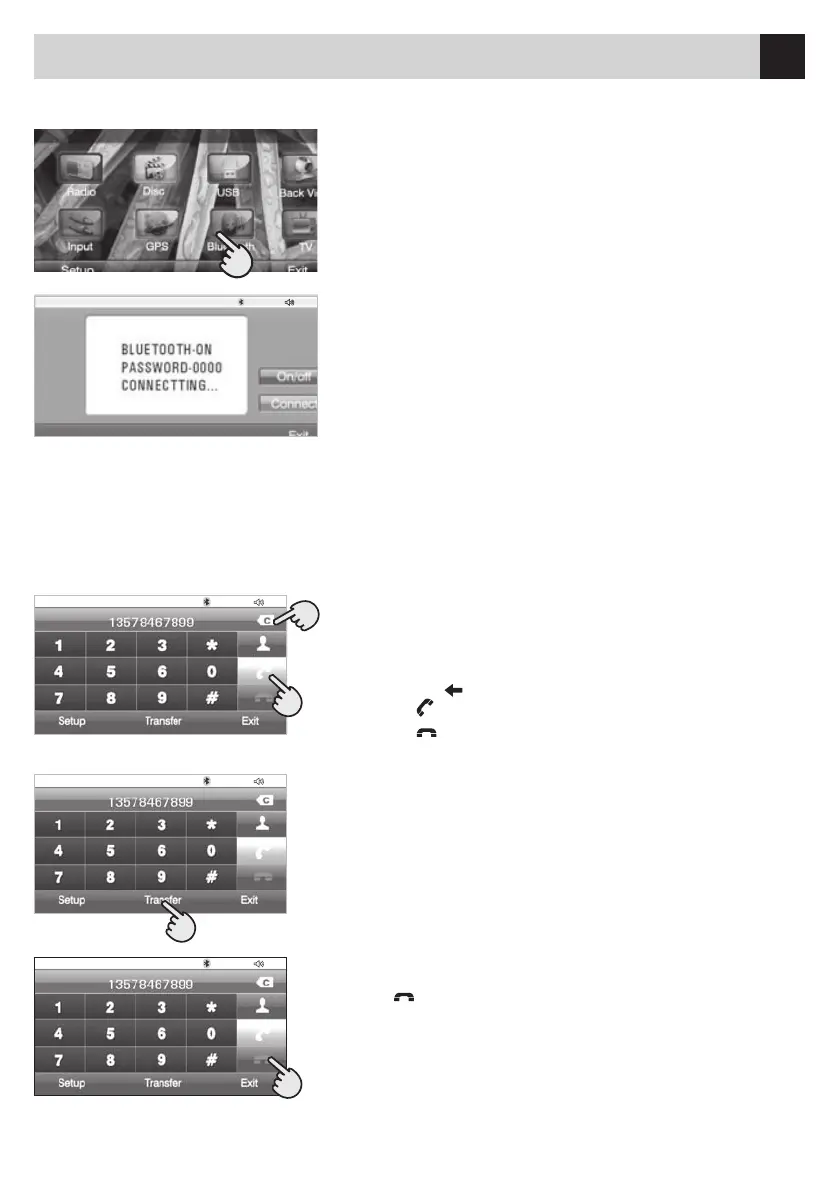
•PressMenu,toreturntotheMainmenu.
•SelecttheBluetooth-icon.
BLUETOOTH-PAIRING
To pair the Bluetooth-Module with the Mobile-phone, proceed
asfollows:
•ActivatetheBluetooth-functionontheMobile-phone
•ActivatetheBluetoothbyselectingtheON/OFF-icononthe
Set-up Menu.
•AssoonastheMobile-phonehasfoundtheUnit,introduce
the security-code 0000.
•OncethePairinghasbeeneffected,theDisplaywillshowthe
information“PairingSucceeded”.
MAKINGAPHONE-CALL
AfterhavingpairedtheMobile-phoneBluetoothwiththeUnit,phone-callscanbestartedwith:
Theremote-control(bytouchingtheScreen),orthroughtheChronologyCalling-List.
Afterhavingintroducedthephone-number,thedisplaywill
show that a phone-call is being started.
Introduce the phone-number on the Display.
Press the icon to correct the introduced phone-number.
Press icon
to ANSWER a phone-call.
Press icon
to CANCEL or FINISH a phone-call.
ANSWERINGTHEPHONE
When a phone-call arrives, the Unit will automatically visualize the
numberofthecallingperson.
Select the icon “TRANSFER”toforwardthephone-calltothe
Mobile-phone.
Selectagain,toreturntotheMode“Handsfree-Reply”.
FINISHINGthePHONE-CALL
Press key .
•••• • ••
•••• • ••
•••• • ••
•••• • ••


 To Next Page