FUNZIONI BLUETOOTH • BLUETOOTH-FUNCTIONS
BLUETOOTH MUSIC PLAY
If the connected phone supports the A2DP-Profile,
you can listen to music.
If the device supports AVRCP, the musical tracks
can be handled on the touch-screen directly.
/ Previous/next Track.
Start/interrupt reproduction.
EQ Equalizer.
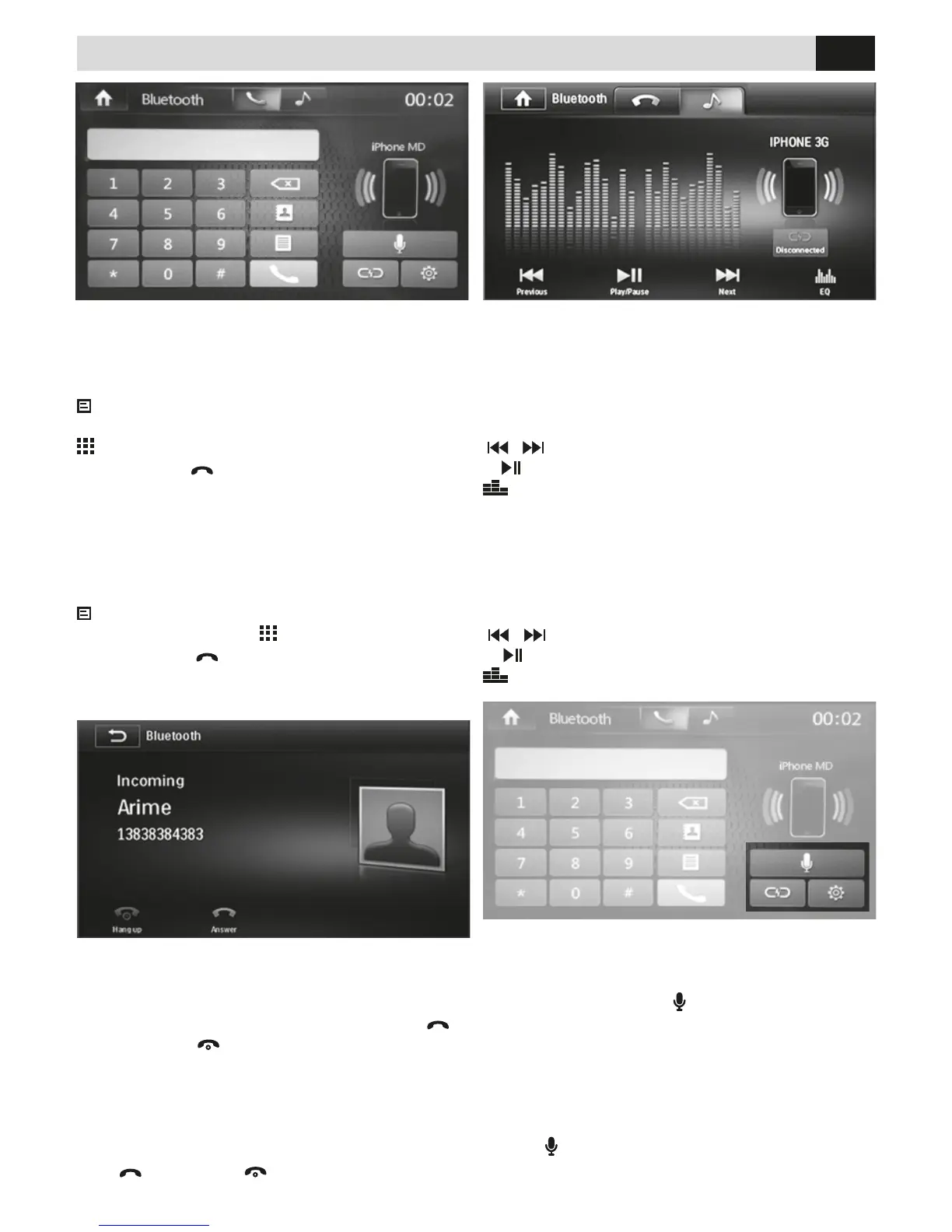
EFFETTUARE UNA CHIAMATA
• Selezionare Bluetooth dal menù principale.
• Premere una delle icone presenti sullo schermo per
chiamare da uno degli elenchi.
Chiamate PERSE-RICEVUTE-EFFETTUATE-RUBRICA
che deve essere stata sincronizzata in precedenza.
chiamata dal tastierino numerico.
Premere l’icona
per inviare la chiamata o digitare il
numero da chiamare direttamente sul tastierino.
RICEVERE UNA CHIAMATA
All’arrivo di una chiamata lo schermo passa in modalità
bluetooth visualizzando il numero del chiamante e il
nominativo se la rubrica è sincronizzata. Premere
per rispondere o
per riutare la chiamata.
ANSWERING A PHONE-CALL
When phone-call arrives, screen switches to Bluetooth-
mode and visualizes the caller’s phone-number and
name, if phone-list has previously been synchronized.
Press
to answer or reject the Call.
STARTING A PHONE-CALL
• Select Bluetooth from the Main Menu.
• Press one of the icons available on the screen, to
choose requested Phone-List.
Calls Lost-Answered-Started - Phone-Book
(Previously synchronized)
Phone-calls from number-
keys. Press icon
to start a phone-call.
As an alternative, digit phone-number directly on the
number-keys available on the screen.
RIPRODUZIONE MUSICA BLUETOOTH
Se il telefono connesso supporta il prolo A2DP è
possibile ascoltare i brani musicali.
Se il dispositivo supporta AVRCP sarà possibile
controllare i brani musicali direttamente dal touch
screen.
/ Brano precedente/successivo.
Avvia/interrompe la riproduzione.
EQ Equalizzatore.
MODALITA’ SIRI PER APPLE SUPPORTATI
Siri consente di utilizzare la voce per inviare messag-
gi, ssare riunioni, telefonare e molto altro ancora. E’
sufciente premere l’icona
sullo schermo e rivolgere
domande parlando in modo naturale. È in grado di
rispondere tramite gli altoparlanti dell’auto.
COMPATIBILITY WITH SIRI FOR APPLE
Siri allows you to vocally send messages, x meet-
ings, effect phone-calls and much more. Simply press
the icon
on the screen and put your questions, by
speaking in a totally normal way. Siri will reply through
the loud-speakers of your car.


 To Next Page