3
En
INSTRUCTION MANUAL
External Power Port
The Indra360 TTL Studio Light can be connected to the Phottix Indra AC
Adapter or the Phottix Indra Battery Pack through the external power port.
Please note:
When connecting the external power source, only use Phottix ash power
cords designed for use with the Indra360 TTL Studio Light.
Connecting the Indra360 to the external power
source
Using the Phottix Indra360 Battery Pack
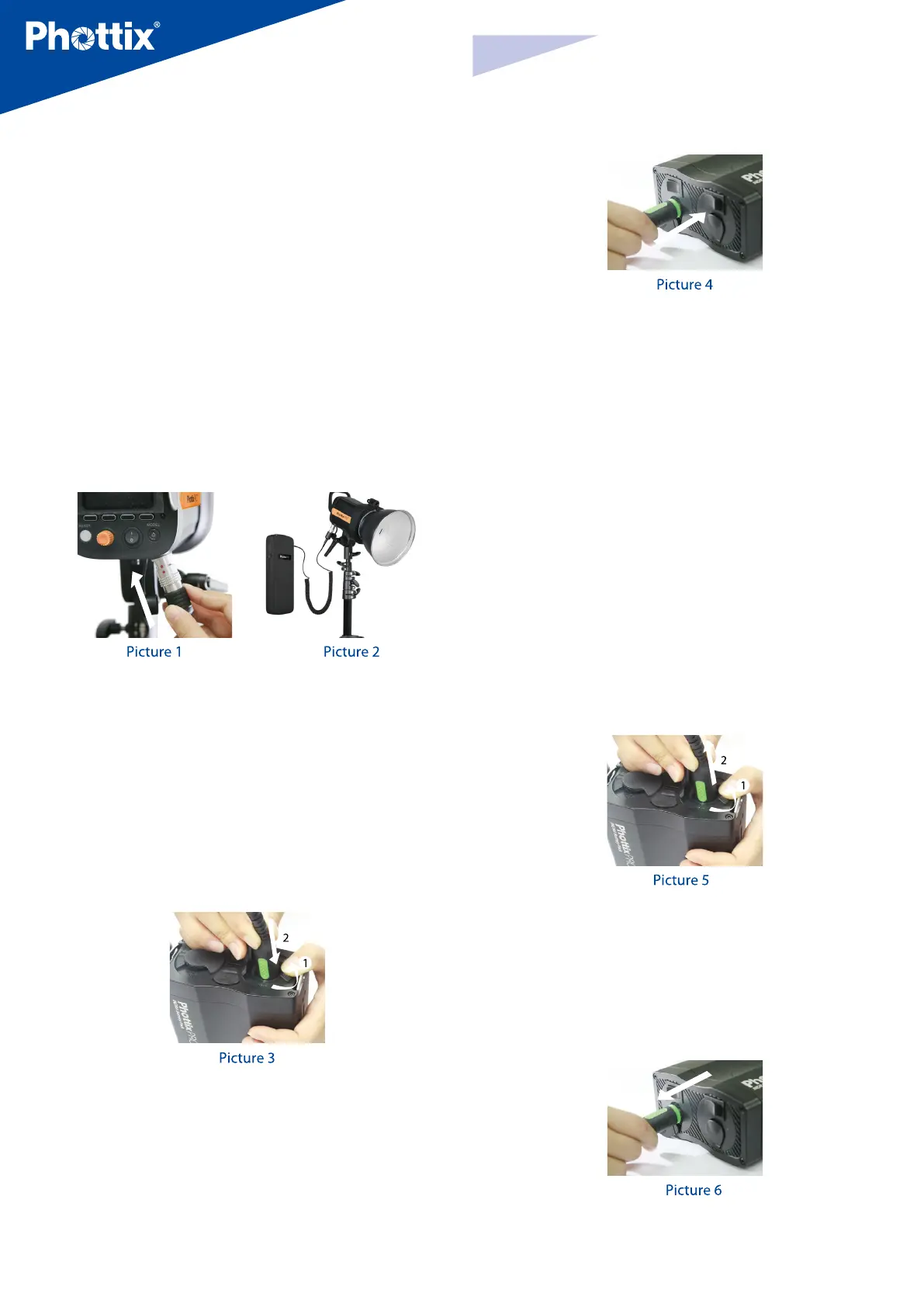
1. Insert the battery pack’s output plug into the external power port on the
Indra 360 TTL Studio Light. The high voltage indicator on battery pack will be
lit. (See picture 1, 2)
2. Turn on the battery pack.
3. Turn on the power switch on the Phottix Indra360 TTL Studio Light.
Using the Phottix Indra Battery Pack
1. Insert one end of the included ash power cord into the external power port
on the Indra360 TTL Studio Light. (See picture 1)
Note: To insert properly, please align the red dots on the cable and port.
2. Insert the other end into the output port on the Phottix Indra Battery Pack.
(See picture 3)
3. Turn on the Output Toggle Switch on the Battery Pack.
4. Turn on the power switch on the Phottix Indra360 TTL Studio Light.
Using the Phottix Indra AC Adapter
1. Insert one end of the included ash power cord into the external power port
on the Indra360 TTL Studio Light. (See picture 1)
Note: To insert properly, please align the red dots on the cable and port.
2. Insert the other end into the output port on the Phottix Indra AC Adapter.
(See picture 4)
3. Connect the AC Adapter to the mains supply.
4. Turn on the main power switch and the output power switch on the AC Adapter.
5. Turn on the power switch on the Phottix Indra360 TTL Studio Light.
Disconnecting the Indra360 from the external
power source
Disconnecting the Phottix Indra360 Battery Pack
1. Turn o the power switch on the Phottix Indra360 TTL Studio Light.
2. Turn o the battery pack.
3. Unplug the output plug of battery pack according to the picture 7.
Disconnecting the Phottix Indra Battery Pack
1. Turn o the power switch on the Indra360 TTL Studio Light.
2. Move the output toggle switch on the battery pack to the “OFF” position.
3. Unplug the ash power cord according to picture 5.
4. Unplug the other end according to picture 6.
Disconnecting the Phottix Indra AC Adapter
1. Turn o the power switch on the Indra360 TTL Studio Light.
2. Turn o the main power switch and output power switch on the AC Adapter.
Unplug the ash power cord according to picture 6.



 To Next Page