5
En
INSTRUCTION MANUAL
Flash Exposure Lock – FEL/FV Lock
Flash Exposure Lock (FEL, also FV Lock in Nikon camera) can be used to lock
the ash exposure before a photo is taken. This is useful when manual spot
metering is being used in a scene with dierent lighting conditions. While in TTL
mode, press the camera’s function button to use this function. See your camera
user manual for more information on FEL functions and usage.
The FEL function is supported but cannot be set on the Indra360 TTL Studio
Light. The availability of this function depends on whether the trigger or camera
is equipped with an FEL function. See you camera manual for more information
on Flash Exposure Lock.
High Speed Sync – HSS/Auto FP
High Speed Sync (HSS) mode is used to shoot at shutter speeds higher than a
camera’s set ash sync speed (typically 1/200-1/250s). This is useful when using
aperture priority mode and in limiting ambient light. HSS results may vary with
dierent camera models – refer to your camera user manual for more details.
Please note:
1. HSS function is supported by the Phottix Indra360 TTL Studio Light, but it
cannot be set on the studio light itself.
2. The camera, ash trigger and receiving mode can greatly aect HSS mode.
For best results in HSS mode please use recommended Phottix ash triggers.
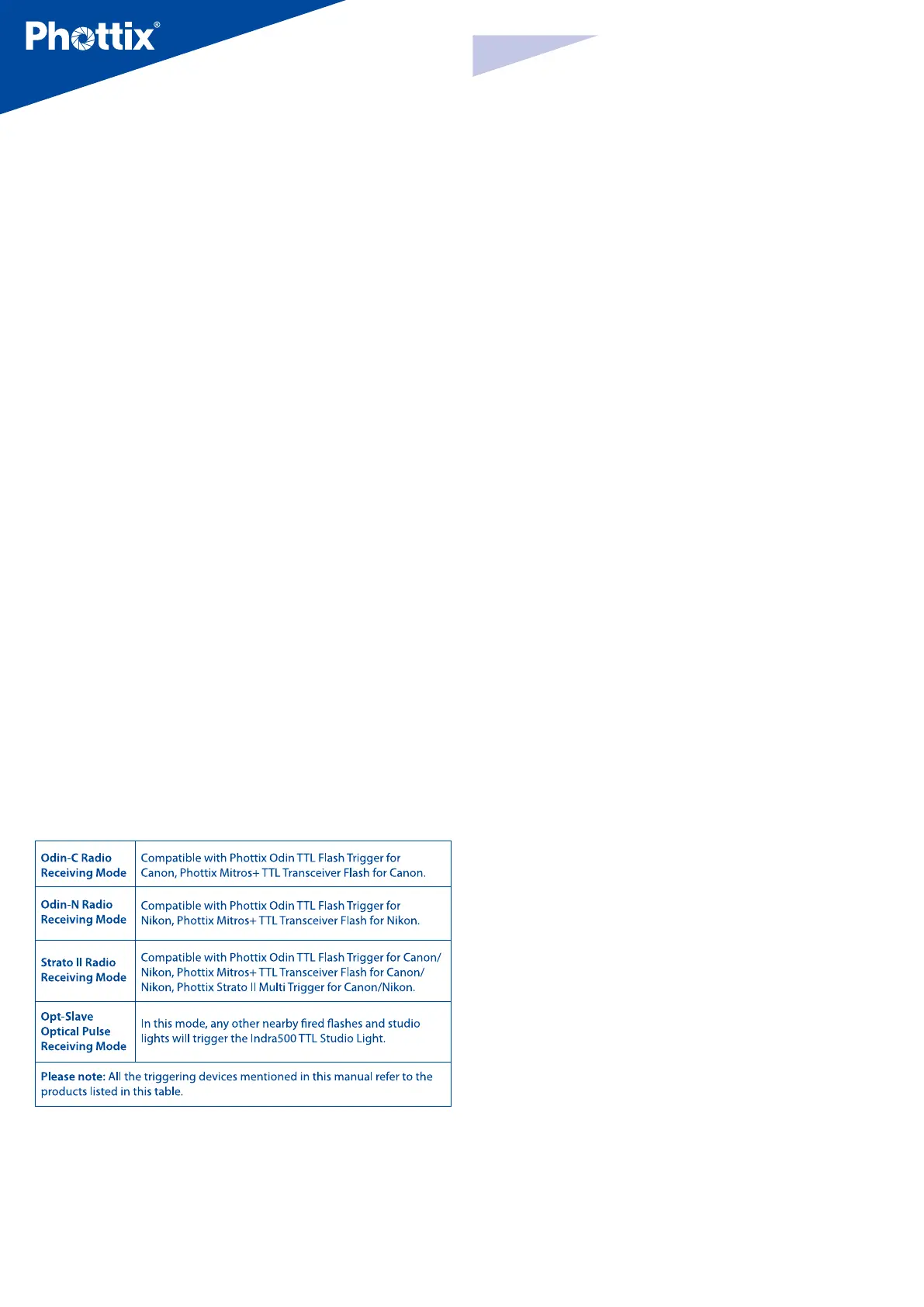
Please see the “Compatibility Table” below and refer to your ash trigger and
camera user manuals for more details.
3. HSS function will not work in Manual and Multi Stroboscopic mode.
4. Use the HSS mode frequently will shorten the ash tube life.
5. Nikon’s ash protocols may limit the maximum sync speed of some Nikon
camera bodies.
Compatibility Table
Second Curtain Sync - SCS
The Phottix Indra360 TTL Second Curtain Sync function makes the studio light
re at the end of an exposure, not the beginning. This helps capture special
eects when using slow shutter speeds.
Please note:
1. SCS function is supported by the Phottix Indra360 TTL Studio Light, but it
cannot be set on the studio light itself. Instead please set the SCS function on
your camera or ash trigger. For more details, please refer to your ash trigger
and camera user manuals.
2. SCS function will not work in Multi Stroboscopic mode.
Test/Ready Button
1. Pressing the test button will trigger the studio light. This can be used for
metering in Manual mode.
2. This button also oers a Flash-ready indication function. The LED indicator on
the button will ash green when the light has the minimum recycle charge. It
will ash red when fully charged.



 To Next Page
 Loading...







