2
www.phywe.com, © All rights reserved 12601-09 and 12601-10 / 4716
The voltage supply of the Wireless/USB-Link is provided by
an integrated rechargeable Li-ion battery. It has to be consid-
ered that the lifetime of a Li-ion battery is limited; each
charge cycle reduces the lifetime. Therefore, the battery can
be replaced. However, the battery should not be replaced
until the battery life without connected sensor falls below
2 hours.
3 FUNCTIONAL AND OPERATING ELEMENTS
3.1 Top side elements
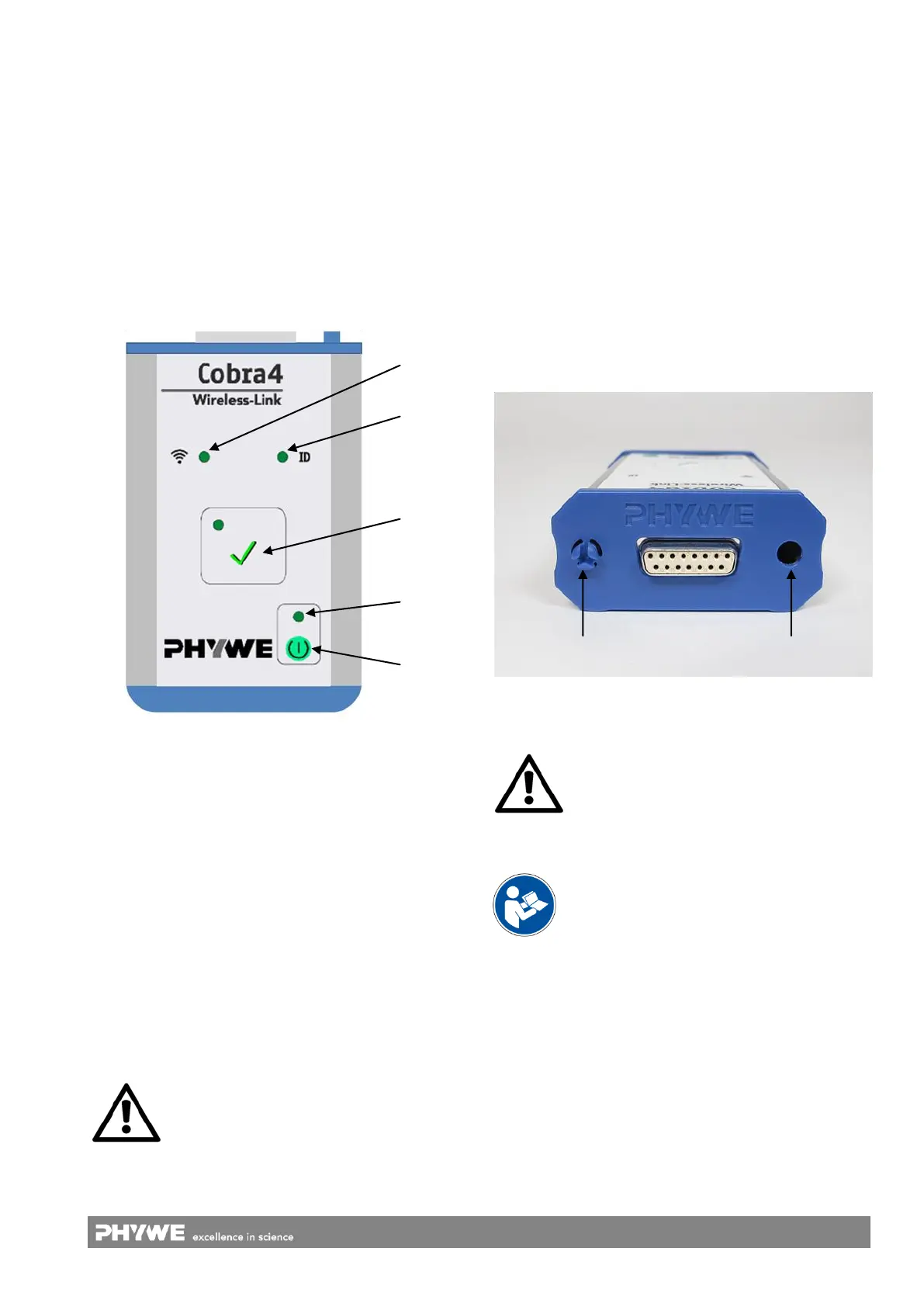
Cobra4 Wireless/USB-Link is equipped with various elements
for status indication, display of the sensor identification, and
for operation of the instrument, which are described below
(Fig. 2):
1 On and off switch
Pressing the button switches the instrument either on or off.
The instrument switches off self-controlled to save the battery
life: Switch-off 10 min after the last press of a button or end-
ing the used software (long-term measurements are not
aborted).
2 LED Power/Charge
Turns green when the instrument is switched on.
Blinks if the battery has to be charged.
Turns orange, when the battery is charged via the USB
socket.
3 Record button
Pressing the button initiates a measurement and pressing
again stops the measurement. An active measurement is in-
dicated by the LED above. Pressing and holding the button
during switch-on causes the device to operate in USB mode
(see chapter 5.5).
4 LED Identification (ID)
Turns green for about 4 s after connecting a sensor and
indicates that it is correctly recognised.
Blinks orange for about 4 s if the user initiates the sensor
identification via software (Assignment to an experiment).
Blinks green in USB mode (see chapter 5.5).
5 LED Network quality
Turns green at good network coverage.
Turns green and orange at medium network coverage.
Turns orange at bad network coverage.
Alternating blinking (orange/green) indicates a network
calibration.
3.2 Sensor interface
The interface for fitting the instrument to the Cobra4 Sensor-
Unit is at the front of it, whereby a mechanically secure click
connection is ensured by the mushroom-shaped click-on
connector and a hole (Fig. 3).
Fig. 3: Interface for connection of a Cobra4 Sensor-Unit.
Mushroom-shaped click-on connector for latching in the
hole of the respective sensor.
Cobra4 Wireless/USB-Link communicates exclusively
with instruments from the Cobra4 product line.
3.3 USB interface
The instrument is charged via the USB interface (see chap-
ter 3.4). It can also be used as connection to a computer for
data logging (comparable to Cobra4 USB-Link). See chap-
ter 5.5.
3.4 Device charging
The Li-ion battery is charged via the USB interface. Using an
external power supply (art. no. 07932-99), the charging of a
completely discharged battery takes about 4 hours. The dura-
tion may vary when using the USB port of a PC. While charg-
ing, the device can still be operated.
Continuously pressing the button for longer
than 5 s restores the factory default settings.
See chapter 5.4.
Fig. 2: Functional elements
Carefully read the respective operating instruc-
tions completely before operating a Sensor-Unit.
This is necessary to avoid damage to it, as well
as for user-safety.



 To Next Page