3
www.phywe.com, © All rights reserved 12601-09 and 12601-10 / 4716
3.5 Battery replacement
If the maximum capacity of the battery has considerably de-
creased, it is possible to replace the battery. Please note that
the warranty does not cover defects caused by the battery
replacement. It also is possible to send the Wireless/USB-
Link to the PHYWE repair department, which will exchange
the battery for a new one.
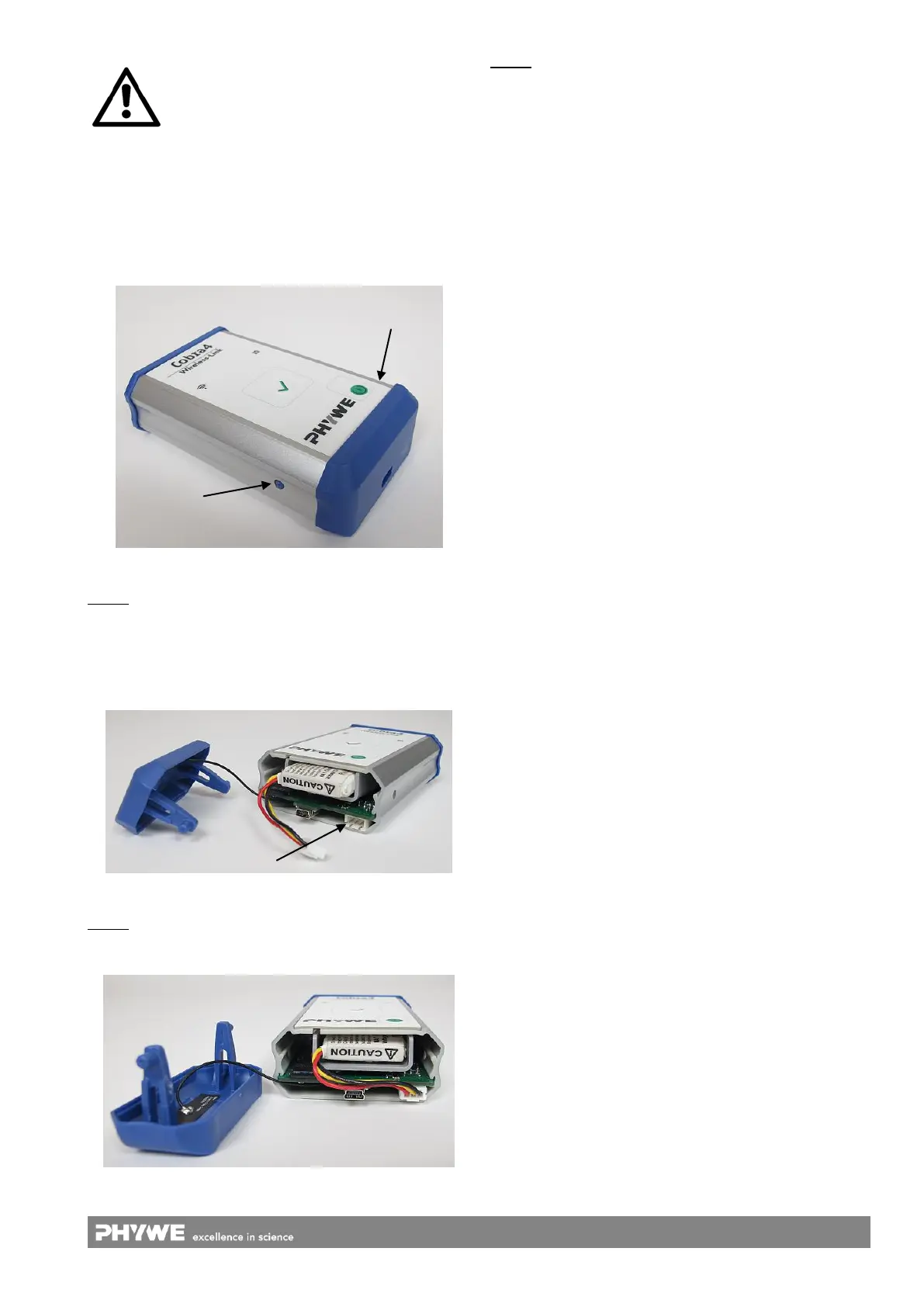
Fig. 4: Removing the end cap
Step 1: Remove the end cap of the instrument by pressing
the release buttons with a pen or another pointed object
(Fig. 4).
Attention: Open the left side first, followed by the right side,
to prevent damage of the connection cord on the left-hand
side of the battery.
Fig. 5: (Un-) plugging the connector
Step 2: Release the connector of the battery from the circuit
board (Fig. 5). Remove the worn-out battery. Insert the new
battery in the holder.
Fig. 6: Backside view with plugged battery connector
Step 3: Plug the connector onto the circuit board.
Attention: Check, that the connection cord lays above the
USB socket (Fig. 6); otherwise the end cap cannot be closed.
Furthermore, the antenna cable must not be pinched.
4 NOTES ON OPERATION
The Cobra4 Wireless/USB-Link fulfils all of the technical re-
quirements that are compiled in current EC guidelines. The
characteristics of this product qualify it for the CE mark and
the FCC mark.
This instrument is only to be put into operation under special-
ist supervision in a controlled electromagnetic environment in
research, educational and training facilities (schools, universi-
ties, institutes and laboratories).
This means that in such an environment, no mobile phones
etc. are to be used in the immediate vicinity. The individual
connecting leads are each not to be longer than 2 m. The in-
strument can be so influenced by electrostatic charges and
other electromagnetic phenomena (HF, bursts, indirect light-
ning discharges) that it no longer works within the given
specifications.
If the instrument should not respond anymore, restart it by
pressing and holding the on and off switch for longer than 3 s.
If necessary, restart the measurement software (PC or app).
An ideal wireless communication between the Cobra4 Wire-
less Link 2 and the data logging device (PC, tablet,
smartphone) can only be ensured by “visual contact” and on
short distance (max. 50 m). Set the experiments up accord-
ingly.
5 HANDLING
This section describes how to put Cobra4 Wireless/USB-Link
into operation and provides an overview of how to handle it.
To avoid failure or improper operation, please read carefully
through this section.
5.1 Putting into operation
Be sure that the battery of the instrument is fully charged.
Use an end device (PC, notebook, tablet or smartphone) with
WiFi enabled.
5.2 Starting the instrument into WiFi mode
Before using the instrument, connect the desired Cobra4
Sensor-Unit to it. Switch on the device. If the instrument is
started for the first time, it will operate in “Excursion” mode
(Access Point Mode). Then, it is visible as “WirelessLink2-xxxxx”
for every end device.
After every restart of the instrument, the network settings will
be restored. This means that the device will automatically re-
connect to the previously connected network. If this network
is not available, the device will switch to “Excursion” mode.
5.3 Configuration
The following procedure explains how to change the network
mode of the Wireless/USB-Link. Be sure that WiFi is enabled
on the end device. Connect to the network “Wireless-
Link2-xxxxx” (as shown in Fig. 7 or similar).
xxxxx corresponds to the last 5 digits of the Mac address that
is denoted on the backside label of the Wireless/USB-Link.
Charging the device while operating a sensor
may cause the battery not to charge, if the
power consumption of the used sensor ex-
ceeds the charging current.



 To Next Page