Power supply
Applying the armband
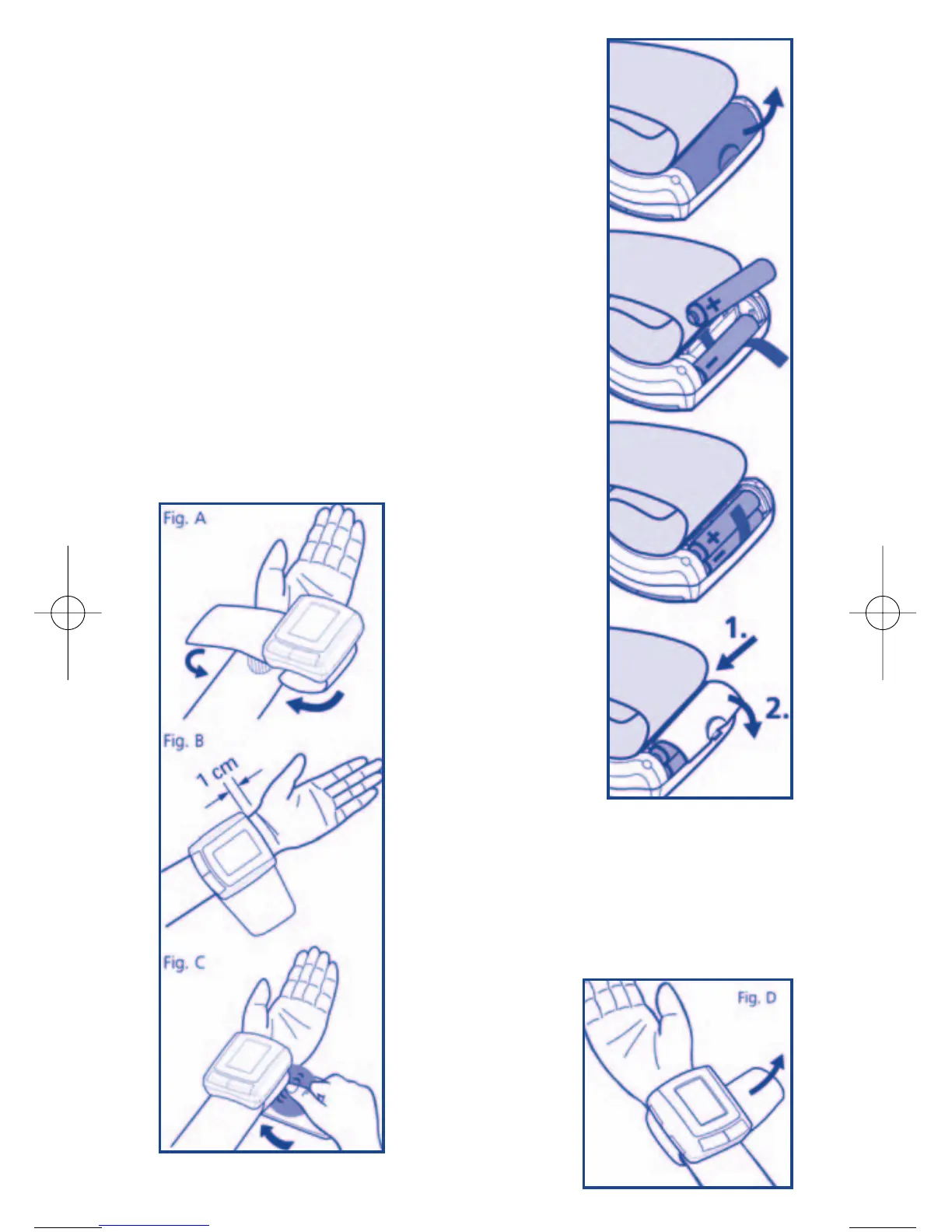
Inserting batteries
1. Remove the battery cover
2. Insert the first battery in the lower position on top of the rib-
bon.
3. Insert the other battery and fold the ribbon over it.
4. Replace the cover by placing the end tabs of the battery cover
in the slots on the top of the battery compartment and push-
ing down the other end to secure the battery cover.
Replace the batteries when:
1. The flat battery symbol appears on the display
2. Nothing appears on the display when the ON/OFF/START
button is pressed
Note: Batteries are hazardous waste. Do not dispose of them
together with domestic refuse.
1. Remove all watches, jew-
ellery, etc. before apply-
ing the wrist monitor. Roll
up your sleeve, as the
armband must be applied
to bare skin for correct
measurement.
2. Apply armband to left
wrist with the palm facing
up, as shown in Fig. A.
3. Make sure that the edge
of the armband is posi-
tioned about 1 cm from
your palm, as shown in Fig. B.
4. In order to ensure accurate measurement, fasten the
Velcro strap securely around your wrist so that there is
no extra space between the armband and your wrist, as
shown in Fig. C.
If the armband is not
tight enough, the meas-
urement values may be
distorted.
5. If your doctor has
diagnosed poor circu-
lation in your left arm,
carefully place the
armband around your
right wrist, as shown
in Fig. D.
15



 To Next Page