English
59
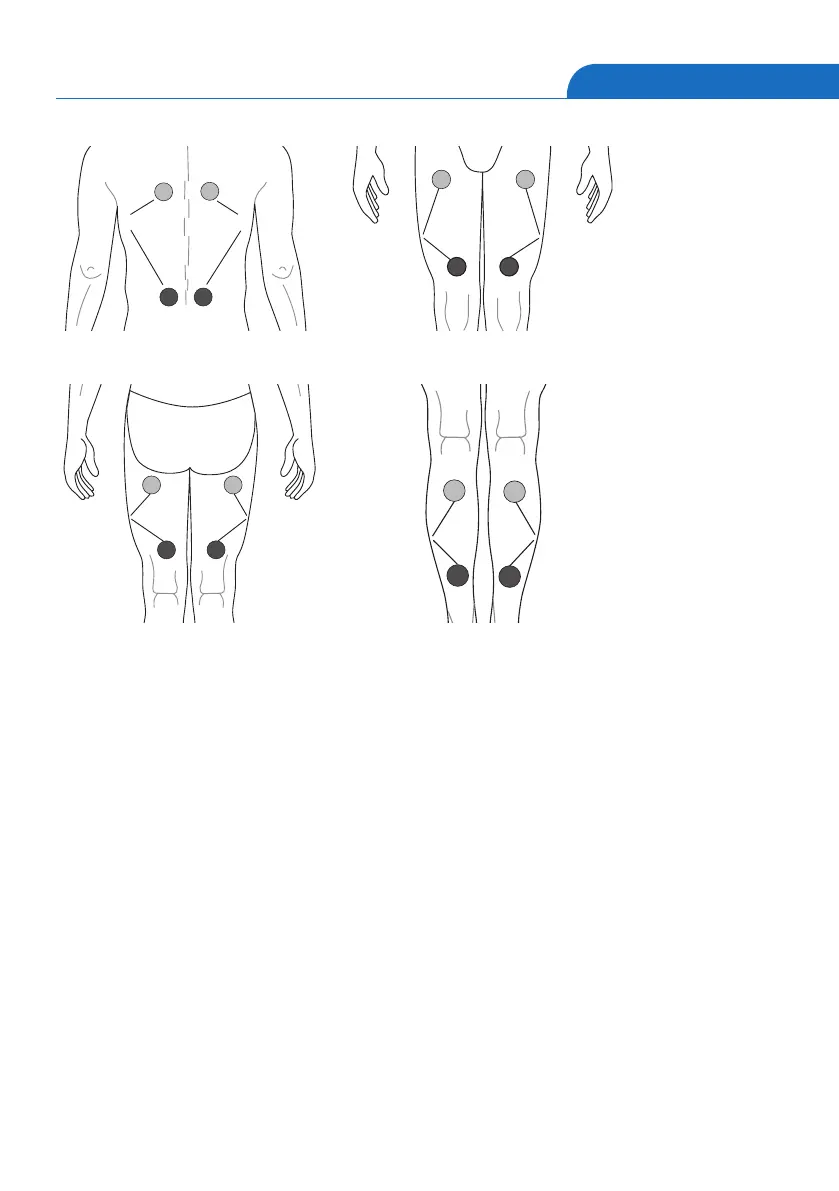
Kanal 2
Kanal 1
Pict. 23: Programme 9
Kanal 1 Kanal 2
Pict. 24: Programme 9
Kanal 1 Kanal 2
Pict. 25: Programme 9
Kanal 1 Kanal 2
Pict. 26: Programme 9
Edit Mode
The edit mode can be reached via pressing the [ E ] key.
The LCD display shows programme, frequency, intensity, and pulse width. The
therapy time is flashing. By pushing the left or right [▲] key the therapy time is
expanded by 5 minutes (max. 90 min.).
By pushing the right or left [▼] key the therapy is diminished by each 5 minutes
(min. 10 min.). By pushing the [ E ] or the [ • ] key in Programme 1-12, the set time
is stored, and the edit mode is left.
In Programme 13 - 16 the edit mode for the pulse width is reached via pressing the
[ E ] key. The therapy frequency is blinking.
By pressing the left [▲] key the therapy frequency is expanded by one Hertz (max.
120 Hz) at a time. By pressing the left [▼] key the therapie frequency is diminished
by one Hertz (min. 1 Hz) at a time.


 To Next Page