
 Need help?
Do you have a question about the PIONEER DJ DDJ-FLX10 and is the answer not in the manual?
Device compatibility and Serato DJ Pro installation requirements.
Installation of manufacturer specific drivers for Windows operating systems.
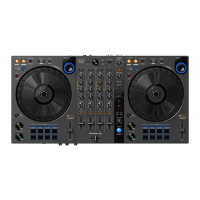
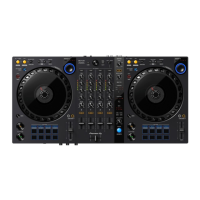
Detailed breakdown of the DDJ-FLX10 hardware components and their functions.
Introduction to the 9 different performance pad modes available.
The Pioneer DJ DDJ-FLX10 is a comprehensive DJ controller designed for use with Serato DJ Pro, offering a wide array of features for both novice and experienced DJs. It functions as a "Serato DJ Pro hardware unlocked" device, meaning it operates out of the box without requiring additional software licenses for basic functionality. For advanced features like Serato DVS (Digital Vinyl System), a paid upgrade and activation of a DVS license are necessary. This allows the use of turntables, media players, or CD players to control Serato DJ Pro via NoiseMap™ Control Tone, with DVS available on all four inputs, and phono-level input specifically for turntables on inputs 3 & 4.
The DDJ-FLX10 integrates seamlessly with Serato DJ Pro, providing tactile control over various software functions. Its rear panel offers essential connectivity, including main audio outputs via XLR (1) and RCA (2), a balanced TRS Booth output, and a grounding post for turntables. Line-level RCA inputs are available for any channel, while phono-level RCA inputs with toggle switches are provided for channels 3 and 4. USB-C ports facilitate connection to a PC (A/B), and microphone inputs are available via balanced TRS (2) or XLR/TRS (1). Power is supplied via an included 12V DC adapter, and headphone monitoring is supported through 3.5mm or 6.5mm jacks.
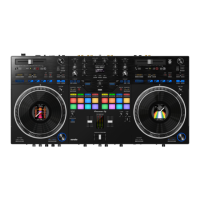
The top panel of the controller is densely packed with controls, offering a familiar layout for DJs. Each deck features a large jog wheel with adjustable resistance, allowing for precise pitch bending and waveform control in vinyl mode. The jog wheel displays virtual deck information, waveforms, artwork, or a DJ logo. Dedicated buttons for IN, OUT, and 4 BEAT / EXIT allow for loop manipulation, including setting loop in/out points, halving/doubling active loops, and toggling 4-beat autoloops. Shift functions for these buttons enable editing loop in/out points and toggling active loops.
Tempo sliders adjust the track's tempo/pitch, with a Shift function to ignore these adjustments. Beat Sync buttons allow for automatic tempo matching, while the Shift function disables sync. Quantize and Slip modes can be toggled, with Shift functions for Tap BPM and switching between vinyl and jog platter modes, respectively. View buttons cycle through different library panels (Files/Browse/Prepare/History), and Link buttons toggle Key Lock.
The mixer section includes channel faders for volume control, a crossfader for blending between channels 1-2, and crossfader assign switches for routing channels to either side A, B, or THRU. Channel CUE buttons enable headphone monitoring, with a Shift function to toggle EQ controls for isolating Stems (Vocals, Melody/Bass, Drums). Trim knobs adjust input gain, and EQ (Hi, Mid, Low) knobs are available for each channel. Sound Color FX knobs apply effects to individual channels, with a Shift function to select the FX part. Microphone level and EQ controls (Hi, Low) are also present, along with a talkover toggle. Master and Booth level controls, along with a master channel CUE toggle, manage overall output and monitoring.
The DDJ-FLX10's performance pads are a central feature, offering 8 pads per deck with 9 different modes, accessible via dedicated buttons and Shift combinations.
Shift-activated pad modes expand functionality:
Beat FX controls allow for selecting various effect types (Enigma Jet, Flanger, Trans, Phaser, Reverb, Stretch, Spiral, Slip Roll, MT Delay, Roll, Mobius In, Echo, Low Cut Echo, Mobius A), adjusting their timing, and assigning them to different channels (Sampler, Mic, 1/2/3/4, Master). Level/Depth knobs control the intensity of the effects, and an On/Off button activates/deactivates them.
The DDJ-FLX10 is designed for ease of setup and use. For Windows users, manufacturer-specific drivers are required, which can be installed via a pop-up prompt in Serato DJ Pro or downloaded directly from Pioneer DJ's website. macOS users benefit from class-compliant operation, requiring no additional drivers.
Serato DJ Pro itself offers several helpful features:
For advanced customization, the DDJ-FLX10 supports MIDI mapping. Users can remap Serato DJ Pro software functions to the controller or assign controls to a secondary MIDI controller. This is done via the SETUP screen's MIDI tab, where connected devices are listed. Enabling "Allow Serato Hardware Remapping" unlocks the MIDI assign button, allowing users to create, edit, or delete custom mappings. A "Restore Defaults" option is available to erase custom mappings and revert functions to their original state.
Beat Jump functionality can be activated by enabling "Show Beat Jump Controls" in the DJ preferences tab of the Setup screen. This integrates Beat Jump controls into the deck area and allows for control via the performance pads in AUTO LOOP or ROLL mode.
Overall, the Pioneer DJ DDJ-FLX10 is a robust and versatile DJ controller, offering extensive control over Serato DJ Pro's features, from basic mixing and looping to advanced performance techniques like Stem separation, Pitch Play, and Key Shift, all supported by user-friendly setup and helpful software resources.
 General
| Channels | 4 |
|---|---|
| Decks | 4 |
| Audio Interface | Yes |
| Weight | 6.7 kg / 14.8 lb |
| Type | DJ controller |
| Number of Channels | 4 |
| Pads | 16 |
| Jog Wheels | 2 |
| Software Compatibility | rekordbox, Serato DJ Pro |
| Frequency Response | 20 Hz - 20 kHz |
| Outputs | 2 x RCA |
| USB Ports | 2 |
| Inputs | 2 x RCA |







 To Next Page