EasyManua.ls Logo

Pioneer AVX-P7300DVD - User Manual

Pioneer AVX-P7300DVD
80 pages
Print Icon
To Next Page IconTo Next Page
Loading...
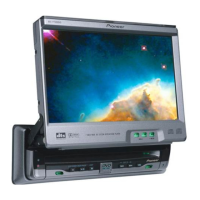
7 Inch Wide AV System Display/DVD Player
Operation Manual
AVX-P7300DVD
ENGLISH

Table of Contents

Other manuals for Pioneer AVX-P7300DVD

Questions and Answers

  • J
    Justin ColemanAug 17, 2025
    What to do if Pioneer AVX-P7300DVD power doesn’t switch ON?
    • A
      Anthony AdamsAug 17, 2025
      If your Pioneer Car Video System doesn't switch on, there are several potential causes. First, ensure all leads and connectors are correctly connected. Second, check the fuse; if it has blown, fix the underlying problem and replace it with a new fuse of the same capacity. Finally, noise or other factors might be causing the built-in microprocessor to malfunction. In this case, press the RESET button.
  • G
    George HamptonAug 20, 2025
    Why is there no sound from my Pioneer AVX-P7300DVD Car Video System and the volume is low?
    • J
      jason50Aug 20, 2025
      If there's no sound or the volume level is low on your Pioneer Car Video System, it could be due to a couple of reasons. First, check the volume level on the head unit or any connected components and increase it. Second, ensure that the attenuator on the head unit is switched OFF.
  • K
    kathrynfoxAug 23, 2025
    What to do if my Pioneer AVX-P7300DVD Car Video System remote control isn’t working?
    • A
      Alan KingAug 23, 2025
      If the remote control isn't working with your Pioneer Car Video System, consider these possibilities: the remote control operation mode may be incorrect, so switch to the correct mode. Also, the remote control code might be incorrect; ensure the remote control code selection switch setting and code type setting are the same. Weak battery power can also be a culprit, so load new batteries. Lastly, some operations are prohibited with certain discs, so try another disc.
  • E
    Emily TaylorAug 26, 2025
    Why is there no picture on my Pioneer Car Video System?
    • S
      Samantha AllenAug 26, 2025
      If there's no picture on your Pioneer Car Video System, it might be because the parking brake cord is not connected. Connect a parking brake cord and apply the parking brake. Also, ensure that the parking brake is applied.
  • C
    Christopher BirdAug 28, 2025
    Why is playback not possible on my Pioneer AVX-P7300DVD?
    • B
      Brenda WattsAug 28, 2025
      If playback isn't possible on your Pioneer Car Video System, it might be due to a few reasons. The disc could be dirty, so clean it. Alternatively, the loaded disc might be a type that the unit cannot play, so check the disc type. Also, ensure that a compatible video system disc is loaded.
  • K
    kennedymistyAug 31, 2025
    Why is there no sound on my Pioneer AVX-P7300DVD Car Video System?
    • A
      Abigail VaughnAug 31, 2025
      If there's no sound on your Pioneer Car Video System, first check that all connections are correct. Also, with some discs, 96 kHz output is prohibited, so switch the output setting to 48 kHz. Finally, there is no sound during Still, Slow Motion or Frame-By- Frame playback.
  • T
    Terrence RodriguezSep 3, 2025
    What to do if the picture stops on Pioneer Car Video System?
    • V
      vanessa27Sep 3, 2025
      If the picture stops (pauses) and the unit cannot be operated on your Pioneer Car Video System, it may be because reading of data has become impossible during playback. After pressing the STOP button once, start playback again.
  • T
    Tracy KingSep 5, 2025
    Why is the picture stretched on my Pioneer Car Video System?
    • J
      James WardSep 5, 2025
      If the picture is stretched or the aspect is incorrect on your Pioneer Car Video System, the aspect setting is likely incorrect for the display. Select the appropriate setting for your display.
  • M
    Michelle BarnettSep 8, 2025
    Why is there audio and video skipping on my Pioneer Car Video System?
    • D
      Dominique JonesSep 8, 2025
      If you're experiencing audio and video skipping on your Pioneer Car Video System, the unit may not be firmly secured. Ensure that the unit is securely mounted.
  • A
    Ann RuizSep 12, 2025
    Why does the rear display picture disappear on my Pioneer AVX-P7300DVD Car Video System?
    • J
      Janet JohnsonSep 12, 2025
      If the rear display picture disappears on your Pioneer Car Video System, it could be because the source disc being listened to with the head unit has been ejected. Before ejecting the disc, switch the source. This problem may occur when certain connection methods are used.

Summary

Before Using This Product

Safe Driving Guidelines

Instructions for safe vehicle operation and avoiding driver distraction.

Display Operation

Deploying the Display

Steps to automatically or manually deploy the display screen.

Closing the Display

Instructions on how to close the display screen automatically or manually.

Video Source Selection

Switching Video Sources

How to select the video input source (RGB, AV, VTR).

Basic Operations

Power Management

Instructions for turning the unit's power on and off.

Disc Playback

How to start playback of DVD, Video CD, and CD discs.

Basic Operations

Direct Search Functions

How to directly search for and play specific titles, chapters, or tracks on a disc.

Playback Variations

Still and Motion Playback

How to pause, view frame-by-frame, or play in slow motion.

Multi-Audio Selection

How to switch between different audio languages or systems on a DVD.

Multi-Subtitle Selection

How to switch between different subtitle languages on a DVD.

Multi-Angle Viewing

How to switch between different camera angles for scenes on a DVD.

DVD Information Display 1

Audio, Subtitle, Angle Settings

How to select audio language, subtitle language, and viewing angle.

DVD Information Display 2

Video CD Information Display

Scene and Time Search

How to search for scenes by track or time on a Video CD.

Repeat Range and Audio Output

How to set repeat play for tracks and select audio output on a Video CD.

Initial Settings

Accessing the Setup Menu

How to access the system's setup menu for various initial configurations.

Initial Settings

Parental Lock Level Setup

How to change the parental lock level after registering a code number.

Subtitle Language and Display

How to select subtitle language and turn subtitle display on/off.

Preferred Subtitle Language

How to choose a specific subtitle language from the available options.

Preferred Audio Language

How to select the preferred audio language for disc playback.

Display Settings

Other Operations

Display Usage and Care

Troubleshooting

Common Problems and Solutions

A guide to identifying and resolving common operational issues with the unit.

DVD Playback Issues

Specific solutions for common problems encountered during DVD playback.

Troubleshooting

Troubleshooting and Errors

Pioneer AVX-P7300DVD Specifications

General IconGeneral
Display TypeLCD
DVD PlaybackYes
MP3 PlaybackYes
BluetoothNo
USB InputNo
Preamp Outputs3 (Front, Rear, Subwoofer)
Power Output50W x 4
Screen Size7 inches
Aspect Ratio16:9
TouchscreenYes

Related product manuals