EasyManua.ls Logo

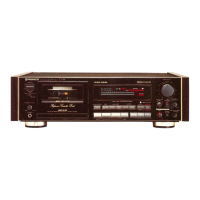
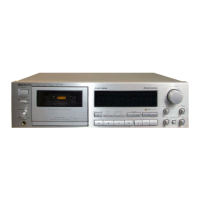
Pioneer CT-676 - User Manual

Pioneer CT-676
20 pages
Print Icon
To Next Page IconTo Next Page
Loading...
Question and Answer IconNeed help?

Do you have a question about the Pioneer CT-676 and is the answer not in the manual?

Summary

General Information and Safety

Line Voltage Selector Switch

Instructions for setting the correct voltage for different regions to prevent damage.

Important Safety Warnings

Crucial safety precautions regarding fire, shock hazards, and proper usage.

Important Notices for U.S. and Canadian Models

Specific notices for U.S. and Canadian users, including serial number location and caution.

Safety Instructions

Important Safety Information

General safety warnings and cautions, including electrical shock risks and proper installation environments.

Instructions for Use in the United Kingdom

Specific wiring and connection guidance for users in the United Kingdom.

Installation and Environment

Installation Guidelines

Advice on choosing suitable locations, ventilation, and avoiding heat and moisture.

Condensation Handling

Guidance on preventing and managing condensation for optimal unit performance.

Maintenance and Cleaning

Cleaning the Tape Path Components

Instructions for cleaning heads, pinch rollers, and capstans for clear sound reproduction.

Head Demagnetization

Explains the process of demagnetizing heads to prevent sound quality degradation.

Front Panel Cleaning

Proper methods for cleaning the unit's front panel without damaging the finish.

Handling Cassette Tapes

Pre-Use Cassette Checks

Essential checks on cassette tape condition before loading into the deck.

Automatic Tape Selector Function

How the deck automatically identifies and adjusts for different tape types.

Cassette Tape Usage Tips

Recommendations for storing, handling, and using cassette tapes for best results.

Connections and Wiring

Audio Input;Output Connections

Connecting the deck's audio input and output jacks to an amplifier or other components.

MPX Filter Switch Operation

Explains the purpose and usage of the MPX filter for FM stereo recording.

CD Deck Synchro Recording Setup

How to connect and perform synchronized recording from a CD player.

System Remote Control Connection

Instructions for connecting and utilizing the Pioneer System Remote Control.

Power Cord Connection

Guidance on safely connecting the unit's power cord.

Front Panel Facilities and Controls

Power and Basic Operation Buttons

Description of power switch, tape transport controls, and tape return function.

Counter and Level Meter Controls

Explanation of counter mode selection and level meter adjustment buttons.

Display Indicators and Functions

Detailed explanation of the various indicators on the function display.

Special Feature Controls

Information on Dolby NR, HX PRO, Super Auto BLE, and ATLC functions.

Counter Modes Explained

Tape Counter Functionality

How the tape counter works and its use for locating specific tape sections.

Time Counter Operation

Details on how the time counter displays elapsed recording or playback time.

Remaining Time Counter Usage

Instructions for setting and viewing the remaining tape time.

Playback Operations

Performing Playback

Step-by-step guide on how to play a cassette tape.

Repeat Playback Function

How to set the deck to repeat playback of a cassette tape.

Music Search Functionality

How to use the music search feature to find specific tracks on a tape.

Recording Procedures

Recording Process Overview

Step-by-step instructions for setting up and starting a recording.

Super Auto BLE Tuning for Recording

Utilizing the Auto BLE system to optimize recording settings for tapes.

Adjusting Recording Level

Guidance on setting the optimal recording level for clear sound.

Bias Control and Mute Function

Adjusting bias and using the recording mute for tape management.

Tape Return and CD Synchro Recording

Features for tape handling and synchronized recording from CD players.

Audio Timer Operations

Unattended Recording Setup

How to set up the deck for automatic recording using an audio timer.

Wake-Up Playback Setup

Instructions for scheduling automatic playback via an audio timer.

Troubleshooting Guide

Power and Door Troubleshooting

Solutions for common issues with power, cassette door operation, and loading.

Playback and Recording Issues

Remedies for sound quality problems, tape stopping, and recording indicator failures.

Sound Quality and Auto BLE Errors

Diagnosing and resolving sound distortion, noise, and AUTO BLE tuning errors.

Other Operational Problems

Troubleshooting tips for music search, timer functions, and CD synchronization.

Technical Specifications

System and Performance Specs

Details on heads, motors, wow/flutter, frequency response, and signal-to-noise ratio.

Noise Reduction and Distortion Data

Specifications for Dolby NR effect and harmonic distortion levels.

Physical and Accessory Details

Information on dimensions, weight, and included accessories with the unit.

Summary

General Information and Safety

Line Voltage Selector Switch

Instructions for setting the correct voltage for different regions to prevent damage.

Important Safety Warnings

Crucial safety precautions regarding fire, shock hazards, and proper usage.

Important Notices for U.S. and Canadian Models

Specific notices for U.S. and Canadian users, including serial number location and caution.

Safety Instructions

Important Safety Information

General safety warnings and cautions, including electrical shock risks and proper installation environments.

Instructions for Use in the United Kingdom

Specific wiring and connection guidance for users in the United Kingdom.

Installation and Environment

Installation Guidelines

Advice on choosing suitable locations, ventilation, and avoiding heat and moisture.

Condensation Handling

Guidance on preventing and managing condensation for optimal unit performance.

Maintenance and Cleaning

Cleaning the Tape Path Components

Instructions for cleaning heads, pinch rollers, and capstans for clear sound reproduction.

Head Demagnetization

Explains the process of demagnetizing heads to prevent sound quality degradation.

Front Panel Cleaning

Proper methods for cleaning the unit's front panel without damaging the finish.

Handling Cassette Tapes

Pre-Use Cassette Checks

Essential checks on cassette tape condition before loading into the deck.

Automatic Tape Selector Function

How the deck automatically identifies and adjusts for different tape types.

Cassette Tape Usage Tips

Recommendations for storing, handling, and using cassette tapes for best results.

Connections and Wiring

Audio Input;Output Connections

Connecting the deck's audio input and output jacks to an amplifier or other components.

MPX Filter Switch Operation

Explains the purpose and usage of the MPX filter for FM stereo recording.

CD Deck Synchro Recording Setup

How to connect and perform synchronized recording from a CD player.

System Remote Control Connection

Instructions for connecting and utilizing the Pioneer System Remote Control.

Power Cord Connection

Guidance on safely connecting the unit's power cord.

Front Panel Facilities and Controls

Power and Basic Operation Buttons

Description of power switch, tape transport controls, and tape return function.

Counter and Level Meter Controls

Explanation of counter mode selection and level meter adjustment buttons.

Display Indicators and Functions

Detailed explanation of the various indicators on the function display.

Special Feature Controls

Information on Dolby NR, HX PRO, Super Auto BLE, and ATLC functions.

Counter Modes Explained

Tape Counter Functionality

How the tape counter works and its use for locating specific tape sections.

Time Counter Operation

Details on how the time counter displays elapsed recording or playback time.

Remaining Time Counter Usage

Instructions for setting and viewing the remaining tape time.

Playback Operations

Performing Playback

Step-by-step guide on how to play a cassette tape.

Repeat Playback Function

How to set the deck to repeat playback of a cassette tape.

Music Search Functionality

How to use the music search feature to find specific tracks on a tape.

Recording Procedures

Recording Process Overview

Step-by-step instructions for setting up and starting a recording.

Super Auto BLE Tuning for Recording

Utilizing the Auto BLE system to optimize recording settings for tapes.

Adjusting Recording Level

Guidance on setting the optimal recording level for clear sound.

Bias Control and Mute Function

Adjusting bias and using the recording mute for tape management.

Tape Return and CD Synchro Recording

Features for tape handling and synchronized recording from CD players.

Audio Timer Operations

Unattended Recording Setup

How to set up the deck for automatic recording using an audio timer.

Wake-Up Playback Setup

Instructions for scheduling automatic playback via an audio timer.

Troubleshooting Guide

Power and Door Troubleshooting

Solutions for common issues with power, cassette door operation, and loading.

Playback and Recording Issues

Remedies for sound quality problems, tape stopping, and recording indicator failures.

Sound Quality and Auto BLE Errors

Diagnosing and resolving sound distortion, noise, and AUTO BLE tuning errors.

Other Operational Problems

Troubleshooting tips for music search, timer functions, and CD synchronization.

Technical Specifications

System and Performance Specs

Details on heads, motors, wow/flutter, frequency response, and signal-to-noise ratio.

Noise Reduction and Distortion Data

Specifications for Dolby NR effect and harmonic distortion levels.

Physical and Accessory Details

Information on dimensions, weight, and included accessories with the unit.

Pioneer CT-676 Specifications

General IconGeneral
Type3-head, single compact cassette deck
Track System4-track, 2-channel stereo
Tape Speed4.8 cm/s
Frequency Response20Hz to 21kHz (Metal tape)
Total Harmonic Distortion0.8%
Heads1 x record, 1 x playback, 1 x erase
Motor1 x capstan, 1 x reel
Tape TypeCrO2, Metal
InputsLine in
OutputsLine out, Headphones
Noise ReductionDolby B, Dolby C
Dimensions420 mm

Related product manuals