EasyManua.ls Logo

Pioneer DEH-P7550MP - User Manual

Pioneer DEH-P7550MP
20 pages
Print Icon
To Next Page IconTo Next Page
Loading...
Operation Manual
Multi-CD/DAB control High power CD/MP3/WMA
player with FM/AM tuner
DEH-P7550MP
English
Português (B)
Español
Question and Answer IconNeed help?

Do you have a question about the Pioneer DEH-P7550MP and is the answer not in the manual?

Summary

Before You Start

About this manual

Explains the manual's purpose and recommends reading it before use.

Safety Precautions

Lists crucial safety warnings and general unit care advice.

Supported Media Formats

Details playback capabilities for CD, MP3, and WMA files.

Understanding WMA

Defines WMA audio compression technology and its Microsoft origin.

Remote Control Use and Care

Instructions for installing the battery and operating the remote control.

Theft Protection Features

Explains detaching the front panel for security purposes.

Front Panel Handling

Guide on removing and attaching the front panel safely.

Demonstration Modes

Overview of the unit's reverse and feature demo modes.

Operation Modes

Differentiates between operation modes 1 and 2.

Whats What

Head Unit Controls Overview

Identifies and explains the functions of buttons on the main unit.

Remote Control Buttons

Explains the functions of buttons on the dedicated remote control.

Power ON;OFF

Powering the Unit On and Off

Procedure for turning the unit on and off using the SOURCE button.

Source Selection Guide

How to choose different audio sources like DAB, Tuner, CD, etc.

Tuner

Basic Radio Tuning

Steps for listening to the radio and adjusting volume.

Tuner Display Indicators

Explanation of symbols and information shown on the tuner display.

Advanced Tuner Operations

Covers BSM, Local seek tuning, and frequency recall functions.

Automatic Station Storage (BSM)

Details the Best Stations Memory feature for storing frequencies.

Built-in CD Player

Playing a CD

Instructions for inserting and playing a CD disc.

CD Player Indicators & Notes

Explains track/time indicators and provides important playback notes.

Advanced CD Playback Features

Introduces Repeat, Random, and Scan playback modes.

Repeat Playback Options

How to repeat the current track or all tracks on the CD.

Random Track Playback

Describes the procedure for playing tracks in a random order.

Track Scanning Function

Details how to scan the first 10 seconds of each track.

Pausing and Resuming Playback

Instructions on how to temporarily pause and resume CD playback.

Search Method Selection

Explains switching between FF/REV and ROUGH SEARCH methods.

Disc Title Management

Covers inputting and displaying custom CD titles.

Displaying Disc Titles

How to view entered disc titles and other display information.

CD TEXT Information Display

Explains how to display CD TEXT info like track titles and artist names.

Scrolling Text Information

Describes how to scroll long text information on the display.

MP3;WMA Player

Playing MP3;WMA Files

Instructions for inserting and playing MP3/WMA files on a CD-ROM.

MP3;WMA Player Indicators

Explains indicators for MP3/WMA playback, folders, and tracks.

Advanced MP3;WMA Features

Introduces advanced playback functions for MP3/WMA discs.

MP3;WMA Repeat Playback Modes

Details the different repeat play ranges for MP3/WMA files.

Overview

This document describes the Pioneer DEH-P7550MP, a multi-CD/DAB control high-power CD/MP3/WMA player with an FM/AM tuner. It is designed for in-car entertainment, offering a range of audio playback and control features.

Function Description:

The DEH-P7550MP serves as a central audio unit for vehicles, capable of playing various audio sources. Its primary functions include:
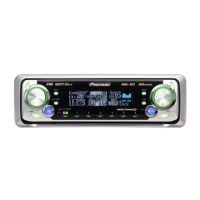
  • Tuner: FM/AM radio reception with the ability to store and recall broadcast frequencies. It supports local seek tuning to find strong signals and a Best Stations Memory (BSM) function to automatically store the six strongest broadcast frequencies. DAB (Digital Audio Broadcasting) control is also supported, indicating compatibility with an external DAB tuner (GEX-P700DAB).
  • Built-in CD Player: Plays standard music CDs, CD-R, and CD-RW discs. It offers basic playback controls such as repeat play (single track), random play, and scan play (first 10 seconds of each track). Advanced features include disc title input for up to 48 discs (or 100 discs with a multi-CD player) and CD TEXT functionality to display disc, track, and artist titles encoded on compatible discs.
  • MP3/WMA Player: Capable of playing MP3 and WMA files recorded on CD-ROM/CD-R/CD-RW discs (ISO9660 Level 1/Level 2 standard recordings). Playback features include folder and track navigation, repeat play (folder, track, or disc), random play, and scan play (first 10 seconds of each track in a folder). It also supports displaying text information (tags) from MP3/WMA files.
  • Multi-CD Player Control: The unit can control an external multi-CD player, extending its CD playback capabilities.
  • External Unit Control: Supports control of two external Pioneer units (e.g., DVD player, multi-DVD player, television) that may be available in the future, even if not directly compatible as a source.
  • Auxiliary Input (AUX): Allows connection of external audio devices.
  • Audio Adjustments: Comprehensive sound control features including:
    • Equalizer (EQ-EX, SFEQ) with recallable curves and fine adjustment.
    • Bass and treble adjustment with selectable frequencies.
    • Loudness control.
    • Subwoofer output control with adjustable settings.
    • Non-fading output adjustment.
    • High-pass filter.
    • Source level adjustment.
    • Automatic Sound Levelizer (ASL).
  • Initial Settings: Customizable settings such as clock, FM/AM tuning step, warning tone, auxiliary setting, dimmer, brightness, rear output/subwoofer controller, telephone muting/attenuation, and motion screen.
  • Operation Modes: Features two operation modes: Mode 1 for full functionality and Mode 2 for basic functions. The manual primarily describes Mode 1.

Important Technical Specifications (Derived from features and context):

  • Disc Compatibility: Music CD, CD-R, CD-RW, CD-ROM (for MP3/WMA).
  • MP3/WMA File System: ISO9660 Level 1/Level 2 standard recordings.
  • WMA Encoding: Compatible with Windows Media Player version 7, 7.1, or Windows Media Player for Windows XP.
  • Battery for Remote Control: CR2025 (3 V) lithium battery.
  • Display: Capable of scrolling text information (e.g., CD TEXT titles, MP3/WMA tags) up to 16 characters at a time.
  • Disc Title Storage: Up to 48 disc titles for the built-in CD player, up to 100 discs with a multi-CD player.
  • Preset Stations: Up to 18 FM stations (6 for each of 3 bands) and 6 AM stations.

Usage Features:

  • Detachable Front Panel: The front panel can be detached and stored in a protective case to deter theft. A warning tone sounds if not removed within five seconds of turning off the ignition (can be disabled).
  • Intuitive Controls: Features a VOLUME knob that extends for easier turning, and dedicated buttons for SOURCE, BAND, FUNCTION, DISPLAY, PAUSE, AUDIO, OPEN, EQ, EQ-EX, and numbered preset buttons (1-6).
  • Remote Control: A wireless remote control provides convenient access to volume, source selection (CD, Tuner), and attenuation.
  • Demo Modes: Includes a "Reverse mode" where screen indications reverse every 10 seconds after 30 seconds of inactivity, and a "Feature demo" that automatically starts when the unit is off but the ignition is on. Both can be cancelled.
  • Search Methods: Offers different search methods for CDs and MP3/WMA files, including fast forward/reverse and "ROUGH SEARCH" to jump every 10 tracks/files.
  • Disc Title Functions: Allows users to input custom titles for CDs, which are then displayed when the disc is inserted.
  • Entertainment Displays: Supports various entertainment displays and the ability to rewrite them.
  • Operation Mode 2: A simplified operation mode for basic functions, distinct from the full-featured Mode 1 described in the manual.

Maintenance Features:

  • Battery Replacement: The remote control battery (CR2025) is user-replaceable. Instructions are provided for installation and precautions against leakage.
  • Error Messages: The manual includes sections on understanding built-in CD player error messages and rewriting entertainment display error messages, aiding in troubleshooting.
  • CD Care: Provides general advice on CD player and disc care, including information on CD-R/CD-RW discs and MP3/WMA files, to ensure optimal performance and longevity.
  • Preset Memory: Notes that if the battery is disconnected or discharged, preset memory will be erased and needs reprogramming.
  • Professional Service: Advises contacting a dealer or authorized Pioneer Service Station if the unit does not operate properly.
  • Front Panel Care: Recommends keeping the front panel out of direct sunlight and high temperatures, and avoiding excessive shocks when handling.

Pioneer DEH-P7550MP Specifications

General IconGeneral
BrandPioneer
ModelDEH-P7550MP
CategoryTurntable
LanguageEnglish

Related product manuals