Need help?
Do you have a question about the Pioneer DT-570 and is the answer not in the manual?
Warning to prevent fire or shock hazard by avoiding exposure to rain or moisture.
Adjusts the power line voltage settings for specific regions.
Sets the power line frequency (50 Hz or 60 Hz) for accurate clock operation.
Displays the current time in hours, minutes, and seconds, with winking on power failure.
Automates waking up to music or recording radio programs unattended.
Allows the user to fall asleep to music with automatic power off.
Guidelines on connecting audio components to avoid overloads and fire hazards.
Switches to control power flow to rear panel AC outlets (STAND-BY, ON, TIMER).
Switches for adjusting displayed time (SEC RESET, FAST, SLOW, REV).
Indicates when power is supplied to the rear panel AC outlets.
Lights when the AC OUTLET-TIMER selector is depressed.
Selects the timer's function (SLEEP, TIMER SET-STAND-BY, TIMER SET-ON, CLOCK, SECOND).
Shows time based on mode selector and time adjust switch settings.
Steps to prepare the unit and connected audio components for operation.
Operations for setting timer ON and OFF times for automatic functions.
Steps to prepare audio components for sleep timer operation.
Instructions for setting the sleep timer to switch off power after a set duration.
Preparation steps for combining sleep and wake-up timer functions.
Sequence of operations for setting combined timer functions.
Instructions to prevent water damage and electric shock.
Warning against disassembling the unit to avoid shock and voiding warranty.
Precautions regarding operating temperature and vibration.
Cleaning instructions and advice for troubleshooting noises.
Details on power requirements, AC outlets, and power consumption.
Lists other functional indicators like LED lights and displays.
Physical measurements of the appliance in millimeters and inches.
The total weight of the appliance in kilograms and pounds.
Lists included accessories, such as the operating instructions manual.
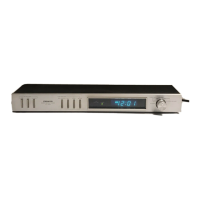
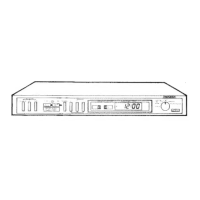
The Pioneer DT-570 is an audio digital timer designed to enhance your audio experience by providing precise control over your stereo equipment. This device allows you to automate various functions, such as waking up to music, unattended recording, and dozing off to sleep with your favorite tunes. It features a clear digital display that shows the present time in hours, minutes, and seconds, and also indicates timer settings.
The primary function of the DT-570 is to act as a programmable timer for your audio components. It can switch the power to connected audio components ON and OFF at desired times, making it a versatile tool for various daily routines.
Indicating the Present Time: The timer displays the current time in hours, minutes, and seconds. If there's a power failure, the time display will blink, indicating that the time settings may need to be reset. The time can be adjusted to the second, allowing for synchronization with radio, TV, or telephone time signals.
Waking Up to Music/Unattended Recording: This feature allows you to program the timer to switch on your stereo amplifier, tuner, or tape deck at a specific time, enabling you to wake up to music or record radio programs unattended. You can set one ON time and one OFF time within a 24-hour period. The timer will operate daily as long as the AC OUTLET-TIMER selector is depressed. For unattended recording, a tape deck with a built-in unattended recording standby mechanism is required.
Dozing Off to Sleep with Music: The sleep timer function lets you listen to music as you fall asleep, automatically switching off your audio components after a set period. The sleep time can be adjusted from 1 minute to 1 hour and 59 minutes.
Combined Sleep Timer and ON/OFF Settings: For a more comprehensive automation, the sleep timer function can be combined with the ON/OFF timer settings. For example, you can set the timer to switch off music after you fall asleep, then switch it back on in the morning to wake you up, and finally switch it off again when you leave home.
The DT-570 is designed for user-friendly operation with a clear interface and intuitive controls.
AC Outlet Selectors: These switches control the power flow to the AC outlets on the rear panel.
Time Adjust Switches: These are used to adjust the displayed time in conjunction with the mode selector.
AC Outlet Indicator (red): This light illuminates when power is being supplied to the AC OUTLETS on the rear panel.
Timer Indicator (green): This light illuminates when the AC OUTLET-TIMER selector is depressed, indicating that the timer is active.
Mode Selector: This rotary switch allows you to select the timer's function:
Power Cord and AC Outlets: The timer connects to a household AC outlet. It provides two AC outlets on the rear panel for connecting your audio components. It's crucial to ensure that the total power consumption of all connected audio components does not exceed the maximum power indicated on the rear panel to prevent fire or malfunction. Avoid connecting electrical appliances with high current surges at startup (like TVs) or high power consumption (like irons, heaters, or air conditioners).
Proper care and maintenance will ensure the longevity and optimal performance of your DT-570.
Cleaning: Use a soft, dry cloth for regular cleaning. For stubborn stains, dilute a neutral detergent with water, dip a cloth into the solution, and wipe the stains away. Never use furniture wax, benzine, insecticides, alcohol, thinners, or other volatile liquids, as these can corrode the cabinet or mar the finish.
Water and Moisture: Keep the unit away from water sources. Do not place vases or other liquid-filled objects on top of the timer. If water accidentally enters the unit, immediately disconnect the power cord and contact a Pioneer authorized service center or your dealer.
Internal Access: Do not attempt to remove the casing screws or open the unit to inspect or make adjustments. This can lead to electric shock and may void any guarantees.
Environmental Conditions: Avoid using the timer in excessively hot (over 45°C) or cold (under -5°C) locations. Also, avoid locations susceptible to vibration, as this can cause time errors.
Buzzing or Rattling Noise: If the timer produces any unusual buzzing or rattling noises during use, disconnect the power cord and contact a Pioneer authorized service center or your dealer.
Nonuse Periods: If the appliance will be unused for an extended period, unplug the power cord from the outlet.
Power-Cord Protection: Route power supply cords carefully to prevent them from being walked on or pinched by other items, paying attention to plugs, convenience receptacles, and the point where they exit the appliance.
Polarization (for applicable models): If your product has a polarized power plug (one blade wider than the other), it is a safety feature. Ensure the plug fits fully into the outlet. If it doesn't, try reversing the plug. If it still doesn't fit, contact an electrician to replace the obsolete outlet. Do not defeat this safety purpose.
 Power
Power| power requirements KU model | AC 120 V 60 Hz |
|---|---|
| power requirements S, S/G model | AC110V/120V/220V/240V (switchable) |
| power consumption | 6 W |
 Weight and Dimensions
| width | 420 mm |
|---|---|
| height | 62 mm |
| depth | 144 mm |
| weight | 1.7 kg |

 To Next Page