EasyManua.ls Logo

Pioneer EQ-E01 EW - Page 6

Pioneer EQ-E01 EW
15 pages
Print Icon
To Next Page IconTo Next Page
To Previous Page IconTo Previous Page
Loading...
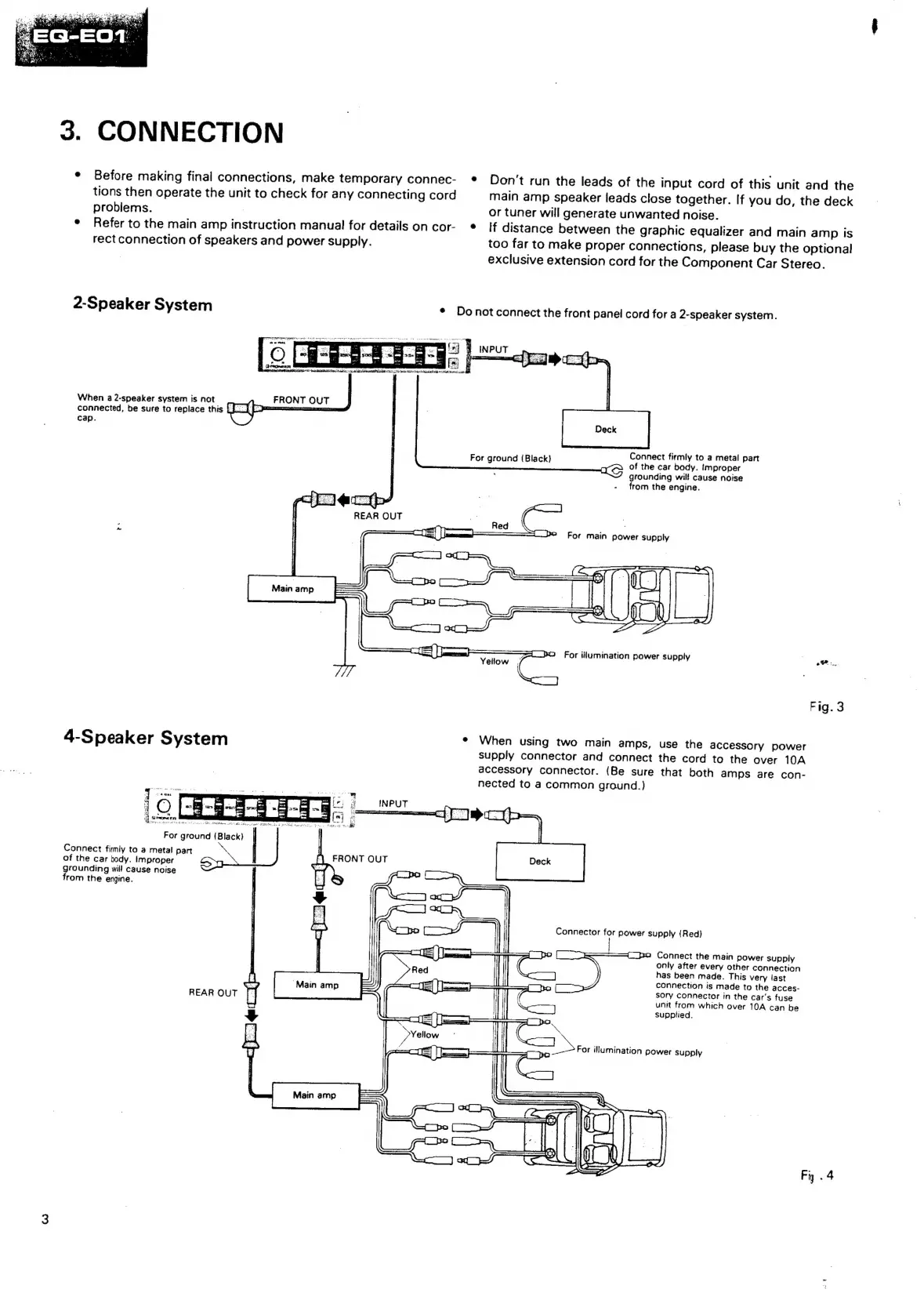
3.
CONNECTION
¢
Before
making
final
connections,
make
temporary
connec-
¢®
Don't
run
the
leads
of
the
input
cord
of
this
unit
and
the
tions
then
operate
the
unit
to
check
for
any
connecting
cord
main
amp
speaker
leads
close
together.
If
you
do,
the
deck
probiems.
.
or
tuner
will
generate
unwanted
noise.
°
Refer
to
the
main
amp
instruction
manual
for
details
on
cor-
©
If
distance
between
the
graphic
equalizer
and
main
amp
is
rect
connection
of
speakers
and
power
supply.
too
far
to
make
proper
connections,
please
buy
the
optional
exclusive
extension
cord
for
the
Component
Car
Stereo.
2-Spea
ker
System
¢
Do
not
connect
the
front
panel
cord
for
a
2-speaker
system.
When
a
2-speaker
system
is
not
connected,
be
sure
to
replace
this
cap.
Connect
firmly
to
a
metal
part
of
the
car
body.
improper
grounding
will
cause
noise
from
the
engine.
For
ground
(Black)
REAR
OUT
_
C
S
Red
SS
Spo
For
main
power
supply
LPS
For
illumination
power
supply
.
ae
Fig.
3
4-Speaker
System
e
When
using
two
main
amps,
use
the
accessory
power
supply
connector
and
connect
the
cord
to
the
over
10A
accessory
connector.
(Be
sure
that
both
amps
are
con-
nected
to
a
common
ground.)
fO::
For
Connect
fimly
to
a
metal
part
of
the
car
body.
Improper
grounding
will
cause
noise
from
the
engine.
ground
(Black)
Connector
for
power
supply
(Red)
Connect
the
main
power
supply
only
after
every
other
connection
has
been
made.
This
very
last
connection
is
made
to
the
acces-
=
=
sory
connector
in
the
car's
fuse
REAR
OUT
)
unit
from
which
over
10A
can
be
Sc]
supplied.
Ee
es
|
uae
[aes
=
i
For
illumination
power
supply
Fig
.
4

Related product manuals