5
owner’s manual
Air Outlet
Selection Switch
Special Function Filter
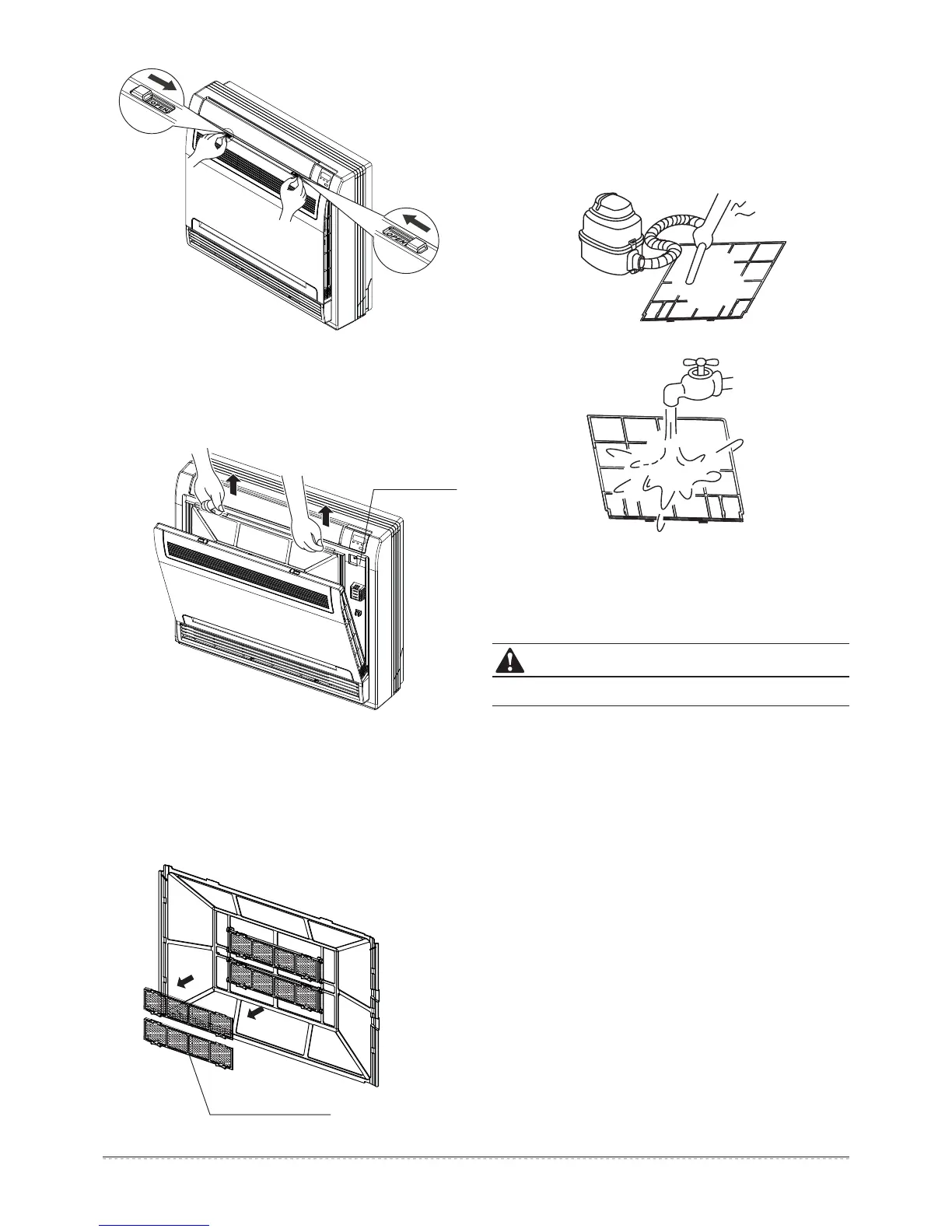
Fig.7-1
Fig.7-2
Do not dry out the air filter underneath direct sunshine.
Open the Front Panel
(Refer to Fig. 7-1).
1
Remove the Air Filter.
2
Clean the Air Filter
A vacuum cleaner or pure water may be used to clean the air
filter. If the dust accumulation is too heavy, please use a soft
brush and mild detergent to clean it, and dry out in cool place.
The air-in side should face up when using a vacuum cleaner.
(Refer to Fig. 7-4)
The air-in side should face down when using water.
(Refer to Fig. 7-5)
Press the claws on the right and left of the air filter down
slightly, and then pull upward
(Refer to Fig. 7-2).
Take off the Special Function Filter
3
Hold the tabs of the frame, and remove the claws in 4 places
(Refer to Fig.7-3).
The special function filter can be renewed
by washing it with water once every 6 months. We
recommend replacing it once every 3 years.
Reset the Air Filter and the Special Function Filter as they
were, and close the front panel.
5
Operating without air filters may result in trouble, as dust will
accumulate witihin the indoor unit.
4
Fig.7-3
Fig.7-4
Fig.7-5
CAUTION




 To Next Page