EasyManua.ls Logo

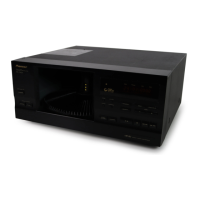
Pioneer PD-F907 - User Manual

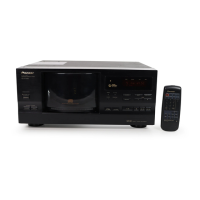
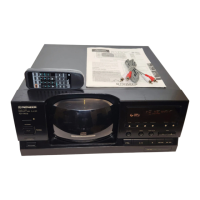
Pioneer PD-F907
20 pages
Print Icon
To Next Page IconTo Next Page
Loading...
BASIC
OPERATIONS
BEFORE
OPERATING
VARIOUS
OPERATIONS
1
<PRB1268>
En
MODE
HI-LITE
CLEAR
PROGRAM
RANDOM
REPEAT
UNLOAD BEST PREVIOUS DISC
OPEN/
CLOSE
D
FILE–TYPE
COMPACT DISC PLAYER
◊Û¿X/?≥
Î
SINGLE
LOADER
ACSESS
PLAY
STANDBY / ON
POWER
67
¡¢
'
FILE –TYME CD MECHANISM
DISC MIN SEC
CUSTOM
ALL
TRACK
I II III
SINGLE
RANDOM REPEAT 1 REMAIN PGM
PREVIOUS
DISC
SCAN BEST
41
1-BIT DLC
DIRECT LINER CONVERSION
◊Û¿X/?≥
'
FILE-TYPE COMPACT DISC PLAYER
CONTENTS
BEFORE YOU USE THE PLAYER ....................................... 4
CAUTIONS REGARDING HANDLING................................. 5
CONNECTIONS .................................................................. 6
NAMES OF PARTS ............................................................. 7
HOW TO LOAD THE DISCS ............................................... 9
BASIC OPERATIONS
To listen in order from the first track............................. 10
To select the disc and track .......................................... 10
To select a play mode ................................................... 10
Playing a disc in the Single Loader slot ......................... 11
The hood can be opened or closed during playback ..... 11
VARIOUS OPERATIONS
To program and play only the discs you want to hear... 12
To start playback from a specific disc ........................... 13
To play a track you want to hear ................................... 13
To repeat playback ........................................................ 13
To playback tracks/discs at random .............................. 14
To program tracks/discs in a desired order ................... 15
To store your favorite tracks ......................................... 16
To find out which discs you’ve listened to recently ...... 16
To scan quickly through tracks on a disc....................... 17
To use the TIME button ................................................ 18
TROUBLESHOOTING ....................................................... 19
SPECIFICATIONS.............................................................. 20
POWER ON DEMO display mode allows you
to see variations of the display. To enter the
POWER ON DEMO display mode, press
STANDBY/ON and then 4 1 within 1 sec-
ond after turning on the power.
POWER ON DEMO display
To cancel the POWER ON DEMO display
mode, press any button.
BASIC
OPERATIONS
BEFORE
OPERATING
VARIOUS
OPERATIONS
783
1¡4¢
RANDOM
DISC
DISC
SET
0
TRACK
SET
78
9
45
6
12
3
TIME
HI-LITE BEST
PREVIOUS
POWER
MODE CLEARPGMREPEAT
D
Î
FILE-TYPE CD PLAYER
REMOTE CONTROL UNIT
CU-P0090
+
Thank you for buying this Pioneer product.
Please read through these operating instructions so you
will know how to operate your model properly. After you
have finished reading the instructions, put them away in a
safe place for future reference.
WARNING: TO PREVENT FIRE OR SHOCK HAZARD, DO
NOT EXPOSE THIS APPLIANCE TO RAIN OR MOISTURE.
IMPORTANT NOTICE
The serial number for this equipment is located on the rear panel.
Please write this serial number on your enclosed warranty card
and keep it in a secure area. This is for your security.
This player is for consumer use. If the player is used in a business
(for example, used for a long period at a restaurant), the player will
not be covered under warranty.
CD Video, VIDEO CD, CD graphics, DVD and CD-ROM discs can
not be played with this player.

Other manuals for Pioneer PD-F907

Questions and Answers

  • V
    vperezJul 29, 2025
    What to do if my Pioneer PD-F907 CD Player remote control will not function?
    • B
      Brittany WilliamsJul 29, 2025
      If the remote control for your Pioneer CD Player isn't working, the first thing to check is the batteries. If they are dead, replace them. Also, make sure there is nothing blocking the path between the remote control and the CD Player. If there is an obstruction, relocate the remote control or remove the obstruction.
  • R
    romerojoshuaAug 2, 2025
    Why does my Pioneer PD-F907 stop immediately after starting playback?
    • J
      jriggsAug 2, 2025
      If your Pioneer CD Player stops immediately after starting playback, or pauses/stops during playback, it could be due to a couple of reasons. Make sure that the disc is inserted correctly, with the label side leftward. Another possibility is that there are smudges or dirt on the disc. Clean the disc and try playing it again.
  • A
    Amy HumphreyAug 6, 2025
    Why is there no sound coming from my Pioneer CD Player?
    • W
      William RiveraAug 6, 2025
      If you're not getting any sound from your Pioneer CD Player, there are several potential causes. First, check that the output cables are connected correctly and not loose; if needed, connect them properly. Ensure that your stereo amplifier is operating correctly by checking its settings and volume controls. Also, inspect the pin plugs and amplifier terminals for dirt and clean them if necessary. Verify that the player isn't in pause mode by pressing 3 or 8. Finally, make sure the disc is loaded correctly with the label side leftward.
  • M
    Mark WeissAug 10, 2025
    What to do if my Pioneer CD Player stops immediately after starting playback?
    • J
      Jose AcostaAug 10, 2025
      If your Pioneer CD Player stops immediately after starting playback, or pauses/stops during playback, ensure the disc is inserted correctly with the label side leftward. Also, check the disc for smudges or dirt; if present, clean the disc and try playing it again.
  • V
    Victoria TaylorAug 15, 2025
    What does Service No. U1 mean on my Pioneer CD Player and how to fix it?
    • J
      Julie WilliamsAug 15, 2025
      Service No. U1 on your Pioneer CD Player indicates a potential issue with disc loading. Reload the discs properly, ensuring only one disc is inserted in each slot. Also, check the discs and the rack for any foreign objects and remove them.
  • R
    Robert ClarkAug 18, 2025
    What does Service No. U2 mean on my Pioneer PD-F907 CD Player and how can I resolve it?
    • O
      oweberAug 19, 2025
      Service No. U2 on your Pioneer CD Player suggests an operation error in the mechanical section. Check the rack for any foreign objects. If that doesn't work, unplug the power cord and plug it back in.
  • D
    David SmithAug 23, 2025
    What does Service No. U3 mean on my Pioneer PD-F907 and how to troubleshoot it?
    • N
      natalie99Aug 23, 2025
      Service No. U3 on your Pioneer CD Player indicates an error related to the hood. Check if the hood is caught on anything. If not, unplug the power cord and plug it back in.

Summary

Safety, Compliance, and User Information

Important Safety Instructions

Essential safety guidelines for operation and handling.

Regulatory Compliance and User Warnings

FCC, Canadian compliance, and user modification warnings.

Before You Use the Player

Player Capabilities and Setup

Overview of player features and battery installation.

Supplied Accessories

List of included accessories.

Cautions Regarding Handling

Environmental and Installation Guidelines

Advice on player placement and environment.

Disc and Unit Care

Proper methods for handling discs and cleaning the player.

Connections

Audio and System Integration

Connecting audio, remote control, and synchro functions.

Names of Parts: Front Panel

Front Panel Controls and Display

Identification of player's front panel components.

Names of Parts: Remote Control

Remote Control Unit and Operations

Identification of remote control buttons and operation.

How to Load the Discs

Disc Loading and Removal Procedures

Step-by-step guide for disc management.

Basic Operations

Playback Basics and Mode Selection

Playing discs and choosing playback modes.

Basic Operations: Single Loader

Single Loader Slot Usage

Instructions for using the single loader slot.

Various Operations: Custom Play

Custom Programming and Playback

Programming custom disc lists.

Various Operations: Track Selection and Repeat

Track Selection, Repeat, and Random Play

Choosing tracks, repeat modes, and random playback.

Various Operations: Random and Favorites

Random Playback and Favorite Tracks

Playing tracks randomly and storing favorite tracks.

Various Operations: Program Play

Programmed Sequencing and Playback

Creating custom playback sequences.

Various Operations: Memory and History Scan

Favorite Tracks and Recent Disc Scan

Memorizing favorite tracks and scanning recent discs.

Various Operations: Track Preview Scan

Quick Track Preview (HI-LITE Scan)

Previewing parts of tracks on discs.

Various Operations: Time Display

Using the TIME Button for Playback Information

Displaying track and disc time details.

Troubleshooting

Self-Diagnostics and Error Codes

Explains error messages and countermeasures.

Power Cord Safety

Safety warning regarding the power cord.

Specifications

Technical Specifications Overview

General, audio, output, and accessory specifications.

Pioneer PD-F907 Specifications

Power IconPower
power requirementsAC 120V, 60 Hz
power consumption12W
Operating Environment IconOperating Environment
operating temperature+5°C - +35°C
operating temperature (imperial)+41°F - +95°F
Audio Specifications IconAudio Specifications
frequency response2 Hz - 20 kHz
signal-to-noise ratio98 dB or more
dynamic range96 dB or more
channel separation96 dB or more
harmonic distortion0.003 % or less
level difference between channels1.0 dB or less
output voltage2 Vrms
wow and flutterless than ±0.001 %
channels2-channel (stereo)
Weight and Dimensions IconWeight and Dimensions
weight6.5 kg
weight (imperial)14 lb 5 oz.
width420 mm
depth402 mm
height190 mm
width (imperial)16-9/16 in.
depth (imperial)15-13/16 in.
height (imperial)7-1/2 in.

Related product manuals