EasyManua.ls Logo

Pioneer PD-T310 - Page 19

Pioneer PD-T310
23 pages
Print Icon
To Next Page IconTo Next Page
To Previous Page IconTo Previous Page
Loading...
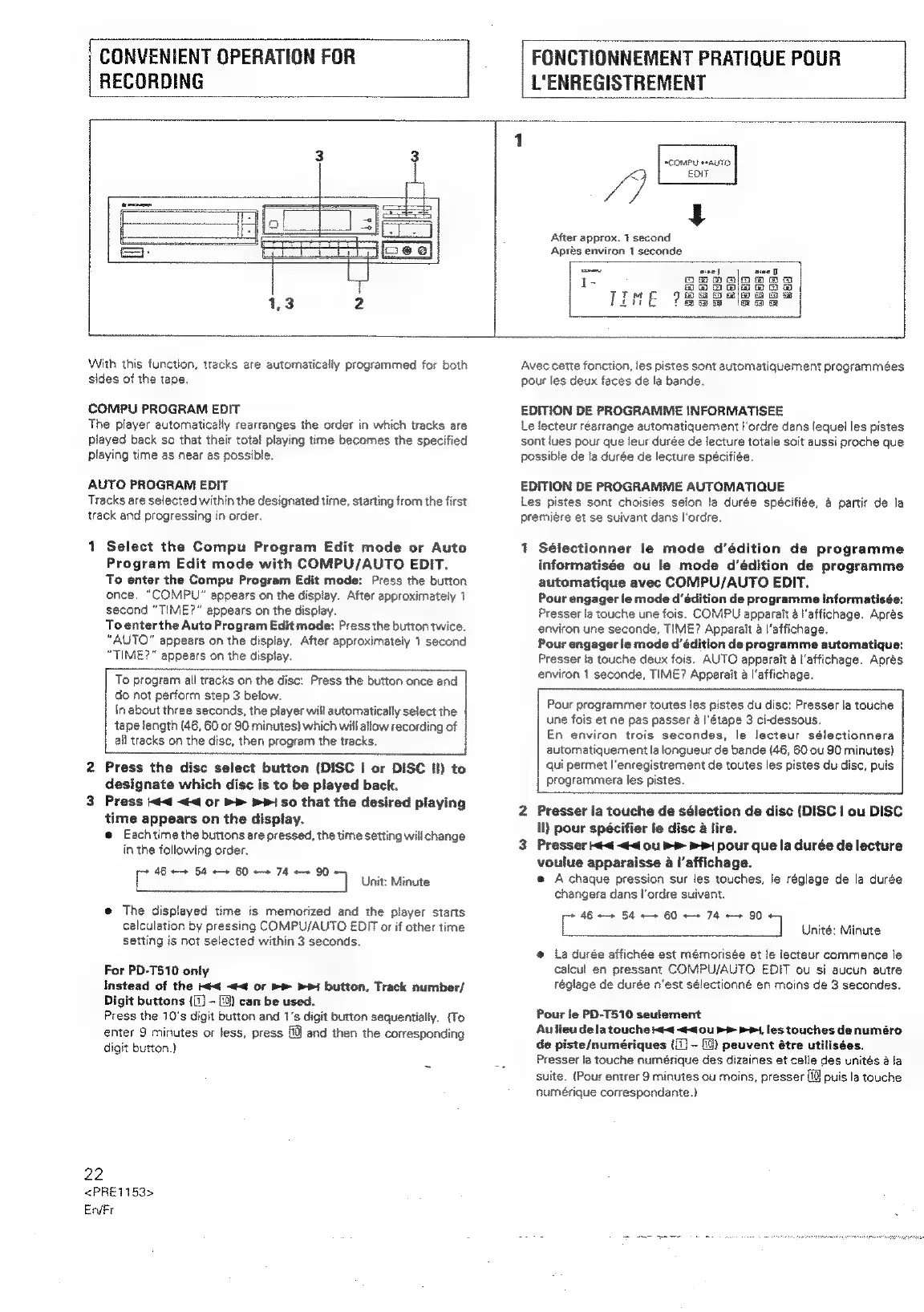
RECORDING
FONCTIONNEMENT
PRATIQUE
POUR
L'ENREGISTREMENT
sCOMPU
*AUTO.
Ve
EO
After
approx.
1
second
Aprés
environ
1
seconde
With
this
function,
tracks
are
automatically
programrmned
for
both
sides
of
the
tape.
COMPU
PROGRAM
EDIT
The
player
automatically
rearranges
the
order
in
which
tracks
are
played
back
so
that
their
total
playing
time
becomes
the
specified
playing
time
as
near
as
possible.
AUTO
PROGRAM
EDIT
Tracks
are
selected
within
the
designated
time,
starting
from
the
first
track
and
progressing
in
order,
1
Select
the
Compu
Program
Edit
mode
or
Auto
Program
Edit
mode
with
COMPU/AUTO
EDIT.
To
enter
the
Compu
Program
Edit
mode:
Press
the
button
once.
“COMPU”
appears
on
the
display.
After
approximately
1
second
“TIME?”
appears
on
the
display.
To
enter
the
Auto
Program
Edit
mode:
Press
the
button
twice.
“AUTO”
appears
on
the
display.
After
approximately
1
second
“TIME?”
appears
on
the
display.
To
program
all
tracks
on
the
disc:
Press
the
button
once
and
do
not
perform
step
3
below.
\n
about
three
seconds,
the
player
will
automatically
select
the
tape
length
(46,
60
or
90
minutes)
which
will
allow
recording
of
all
tracks
on
the
disc,
then
program
the
tracks.
2
Press
the
disc
select
button
(DISC
|
or
DISC
Il)
to
designate
which
disc
is
to
be
played
back.
3
Press
<4
<<
or
>>
bP
so
that
the
desired
playing
time
appears
on
the
display.
@
Each
time
the
buttons
are
pressed,
the
time
setting
will
change
in
the
following
order.
46
++
54
«+
60
++
74
++
90
i
‘]
Unit:
Minute
@
The
displayed
time
is
memorized
and
the
player
starts
calculation
by
pressing
COMPU/AUTO
EDIT
or
if
other
time
setting
is
not
selected
within
3
seconds.
For
PD-T510
only
Instead
of
the
<4
<<
or
>>
»P1
button,
Track
number/
Digit
buttons
([T)
-
[0)
can
be
used.
Press
the
10's
digit
button
and
1's
digit
button
sequentially.
(To
emter
9
minutes
or
jess,
press
ff
and
then
the
corresponding
digit
button.)
22
<PRE1153>
En/Fr
Avec
cette
fonction,
les
pistes
sont
automatiquement
programmées
pour
les
deux
faces
de
la
bande.
EDITION
DE
PROGRAMME
INFORMATISEE
Le
lecteur
réarrange
automatiquement
l'ordre
dans
lequel
les
pistes
sont
lues
pour
que
leur
durée
de
lecture
totale
soit
aussi
proche
que
possible
de
!a
durée
de
lecture
spécifiée.
EDITION
DE
PROGRAMME
AUTOMATIQUE
Les
pistes
sont
choisies
selon
la
durée
spécifiée,
a
partir
de
la
premiere
et
se
suivant
dans
l'ordre.
1
Sélectionner
le
mode
d’édition
de
programme
informatisée
ou
le
mode
d’édition
de
programme
automatique
avec
COMPU/AUTO
EDIT.
Pour
engager
le
mode
d’édition
de
programme
informatisée:
Presser
fa
touche
une
fois.
COMPU
apparait
a
l’affichage.
Apres
environ
une
seconde,
TIME?
Apparait
a
l’affichage.
Pour
engager
Je
mode
d’édition
de
programme
automatique:
Presser
la
touche
deux
fois,
AUTO
apparait
a
l'affichage.
Aprés
environ
1
seconde,
TIME?
Apparait
a
l’affichage.
Pour
programmer
toutes
les
pistes
du
disc:
Presser
la
touche
une
fois
et
ne
pas
passer
a
I'étape
3
ci-dessous,
En
environ
trois
secondes,
le
lecteur
sélectionnera
automatiquement
la
longueur
de
bande
(46,
60
ou
90
minutes}
qui
permet
I’enregistrement
de
toutes
les
pistes
du
disc,
puis
programmera
les
pistes.
2
Presser
la
touche
de
sélection
de
disc
(DISC
|
ou
DISC
ll)
pour
spécifier
le
disc
a
lire.
3
Presser
<4
<<
ou
>>
pour
que
la
durée
de
lecture
voulue
apparaisse
4
l’affichage.
e
A
chaque
pression
sur les
touches,
le
réglage
de
la
durée
changera
dans
l'ordre
suivant.
ace
eae
e
te
tey
a
Unité:
Minute
@
La
durée
affichée
est
mémorisée
et
le
lecteur
commence
le
calcul
en
pressant
COMPU/AUTO
EDIT
ou
si
aucun
autre
réglage
de
durée
n’est
sélectionné
en
moins
de
3
secondes.
Pour
le
PD-T510
seulement
Aulieu
dela
touche
44
<<
0u
>>
p>,
les
touches
de
numéro
de
piste/numériques
([1]
~
)
peuvent
étre
utilisées.
Presser
ia
touche
numérique
des
dizaines
et
celle
des
unités
ala
suite.
{Pour
entrer
9
minutes
ou
moins,
presser
[0
puis
la
touche
numérique
correspondante.)

Related product manuals