EasyManua.ls Logo

Pioneer PD-T310 - Page 20

Pioneer PD-T310
23 pages
Print Icon
To Next Page IconTo Next Page
To Previous Page IconTo Previous Page
Loading...
CONVENIENT
OPERATION
FOR
RECORDING
FONCTIONNEMENT
PRATIQUE
POUR
L'ENREGISTREMENT
PD-T510
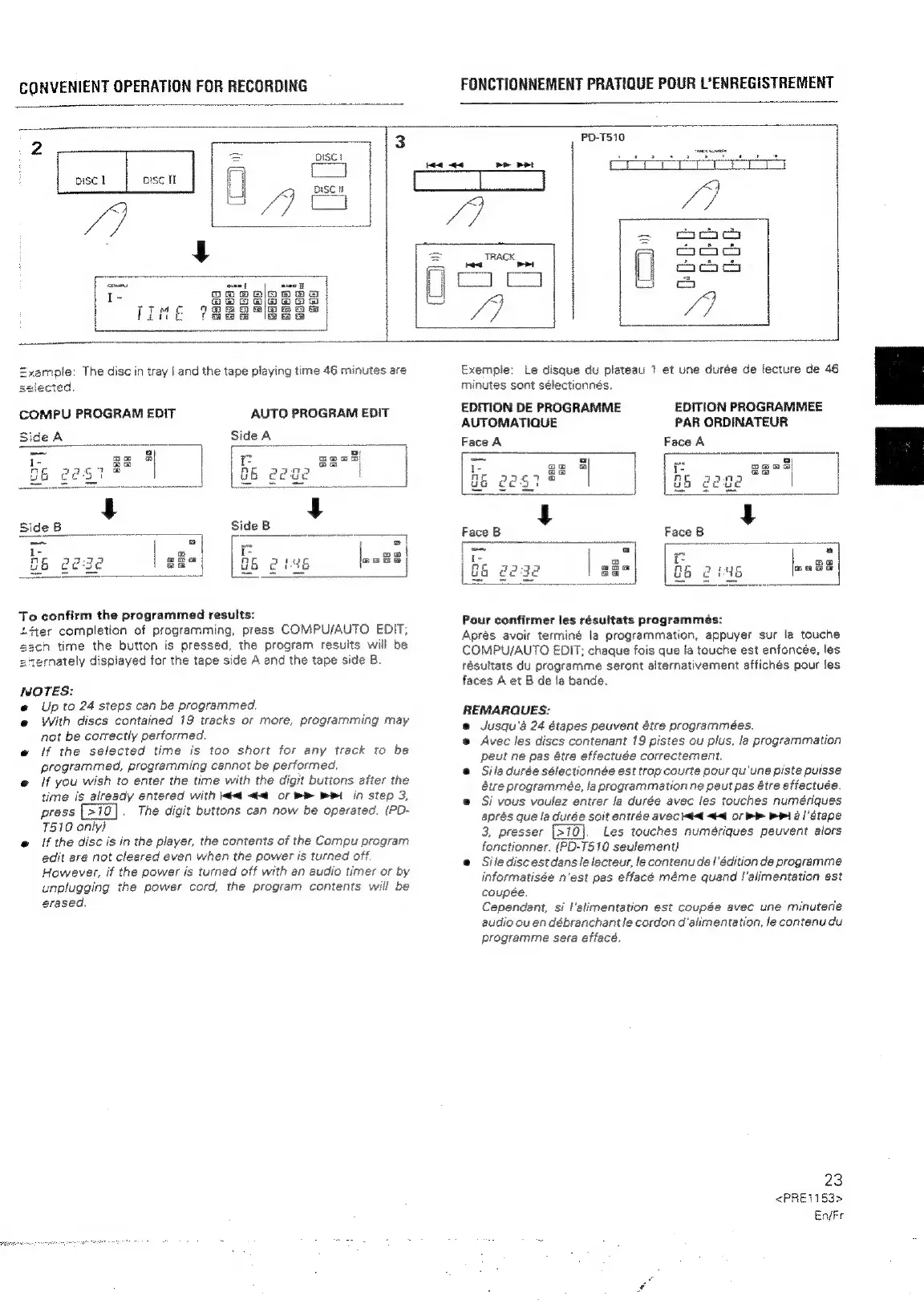
ample:
The
disc
in
tray
|
and
the
tape
playing
time
46
minutes
are
ected.
COMPU
PROGRAM
EDIT
AUTO
PROGRAM
EDIT
BideA
Side
A
ns
es
i.
ee
}
f
=a
ican
i
oe
Be
7
i
|
ft
g6
gest
|
|
G6
2ege
SideB
Side
B
ox
ta
f6
2222
|
sa
86
2146
|na3
|
To
confirm
the
programmed
results:
Ltter
completion
of
programming,
press
COMPU/AUTO
EDIT;
ch
time
the
button
is
pressed,
the
program
results
will
be
eternately
displayed
for
the
tape
side
A
and
the
tape
side
B.
NOTES:
e
Up
to
24
steps
can
be
programmed.
@
With
discs
contained
19
tracks
or
more,
programming
may
not
be
correctly
performed.
e
if
the
sefected
time
is
too
short
for
any
track
to
be
programmed,
programming
cannot
be
performed.
@
if
you
wish
to
enter
the
time
with
the
digit
buttons
after
the
time
is
already
entered
with
t<@
<<
or
RR
RPI
in
step
3,
press
|
>10
The
digit
buttons
can
now
be
operated,
(PD-
T510
only)
«@
{f
the
disc
is
in
the
player,
the
contents
of
the
Compu
program
edit
are
not
cleared
even
when
the
power
is
turned
off.
However,
if
the
power
is
turned
off
with
an
audio
timer
or
by
unplugging
the
power
cord,
the
program
contents
will
be
erased.
Exempie:
Le
disque
du
plateau
7
et
une
durée
de
lecture
de
46
minutes
sont
sélectionnés.
EDITION
DE
PROGRAMME
EDITION
PROGRAMMEE
AUTOMATIQUE
PAR
ORDINATEUR
Face
A
i
ave
||
U6
ges
|
Face
B
a)
(2
cn
ny
my
ba
Lee]
Pour
confirmer
les
résultats
programmes:
Aprés
avoir
terminé
la
programmation,
appuyer
sur
la
touche
COMPU/AUTO
EDIT;
chaque
fois
que
la
touche
est
enfoncée,
les
résultats
du
programme
seront
alternativement
affichés
pour
les
faces
A
et
B
de
fa
bande.
REMARQUES:
@
Jusqu’é
24
étapes
peuvent
étre
programmées.
@
Avec
les
discs
contenant
19
pistes
ou
plus,
la
programmation
peut
ne
pas
étre
effectuée
correctement.
@
Sila
durée
sélectionnée
est
trop
courte
pour
qu'une
piste
puisse
étre
programmée,
la
programmation
ne
peut
pas
étre
effectuée.
e
Si
vous
voulez
entrer
fa
durée
avec
les
touches
numériques
aprés
que
fa
durée
soit
entrée
avec
Med
<4
OF
>>
ei
a
etape
3,
presser
{>10
Les
touches
numériques
peuvent
alors
fonctionner.
{(PD-T510
seulement)
e@
Silediscestdans
le
lecteur,
le
contenu
de
|
‘édition
de
programme
informatisée
n'est
pas
effacé
méme
quand
!'alimentation
est
coupée,
Cependant,
si
I'alimentation
est
coupée
avec
une
minuterie
audio
ou
en
débranchant
le
cordon
d'alimentation,
le
contenu
du
programme
sera
effacé.
23
<PRE1153>
EnjFr

Related product manuals