EasyManua.ls Logo

Pioneer PD-T310 - Page 21

Pioneer PD-T310
23 pages
Print Icon
To Next Page IconTo Next Page
To Previous Page IconTo Previous Page
Loading...
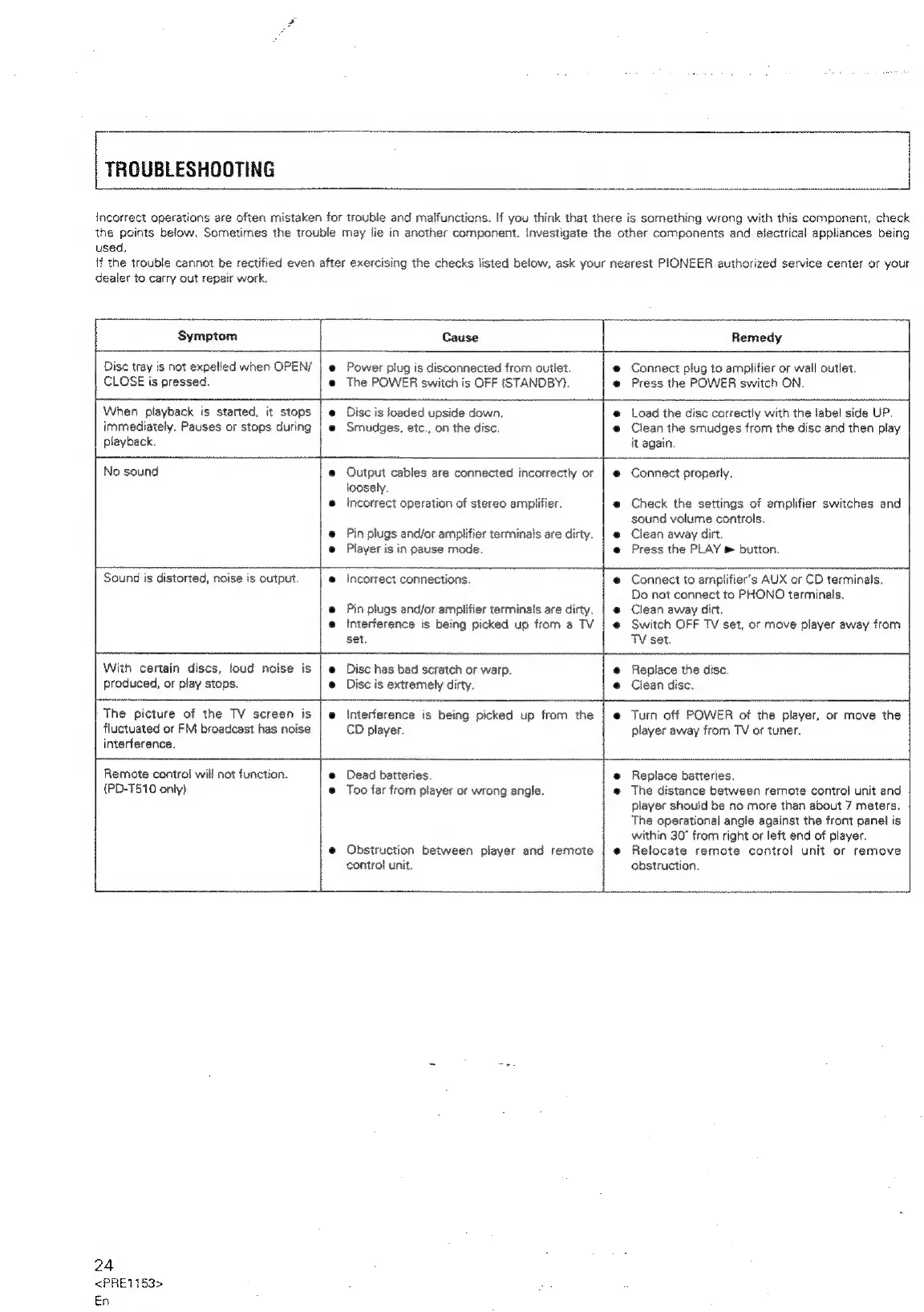
TROUBLESHOOTING
incorrect
operations
are
often
mistaken
for
trouble
and
malfunctions.
If
you
think
that
there
is
something
wrong
with
this
component,
check
the
points
below,
Sometimes
the
trouble
may
lie
in
another
component.
Investigate
the
other
components
and
electrical
appliances
being
used.
if
the
trouble
cannot
be
rectified
even
after
exercising
the
checks
listed
below,
ask
your
nearest
PIONEER
authorized
service
center
or
your
dealer
to
carry
out
repair
work.
Symptom
Cause
Remedy
Disc
tray
is
not
expelled
when
OPEN/
CLOSE
is
pressed.
Power
plug
is
disconnected
from
outlet.
The
POWER
switch
is
OFF
(STANDBY).
Connect
piug
to
amplifier
or
wall
outlet.
Press
the
POWER
switch
ON,
When
playback
is
started,
it
stops
immediately.
Pauses
or
stops
during
playback.
Disc
is
loaded
upside
down.
Smudges,
etc.,
on
the
disc.
Load
the
disc
correctly
with
the
label
side
UP.
Clean
the
smudges
from
the
disc
and
then
play
it
again.
No
sound
Output
cables
are
connected
incorrectly
or
loosely.
Incorrect
operation
of
stereo
amplifier.
Pin
plugs
and/or
amplifier
terminals
are
dirty.
Player
is
in
pause
mode.
Connect
properly.
Check
the
settings
of
amplifier
switches
and
sound
volume
controls.
Clean
away
dirt.
Press
the
PLAY
»
button.
eh
Sound
is
distorted,
noise
is
output.
incorrect
connections.
Pin
plugs
and/or
amplifier
terminals
are
dirty.
Interference
is
being
picked
up
from
a
TV
set.
Connect
to
amplifier's
AUX
or
CD
terminals.
Do
not
connect
to
PHONO
terminals.
Clean
away
dirt,
Switch
OFF
TV
set,
or
move
player
away
from
See
eat
With
certain
discs,
loud
noise
is
produced,
or
play
stops.
Disc
has
bad
scratch
or
warp.
Disc
is
extremely
dirty.
TV
set.
a
Replace
the
disc.
Clean
disc.
The
picture
of
the
TV
screen
is
fluctuated
or
FM
broadcast
has
noise
interference.
Remote
contro!
will
not
function.
{PD-T510
only}
interference
is
being
picked
up
from
the
CD
player.
Turn
off
POWER
of
the
player,
or
move
the
player
away
frorn
TV
or
tuner,
Dead
batteries.
Too
far
fron
player
or
wrong
angle.
Obstruction
between
player
and
remote
contro!
unit,
Replace
batteries.
The
distance
between
remote
control
unit
and
player
should
be
no
more
than
about
7
meters.
The
operational
angle
against
the
front
panel
is
within
30°
from
right
or
left
end
of
player.
Relocate
remote
control
unit
or
remove
obstruction.
24
<PRE1153>
En

Related product manuals