EasyManua.ls Logo

Pioneer PD-T310 - Page 9

Pioneer PD-T310
23 pages
Print Icon
To Next Page IconTo Next Page
To Previous Page IconTo Previous Page
Loading...
BASIC
OPERATION
FONCTIONNEMENT
DE
BASE
i
To
play
a
compact
disc
|
Pour
lire
un
compact
disc
,
Bereta:
i
4
1
POWER
=<
©
STANDBY
STANDBY/ON
{DISC
|)
(DISC
il)
tl
PAUSE:
STOP;
=
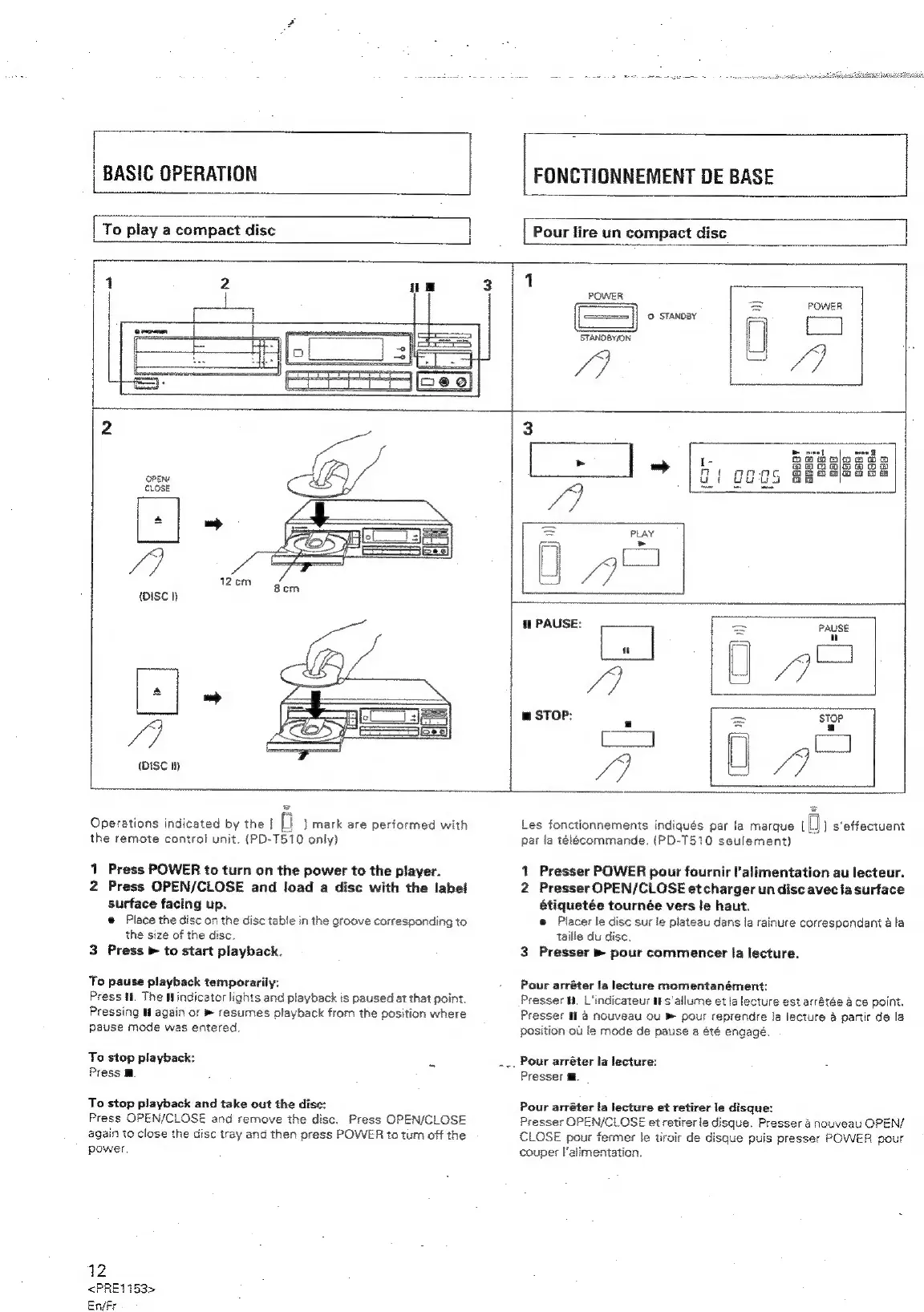
Operations
indicated
by
the
{
ft
J
mark
are
performed
with
the
remote
control
unit.
(PD-T510
only)
1
Press
POWER
to
turn
on
the
power
to
the
player.
2
Press
OPEN/CLOSE
and
load
a
disc
with
the
label
surface
facing
up.
@
Place
the
disc
on
the
disc
table
in
the
groove
corresponding
to
the
size
of
the
disc.
3
Press
»
to
start
playback.
To
pause
playback
temporarily:
Press
if.
The
findicator
lights
and
playback
is
paused
at
that
point
Pressing
Uf
again
or
®
resumes
playback
from
the
position
where
pause
mode
was
entered.
To
stop
playback:
Press
M.
To
stop
playback
and
take
out
the
dise:
Press
OPEN/CLOSE
and
remove
the
disc.
Press
OPEN/CLOSE
again
to
close
the
disc
tray
and
then
press
POWER
to
turn
off
the
power
12
<PRE1153>
En/Fr
Les
fonctionnements
indiqués
par
la
marque
igh
s‘effectuent
par
la
télécommande.
(PD-T510
seulement)
1
Presser
POWER
pour
fournir
l'alimentation
au
lecteur.
2
Presser
OPEN/CLOSE
et
charger
un
disc
avec
la
surface
étiquetée
tournée
vers
le
haut.
e
Placer
le
disc
sur
le
plateau
dans
la
rainure
correspondant
4
la
taille
du
disc.
3
Presser
»
pour
commencer
la
lecture.
Pour
arréter
fa
lecture
momentanément:
Presser
H.
L'indicateur
if
s'allume
et
la
lecture
est
arrétée
a
ce
point.
Presser
11
@
nouveau
ou
»
pour
reprendre
la
lecture
@
partir
de
la
position
ou
le
mode
de
pause
a
été
engagé.
Pour
arréter
la
lecture:
Presser
a.
Pour
arréter
la
tecture
et
retirer
le
disque:
Presser
OPEN/CLOSE
et
retirer
le
disque.
Presser
&
nouveau
OPEN/
CLOSE
pour
fermer
le
tiroir
de
disque
puis
presser
POWER
pour
couper
l'alimentation.

Related product manuals