EasyManua.ls Logo

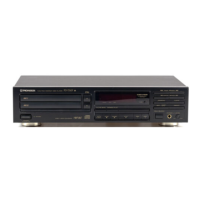
Pioneer PD-TM3 - PLAYBACK MODES AND SEARCHING; Manual Passage Search; Repeat Playback Options; Random Playback Modes

Pioneer PD-TM3
24 pages
Print Icon
To Next Page IconTo Next Page
To Previous Page IconTo Previous Page
Loading...
VARIOUS
OPERATIONS
Manual
search
-
To
search
for
a
particular
passage
|
During
playback
or
pause
mode
While
mB
mpi
is
kept
pressed,
playback
rapidly
advances
toward
the
end
of
the
disc.
When
playback
reaches
the
end
of
the
disc,
the
player
enters
pause
mode
and
“END”
is
displayed.
While
leq
~4
is
kept
pressed,
playback
rapidly
reverses
toward
the
beginning
of
the
disc.
When
the
desired
passage
is
reached,
release
D>
PP!
or
Kd
<q,
The
player
enters
original
mode
(playback
or
pause)
where
>
pe
OF
Mfg
«tq
is
released.
@
During
normal
playback,
Manual
Search
can
be
carried
out
on
one
disc
only.
@
During
program
playback,
Manual
Search
can
be
carried
out
in
one
program
step
only.
Magazine
Hi-Lite
Scan
During
stop
mode
HI-LITE
SCAN
Ve
When
HI-LITE
SCAN
is
pressed
once
during
stop
mode,
playback
starts
from
a
point
1
minute
after
the
beginning
of
the
first
track,
and
the
first
track
of
each
disc
is
played
for
about
10
seconds.
The
DISC
SCAN
indicator
is
lit
during
Disc
Scan
mode.
After
the
first
tracks
of
all
discs
are
scanned,
the
player
enters
stop
mode.
When
HI-LITE
SCAN
is
pressed
twice
during
stop
mode,
playback
starts
from
a
point
1
minute
after
the
beginning
of
the
track,
and
each
track
is
played
for
about
10
seconds.
The
SCAN
indicator
is
lit
during
Track
Scan
mode.
After
all
tracks
of
all
discs
are
scanned,
the
player
enters
stop
mode.
To
exit
Magazine
Hi-Lite
Scan
mode
Press
@,
»,
MAGAZINE
buttons
(1-3),
DISC
number
buttons
(DISC1
-
DISC6)
or
Digit
buttons
(1-10,
+10,
2:20).
When
®
is
pressed,
normal
playback
starts
from
the
current
paint.
When
the
DISC
number
button
or
the
digit
button
is
pressed,
the
selected
disc
or
track
is
played
from
the
beginning.
NOTES:
@
Hi-Lite
Scan
can
be
carried
aut
from
the
desired
elapsed
time
of
the
track.
During
playback,
press
Hi-LITE
SCAN
at
the
point
you
warit
to
start
Hr-Lite
Scan
playback.
The
player
memorizes
the
minute
and
second
of
the
point
and
Track
Hi-Lite
Scan
playback
is
carried
out
from
the
memorized
minute
and
second
on
each
track.
@
Each
tme
HI-LITE
SCAN
is
pressed,
the
mode
switches
between
Disc
Sean
and
Track
Scan.
@
Programming
of
only
desired
tra
Scan
playback.
See
‘Direct
p
a)
During
Track
Hi-Lite
Scan
piaybac
WIth
Pett
Od
OF
BeBe
pepe}
@
When
REPEAT
is
pressed,
Hi-Li
@
When
piayback
time
of
a
track
is
than
memorized
time,
Hi-Lite
Sc
yb
beginning
of
the
track
for
about
7
ons,
When
playback
time
of
a
track
is
less
than
10
seconds,
the
track
is
played
from
the
beginning
to
the
end.
14
<PRB1188>
En
“3
is
possible
during
Track
Hi-Lite
am"
on
page
16.
youcan
skip
to
the
desired
track
>
Scan
playback
will
be
repeated.
$
than
one
minute
or
is
shorter
is
carried
out
from
the
To
repeat
playback
{repeat
play)
REPEAT
ce)
A
Yo
repeatedly
piay
the
displayed
track,
press
REPEAT
once.
The
1~
REPEAT
indicator
lights.
REPEAT
can
be
pressed
in
any
playback
mode.
To
repeatedly
play
all
tracks
on
all
of
the
discs
in
normal
playback
mode
or
in
the
specified
playback
mode
(Program
playback,
Delete
program
playback,
Random
playback
or
Delete
random
playback),
press
REPEAT
twice,
The
REPEAT
indicator
lights.
®
To
exit
repeat
mode,
press
REPEAT
so
that
the
1-
REPEAT
or
REPEAT
indicator
goes
off,
®
When
the
time
fade
edit
operation
is
performed,
the
repeat
playback
cannot
be
carried
out.
®
Single
repeat
can
not
be
carried
out
in
HI-LITE
SCAN
mode.
Random
playback
-
To
play
all
tracks
in
random
order
RANDOM
——)
va
Press
RANDOM.
The
RANDOM
indicator
lights
and
all
tracks
on
all
discs
are
played
in
a
random
order.
After
all
of
the
tracks
are
played,
the
player
enters
stop
mode.
Fo
play
tracks
other
than
the
deleted
tracks
in
a
random
order,
press
RANDOM
after
carrying
out
the
Delete
Program
procedure.
See
the
“Delete
Program
Playback”
on
page
18.
Continuous
Random
function
When
@
is
pressed
during
random
playback
or
delete
random
playback,
the
player
enters
standby
mode
for
Continuous
Random
playback.
Pressing
®
or
RANDOM
resumes
random
playback.
Remain
tracks
are
played
in
a
random
order.
e@
When
gis
pressed
again
during
standby
mode
for
Continuous
Random
playback,
Continuous
Random
mode
is
canceled.
@
/f
the
magazine
is
in
the
player,
remain
tracks
will
be
stored
in
mernory
even
if
the
power
is
turned
off.
3

Related product manuals