EasyManua.ls Logo

Pioneer RT-707 - Frequency Response and Recording Level Calibration

Pioneer RT-707
85 pages
Print Icon
To Next Page IconTo Next Page
To Previous Page IconTo Previous Page
Loading...
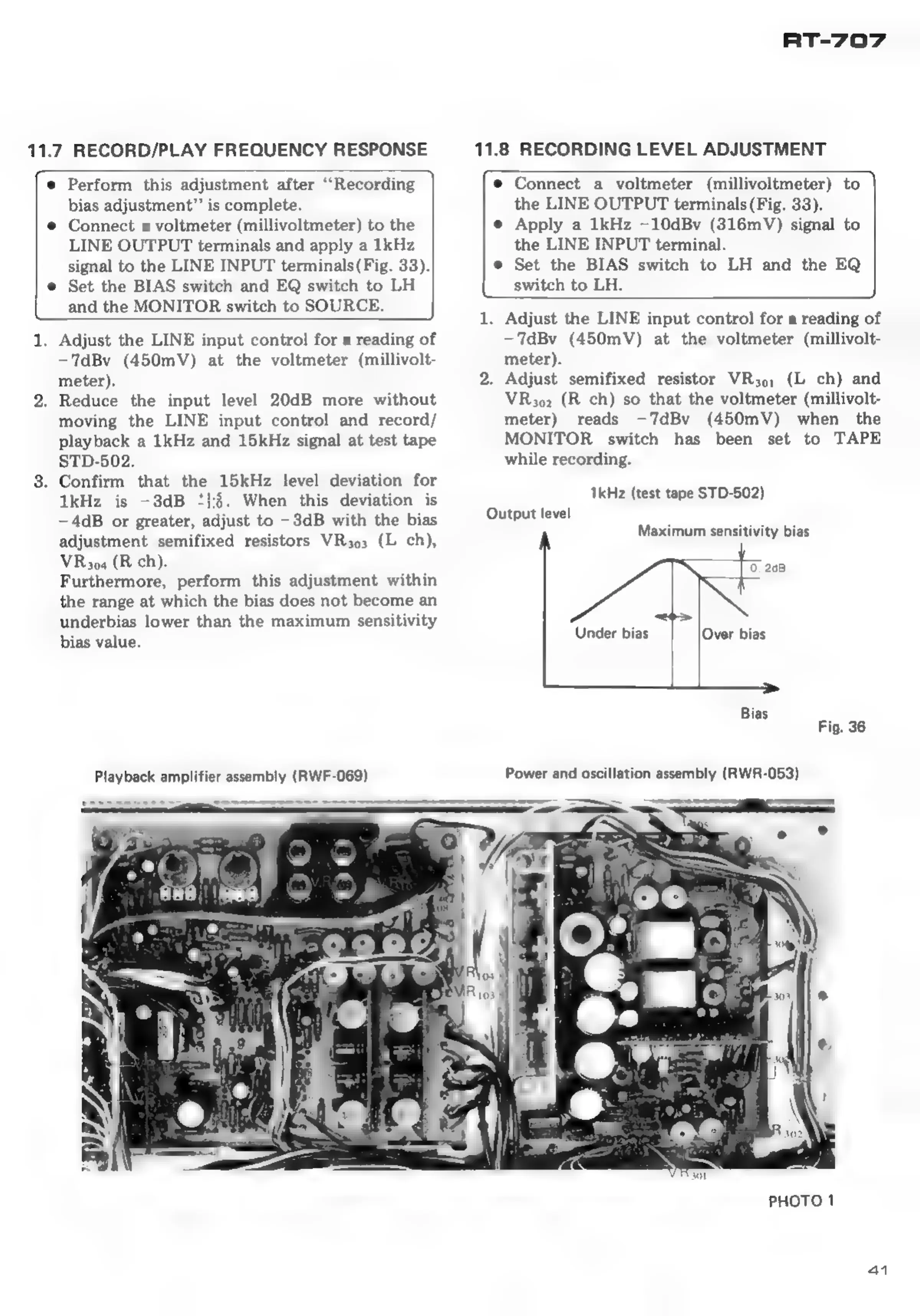
11.7
RECORD/PLAY
FREQUENCY
RESPONSE
RT-707
11.8
RECORDING
LEVEL
ADJUSTMENT
e
Perform
this
adjustment
after
“Recording
bias
adjustment”’
is
complete.
e
Connect
a
voltmeter
(millivoltmeter)
to
the
LINE
OUTPUT
terminals
and
apply
a
1kHz
signal
to
the
LINE
INPUT
terminals(Fig.
33).
e
Set
the
BIAS
switch
and
EQ
switch
to
LH
and
the
MONITOR
switch
to
SOURCE.
1.
Adjust
the
LINE
input
control
for
a
reading
of
-—TdBv
(450mV)
at
the
voltmeter
(millivolt-
meter).
2.
Reduce
the
input
level
20dB
more
without
moving
the
LINE
input
control
and
record/
playback
a
1kHz
and
15kHz
signal
at
test
tape
STD-502.
8.
Confirm
that
the
15kHz
level
deviation
for
1kHz
is
-3dB
‘1:5.
When
this
deviation
is
—4dB
or
greater,
adjust
to
—-3dB
with
the
bias
adjustment
semifixed
resistors
VR3o3
(L
ch),
VR304
(R
ch).
Furthermore,
perform
this
adjustment
within
the
range
at
which
the
bias
does
not
become
an
underbias
lower
than
the
maximum
sensitivity
bias
value.
Playback
amplifier
assembly
(RWF-069)
e
Connect
a
voltmeter
(millivoltmeter)
to
the
LINE
OUTPUT
terminals
(Fig.
33).
e
Apply
a
1kHz
—10dBv
(316mV)
signal
to
the
LINE
INPUT
terminal.
e
Set
the
BIAS
switch
to
LH
and
the
EQ
switch
to
LH.
1.
Adjust
the
LINE
input
control
for
a
reading
of
—7dBv
(450mV)
at
the
voltmeter
(millivolt-
meter).
2.
Adjust
semifixed
resistor
VR3o,;
(L
ch)
and
VR4302
(R
ch)
so
that
the
voltmeter
(millivolt-
meter)
reads
—7dBv
(450mV)
when
the
MONITOR
switch
has
been
set
to
TAPE
while
recording.
1kHz
(test
tape
STD-502)
Output
level
Maximum
sensitivity
bias
0.
208
Under
bias
Over
bias
Fig.
36
Power
and
oscillation
assembly
(RWR-053)
PHOTO
1
ai

Other manuals for Pioneer RT-707

Related product manuals