EasyManua.ls Logo

Pioneer RT-707 - 3. Front Panel Facilities

Pioneer RT-707
85 pages
Print Icon
To Next Page IconTo Next Page
To Previous Page IconTo Previous Page
Loading...
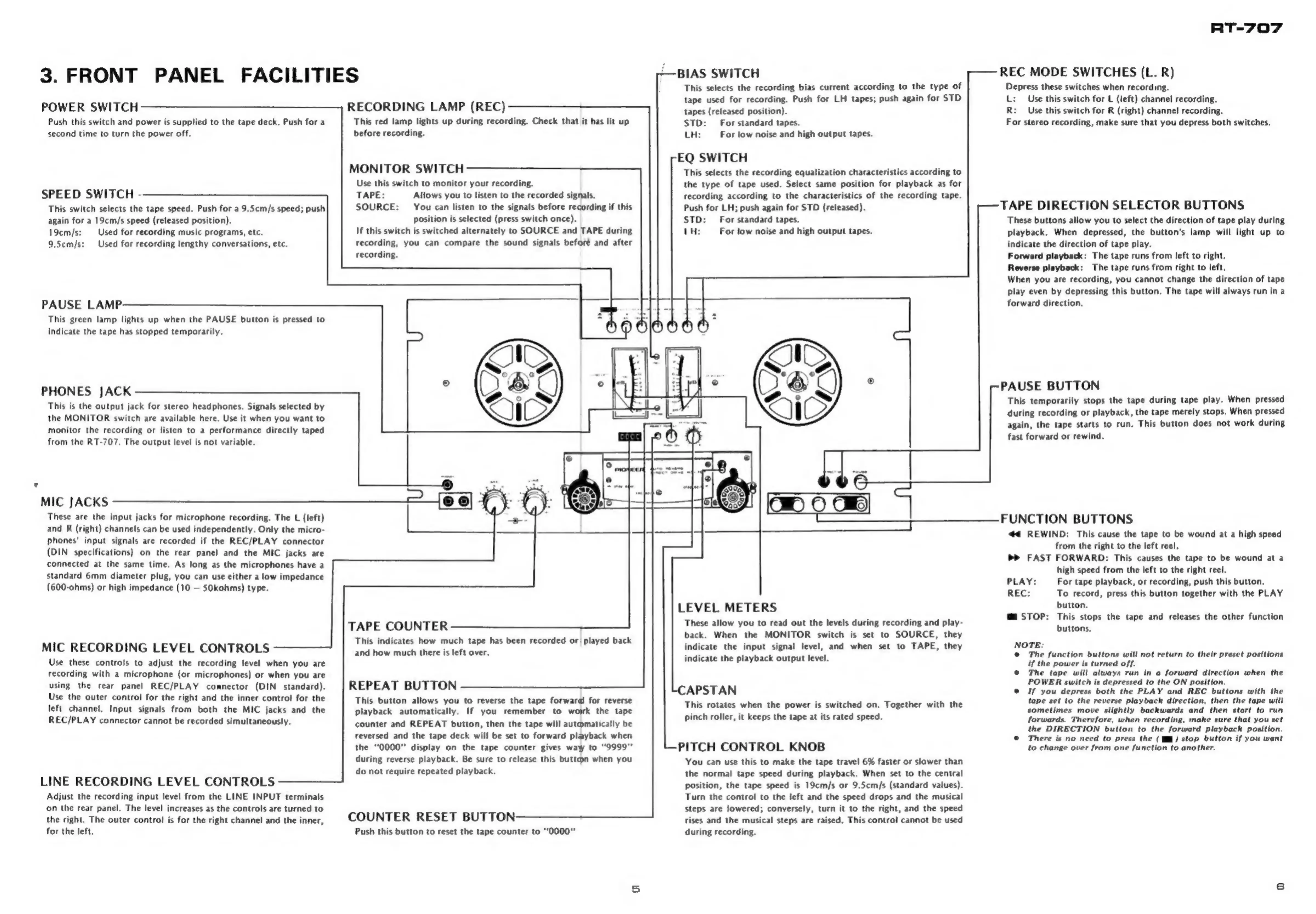
3.
FRONT
PANEL
FACILITIES
POWER
SWITCH
Push
this
switch
and
power
is
supplied
to
the
tape
deck.
Push
for
a
second
time
to
turn
the
power
off.
SPEED
SWITCH
-
This
switch
selects
the
tape
speed.
Push
for
a
9.5cm/s
speed;
push
again
for
a
19cm/s
speed
(released
position).
19cm/s:
Used
for
recording
music
programs,
etc.
9,5cm/s:
Used
for
recording
lengthy
conversations,
etc.
PAUSE
LAMP:
This
green
lamp
lights
up
when
the
PAUSE
button
is
pressed
to
indicate
the
tape
has
stopped
temporarily.
PHONES
JACK
This
is
the
output
jack
for
stereo
headphones.
Signals
selected
by
the
MONITOR
switch
are
available
here.
Use
it
when
you
want
to
monitor
the
recording
or
listen
to
a
performance
directly
taped
from
the
RT-707.
The
output
level
is
not
variable.
MIC
JACKS
€)
These
are
the
input
jacks
for
microphone
recording.
The
L
(left)
and
R
(right)
channels
can
be
used
independently.
Only
the
micro-
phones’
input
signals
are
recorded
if
the
REC/PLAY
connector
(DIN
specifications)
on
the
rear
panel
and
the
MIC
jacks
are
connected
at
the
same
time,
As
long
as
the
microphones
have
a
standard
6mm
diameter
plug,
you
can
use
either
a
low
impedance
(600-ohms)
or
high
impedance
(10
SOkohms)
type.
MIC
RECORDING
LEVEL
CONTROLS
Use
these
controls
to
adjust
the
recording
level
when
you
are
recording
with
a
microphone
(or
microphones)
or
when
you
are
using
the
rear
panel
REC/PLAY
comnector
(DIN
standard).
Use
the
outer
control
for
the
right
and
the
inner
control
for
the
left
channel.
Input
signals
from
both
the
MIC
jacks
and
the
REC/PLAY
connector
cannot
be
recorded
simultaneously.
LINE
RECORDING
LEVEL
CONTROLS
Adjust
the
recording
input
level
from
the
LINE
INPUT
terminals
‘on
the
rear
panel.
The
level
increases
as
the
controls
are
turned
to
the
right.
The
outer
control
is
for
the
right
channel
and
the
inner,
for
the
left.
RECORDING
LAMP
(REC)
This
red
lamp
lights
up
during
recording.
Check
that
it
has
lit
up
before
recording.
MONITOR
SWITCH
Use
this
switch
to
monitor
your
recording.
TAPE:
Allows
you
to
listen
to
the
recorded
signals.
SOURCE:
You
can
listen
to
the
signals
before
recording
if
this
position
is
selected
(press
switch
once).
If
this
switch
is
switched
alternately
to
SOURCE
and
TAPE
during
recording,
you
can
compare
the
sound
signals
beforé
and
after
recording.
BIAS
SWITCH
This
selects
the
recording
bias
current
according
to
the
type
of
tape
used
for
recording.
Push
for
LH
tapes;
push
again
for
STD
tapes
(released
position).
STD:
For
standard
tapes.
LH:
For
low
noise
and
high
output
tapes.
EQ
SWITCH
This
selects
the
recording
equalization
characteristics
according
to
the
type
of
tape
used.
Select
same
position
for
playback
as
for
recording
according
to
the
characteristics
of
the
recording
tape.
Push
for
LH;
push
again
for
STD
(released).
STD:
For
standard
tapes.
1H:
For
low
noise
and
high
output
tapes.
TAPE
COUNTER
This
indicates
how
much
tape
has
been
recorded
or
played
back
and
how
much
there
is
left
over.
REPEAT
BUTTON
This
button
allows
you
to
reverse
the
tape
forward
for
reverse
playback
automatically.
If
you
remember
to
worrk
the
tape
counter
and
REPEAT
button,
then
the
tape
will
automatically
be
reversed
and
the
tape
deck
will
be
set
to
forward
playback
when
the
“0000”
display
on
the
tape
counter
gives
way
to
"9999"
during
reverse
playback.
Be
sure
to
release
this
button
when
you
do
not
require
repeated
playback.
COUNTER
RESET
BUTTON
Push
this
button
to
reset
the
tape
counter
to
“0000"
LEVEL
METERS
These
allow
you
to
read
out
the
levels
during
recording
and
play-
back.
When
the
MONITOR
switch
is
set
to
SOURCE,
they
indicate
the
input
signal
level,
and
when
set
to
TAPE,
they
indicate
the
playback
output
level.
APSTAN
This
rotates
when
the
power
is
switched
on,
Together
with
the
pinch
roller,
it
keeps
the
tape
at
its
rated
speed.
PITCH
CONTROL
KNOB
You
can
use
this
to
make
the
tape
travel
6%
faster
or
slower
than
the
normal
tape
speed
during
playback.
When
set
to
the
central
position,
the
tape
speed
is
19cm/s
or
9.5cm/s
(standard
values).
Turn
the
control
to
the
left
and
the
speed
drops
and
the
musical
steps
are
lowered;
conversely,
turn
it
to
the
right,
and
the
speed
rises
and
the
musical
steps
are
raised.
This
control
cannot
be
used
during
recording.
RT-707
REC
MODE
SWITCHES
(L.
R)
Depress
these
switches
when
recording.
L:
Use
this
switch
for
L
(left)
channel
recording.
R:
Use
this
switch
for
R
(right)
channel
recording.
For
stereo
recording,
make
sure
that
you
depress
both
switches.
7
TAPE
DIRECTION
SELECTOR
BUTTONS
These
buttons
allow
you
to
select
the
direction
of
tape
play
during
playback.
When
depressed,
the
button’s
lamp
will
light
up
to
indicate
the
direction
of
tape
play.
Forward
playback:
The
tape
runs
from
left
to
right.
Reverse
playback:
The
tape
runs
from
right
to
left.
When
you
are
recording,
you
cannot
change
the
direction
of
tape
play
even
by
depressing
this
button.
The
tape
will
always
run
ina
forward
direction.
PAUSE
BUTTON
This
temporarily
stops
the
tape
during
tape
play.
When
pressed
during
recording
or
playback,
the
tape
merely
stops.
When
pressed
again,
the
tape
starts
to
run.
This
button
does
not
work
during
fast
forward
or
rewind.
FUNCTION
BUTTONS
44
REWIND:
This
cause
the
tape
to
be
wound
at
a
high
speed
from
the
right
to
the
left
reel.
>P
FAST
FORWARD:
This
causes
the
tape
to
be
wound
at
a
high
speed
from
the
left
to
the
right
reel.
PLAY:
For
tape
playback,
or
recording,
push
this
button.
REC:
To
record,
press
this
button
together
with
the
PLAY
button.
@™
STOP:
This
stops
the
tape
and
releases
the
other
function
buttons.
NOTE:
©
The
function
buttons
will
not
return
to
their
preset
positions
if
the
power
is
turned
off.
©
The
tape
will
always
run
in
a
forward
direction
when
the
POWER
switch
is
depressed
to
the
ON
position.
©
If
you
depress
both
the
PLAY
and
REC
buttons
with
the
tape
set
to
the
reverse
playback
direction,
then
the
tape
will
sometimes
move
slightly
backwards
and
then
start
to
run
forwards.
Therefore,
when
recording,
make
sure
that
you
set
the
DIRECTION
button
to
the
forward
playback
position.
©
There
is
no
need
to
press
the
(j™)
stop
button
if
you
want
to
change
over
from
one
function
to
another.

Other manuals for Pioneer RT-707

Related product manuals