
 Need help?
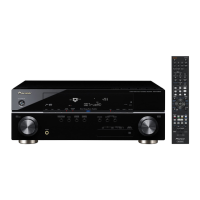
Do you have a question about the Pioneer VSX-1019AH-K and is the answer not in the manual?
Instructions for connecting components using HDMI for audio and video transfer.
How to set up and connect for independent audio playback in multiple rooms.
Automatic acoustic calibration for optimizing speaker settings and room equalization.
Configuring input assignments for components connected to the receiver.
Selecting MCACC calibration presets and choosing input signal types.
Steps to connect compatible Pioneer components for synchronized operation.
Configuring KURO LINK settings and important precautions for its use.
Adjusting various audio parameters like MCACC, EQ, S-Wave, and tone controls.
Operating the sub zone's volume and selecting sources using front panel controls.
Procedure to reset all receiver settings to their factory default values.
Accessing and navigating the Advanced MCACC menu for system calibration.
Performing detailed automatic calibration with multiple MCACC presets.
Manually fine-tuning speaker settings and acoustic calibration for optimal sound.
Renaming, copying, and clearing MCACC presets for system calibration management.
Detailed manual adjustment of speaker size, number, distance, and levels.
Specifying speaker size (Large/Small/No) and crossover frequency.
Adjusting speaker channel levels and distances for optimal sound balance.
Solutions for power-related problems like unit not turning on or switching off.
Diagnosing and resolving problems related to lack of sound from speakers.
Resolving problems with video output, including no image, distortion, or HDCP errors.
Resolving issues with MCACC setup errors, incorrect settings, or display problems.
Solutions for issues where the remote control or other components are not responding.
Resolving issues with USB device recognition, file playback, and system freezes.
 General
| Impedance | 6 Ω |
|---|---|
| Audio output channels | 7.1 channels |
| Signal-to-Noise Ratio (SNR) | 100 dB |
| Output power | 140 W |
| Frequency band | 0.005 — 100 GHz |
| Dimensions (WxDxH) | 420 x 349 x 158 mm |
| Power requirements | 220 — 230 V, 50/60 Hz |
| Connectivity technology | Wired |
| Headphone outputs | 1 |
| Headphone connectivity | 3.5 mm |
| Product color | Black |
| Power consumption (standby) | 0.5 W |
| Power consumption (typical) | 290 W |
 Weight and Dimensions
| Weight | 8700 g |
|---|




 To Next Page