To Next Page
N
Nicole ParrishAug 13, 2025
Why does my Pioneer VSX-325 Home Theater System receiver suddenly switch off?
- BBrittany ShieldsAug 14, 2025
The Auto Power Down function might be enabled. Check the setting for the Auto Power Down function.

Why does my Pioneer VSX-325 Home Theater System receiver suddenly switch off?
The Auto Power Down function might be enabled. Check the setting for the Auto Power Down function.
What to do if OVERHEAT shows on my Pioneer VSX-325 display?
If 'OVERHEAT' appears on the display and the power turns off, it means the unit's internal temperature is too high. Try moving the Pioneer Home Theater System unit to a location with better ventilation.
How to fix no sound when input is selected on Pioneer VSX-325 Home Theater System?
If there's no sound when you select an input function, try pressing the VOLUME +/–MUTE button on the remote control to ensure muting is turned off.
How to troubleshoot no sound from a specific speaker on Pioneer VSX-325?
Ensure the speaker cable is correctly connected. Check that the connection terminal is correct, the speaker wire is firmly inserted, and no speaker wire is touching the rear panel.
What to do if my Pioneer VSX-325 Home Theater System power does not turn on?
If the power does not turn on, disconnect the power plug from the outlet and then re-insert it.
Why does TEMP show on my Pioneer VSX-325 Home Theater System and the volume drops?
If 'TEMP' is displayed and the volume level drops, the unit's internal temperature is too high. Try moving the unit for better ventilation.
Why won't my Bluetooth device connect to my Pioneer VSX-325?
There might be interference. Ensure that there are no devices emitting electromagnetic waves in the 2.4 GHz band (like a microwave oven, wireless LAN device, or another Bluetooth device) near the receiver. Also, check that the Bluetooth device is not too far from the receiver and that there are no obstructions between them.
What does USB Error 4 (I/U ERR4) mean on Pioneer VSX-325 Home Theater System?
USB Error 4 (I/U ERR4) indicates that the power requirements of the USB device are too high for the receiver.
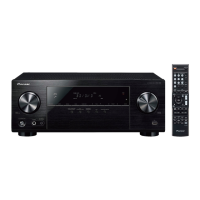
Identification and description of the AV receiver's front panel buttons and indicators.
Detailed explanation of remote control buttons and their functions.
Recommendations for optimal speaker positioning and initial connection steps.
Information on connecting via HDMI and other audio/video cables.
Instructions for connecting TV and source components using HDMI.
Steps for playing audio sources and choosing the correct audio input signal.
 General
| Channels | 5.1 |
|---|---|
| HDMI Inputs | 4 |
| HDMI Outputs | 1 |
| Bluetooth | No |
| AM/FM Tuner | Yes |
| HDMI Version | 2.0 |
| HDCP Version | 2.2 |
| Audio Return Channel (ARC) | Yes |
| 4K Ultra HD Pass-through | Yes |
| HDR Support | HDR10, HLG |
| Dolby Atmos Height Virtualizer | No |
| DTS Virtual:X | No |
| Total Power Output | 500 W |
| Frequency Response | 10 Hz - 100 kHz |
| Input Sensitivity | 200 mV |
| Signal-to-Noise Ratio | 98 dB |
| Speaker Impedance | 6 - 16 Ohms |
| USB Port | Yes |
| Ethernet Port | No |
| Wi-Fi | No |
| Audio Formats Supported | DTS 96/24, DTS-ES, DTS Express |
| Video Formats Supported | 4K |
| Total Harmonic Distortion | 0.08% |