EasyManua.ls Logo

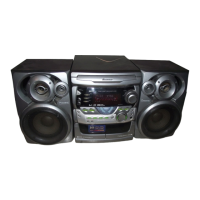
Pioneer XR-J11M - User Manual

Pioneer XR-J11M
28 pages
Print Icon
To Next Page IconTo Next Page
Loading...
STEREO
MULTI-PLAY
CD
CASSETTE
DECK
RECEIVER
XR-JTIM/7XK-J22M
AUTO
RETURN
STEREO
TURNTABLE
Piero
SPEAKER
SYSTEM
HED
Wise
-2vs
uD
DIGITAL
AUDIO
Thank
you
for
buying
this
Pioneer
product
Please
read
through
these
operating
instructions
so
you
will
know
how
10
Operate
your
model
properly.
After
you
have
finished
reading
the
instructions,
put
them
away
in
a
safe
place
for
future
reference.
in
some
countries
or
regions,
the
shape
of
the
power
plug
and
power
outlet
may
sometimes
differ
from
thet
shown
in
the
explanatory
Crawings.
However,
the
method
of
connecting
and
operating
the
unit
is
the
same.
WARNING:
to
prevent
FIRE
OR
SHOCK
HAZARD.
DO
NOT
EXPOSE
THIS
APPLIANCE
TO
RAIN
OR
MOISTURE.
IMIPPORTANT
NOTICE
[For
U.S.
and
Canadian
models]
The
serial
number
for
this
equipment
is
located
on
the
rear
panel.
Please
write
this
serial
number
on
your
enclosed
warranty
card
and
keep
it
in
a
secure
area.
This
is
for
your
security.
[For
Canadian
model]
CAUTION:
To
PREVENT
ELECTRIC
SHOCK
DO
NOT
USE
THIS
(POLARIZED)
PLUG
WITH
AN
EXTENSION
CORD,
RECEPTACLE
OR
OTHER
OUTLET
UNLESS
THE
BLADES
CAN
BE
FULLY
INSERTED
TO
PREVENT
BLADE
EXPOSURE.
ATTENTION:
pour
PREVENIR
LES
CHOCS
ELECTRIQUES
NE
PAS
UTILISER
CETTE
FICHE
POLARISEE
AVEC
UN
PROLONGATEUR
UNE
PRISE
DE
COURANT
OU
UNE
AUTRE
SORTIE
DE
COURANT,
SAUF
SI
LES
LAMES
PEUVENT
ETRE
INSEREES
A
FOND
SANS
EN
LAISSER
AUCUNE
PARTIE
A
DECOUVERT.
[For
Multi-voltage
model]
FM/AM
CHANNEL
STEP
SWITCH
Adjustment
is
only
necessary
when
there
is
s
CHANNEL
STEP
Switch
at
the
rear
panel.
The
CHANNEL
STEP
switch
is
located
on
the
rear
panel
of
the
CD
deck
receiver.
Before
the
CD
deck
receiver
leaves
the
factory,
this
Switch
is
set
to
the
channe!
step
standard
of
the
area
where
the
CD
deck
receiver
is
sold.
Depending
on
the
position
of
this
switch,
each
time
TUNING
button
is
pressed,
the
frequency
display
chanoes
by
the
following
amount:
t
Information
to
User
si@p
sianderd
in
your
aree.
*
The
XR-J22M,
PL-J210
and
S-J11D
ore
not
sold
in
U.S.A.
and
Canada.
LINE
VOLTAGE
SELECTOR
SWITCH
Only
multi-voltage
models
are
provided
with
this
switch.
U.S.,
Canadian,
European,
U.K.,
and
Australian
models
are
not
provided
with
this
switch.
Main
voltages
in
Saudi
Arabia
are
127
V
and
220
V
only.
Never
use
this
model
with
110
V
setting
in
Saudi
Arabia.
Before
your
model
is
shipped
from
the
faciory,this
switch
is
set
to
the
power
requirements
of
the
destination;
nevertheless,
you
should
check
that
it
is
set
properly
before
plugging
the
power
cord
into
the
wall
outlet.
VOLTAGE
BELECTOR
Disconnect
the
power
cord.
Use
a
screwdriver
with
e
tip
that
cone
fits
neatly
in
the
groove.
3.
Insert
the
screwdriver
into
the
groove
on
the
voltage
selector
and
adjust
according
to
the
voltage
value
of
your
area.
Noo
[For
Multi-voltage
model)
CAUTION
e
Use
of
controls
or
adjustments
or
performance
of
procedures
other
than
those
specified
herein
may
result
in
hazardous
Tadiation
exposure.
¢
The
use
of
optical
instruments
with
this
product
will
increase
eye
hazard.
[200
kKH2/10
kHz]
position
For
areas
with
channel
step
of
100
kHz
for
FM
and
10
kHz
for
AM.
[50
kHz/S
kHz]
position
For
areas
with
channel
step
of
50
kHz
for
FM
and
8
kHz
for
AM.
NOTE:
ff
the
switch
is
setto
the
wrong
position,
correct
tuning
may
noi
be
possible,
Consult
your
dealer
if
you
are
not
sure
about
the
radio
channe!}
Alteration
or
modifications
carried
out
without
appropriate
authorization
may
invalidate
the
user's
right
To
Operate
the
equipment
WU)
PIONEER’
The
Art
of
Entertainment
Question and Answer IconNeed help?

Do you have a question about the Pioneer XR-J11M and is the answer not in the manual?

Pioneer XR-J11M Specifications

General IconGeneral
BrandPioneer
ModelXR-J11M
CategoryStereo System
LanguageEnglish

Related product manuals