Operator Guide | SV62751 Rev. A
SH39 Shredder | 5
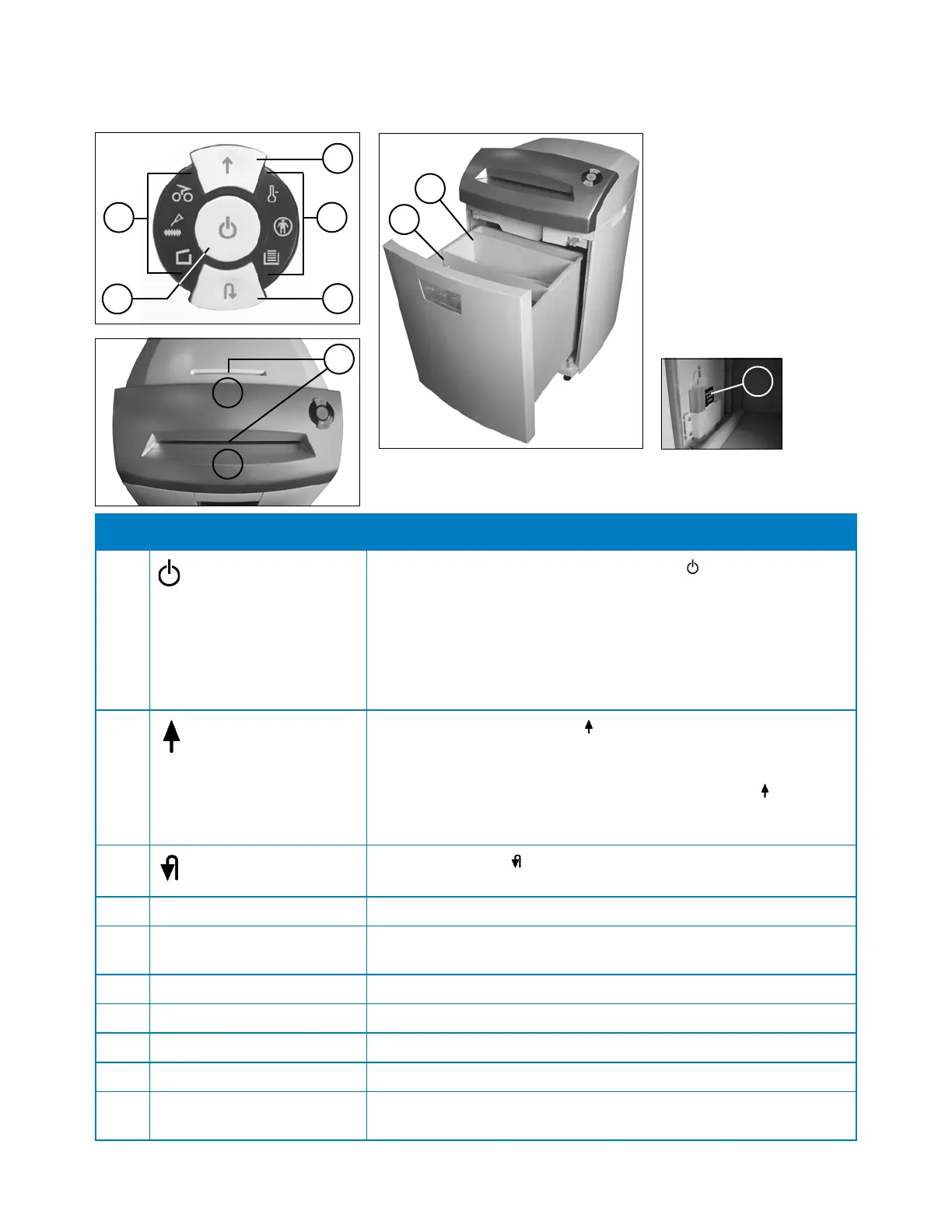
Item Part Description
1
ON/Sleep/Stop button
• When pressed (if the machine is off), the icon lights up and
machine turns ON.
• When pressed and held for about three seconds (if the machine
is on), the machine tuns OFF. NOTE: The machine turns off
automatically if it is not used after 30 minutes.
• When pressed if the cutter mechanism is running, the machine
stops.
2
Forward Button
• When pressed briefly, the icon lights up and the cutting
mechanism runs forwards for a few seconds so remaining
material can be cleared from the machine.
• When pressed and held for about two seconds, the
icon lights
up and the cutting mechanism runs forward continually so you
can feed material into the machine.
3
Reverse Button
When pressed, the icon lights up and the cutter mechanism runs
in reverse for a short time.
4 Control Panel Icons Indicates status or condition of machine (see next page for details)
5 Material Sensors Detects when material is fed into any of the feed slots, prompting
the cutter mechanism to start shredding.
6 Paper Feed Slot Allows you to feed paper for shredding
7 CD/DVD Feed Slot Allows you to feed CDs/DVDs/floppy disks for shredding
8 CD/DVD Collection Section Collects and stores shredded CDs/DVDs/floppy disks
9 Paper Collection Section Collects and stores shredded paper
10 Bottle of Lubricating Oil Stored on the inside of the collection bin housing and used to
lubricate the cutter mechanism when required
2
3
4
1
4
Parts of the Machine
7
6
5
9
8
10


 To Next Page