SV62751 Rev. A | Operator Guide
6 | SH39 Shredder
4
5
6
1
2
3
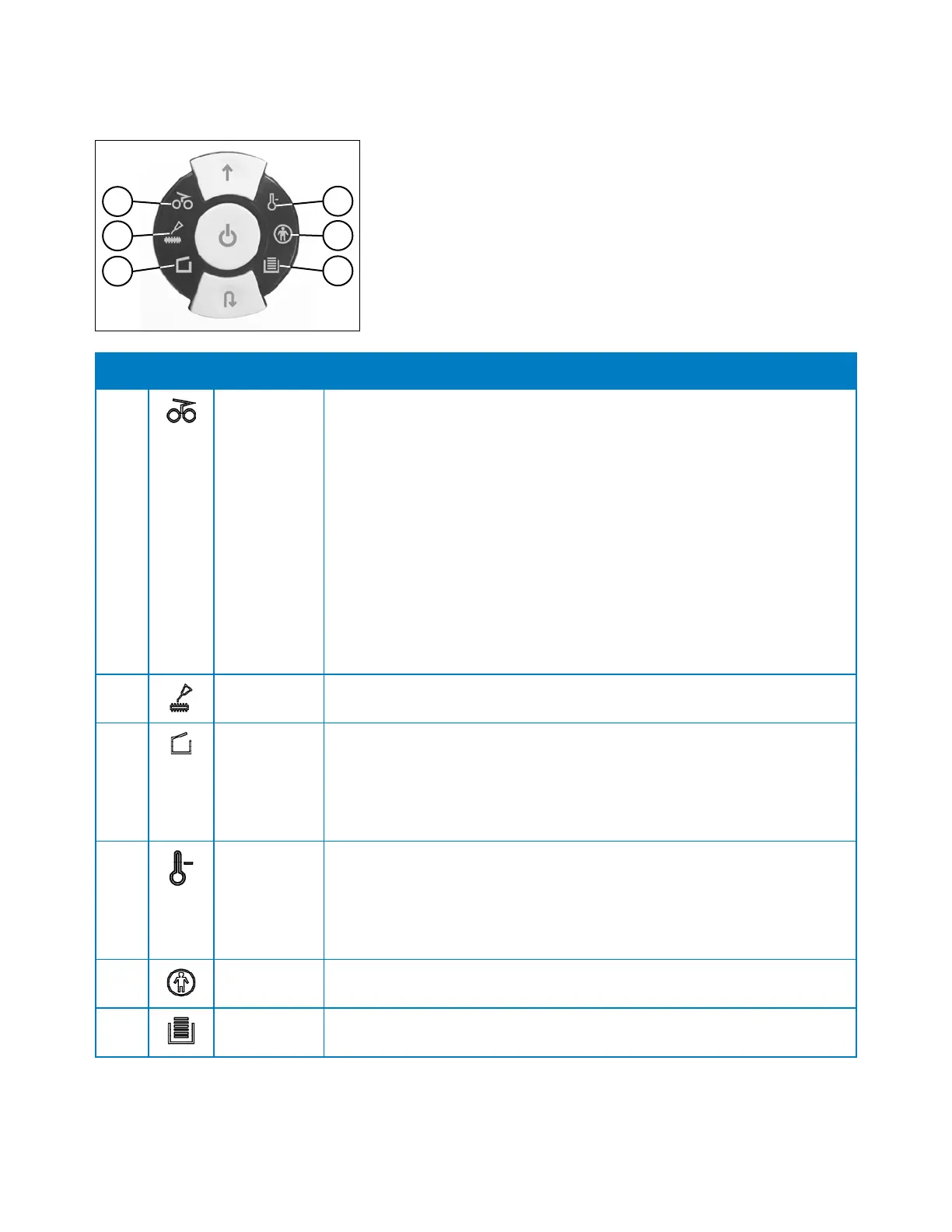
Item Icon Meaning Description
1 Operation
Error
Lights when one of the following occurs:
• Material jam in machine (too much material has been fed into the
cutters) - the cutters jam, run in reverse for a short time, and stop. The
motor turns off.
• Simultaneous material feed (material has been fed into both slots
at the same time) - the cutter mechanism stops, runs in reverse for a
short time, and stops. The motor turns off.
• Material sensors blocked when collection bin is pulled out (there
is material left in one of the two feed slots when the bin is opened) -
the cutter mechanism stops and the motor turns off.
• Material sensors blocked when machine is turned on (there is
material left in one of the two feed slots when the machine is switched
on) - the cutter mechanism does not start.
2
Lubrication
Needed
Lights when the cutter mechanism needs lubricating. See Maintenance
section for procedure.
3
Collection
Bin Open/
Fault
Lights when one of the following occurs:
• Collection bin is pulled out - the machine turns off and cannot be
started as long as the bin remains open.
• Electrical fault (there is an electrical fault in the bin open sensor) - the
light flashes and the machine turns off. Call for servicing.
4
Motor/
Electrical
Fault
Lights when one of the following occurs:
• Motor protection (motor has been overloaded) - the machine turns off
and cannot be started until the motor has cooled down.
• Electrical fault (an electrical fault occurred inside the control board) -
the light flashes and the machine turns off. Call for servicing.
5 Interlock
Engaged
Lights when the operator interlock is enabled. The machine won’t run
when in this state.
6
Collection
Bin Full
Lights when the collection bin is full and needs emptying. The machine
stops.
Control Panel Icons


 To Next Page