Page 6 For technical questions, please call 1-888-866-5797. 63586
Instructions
1. Remove pull tab from battery
compartment before use.
2. Push the OFF ON button to turn caliper on.
3. To toggle measurement between inches
and millimeters, press in/mm button.
4. With jaws closed, press ZERO
to set readout to 0.
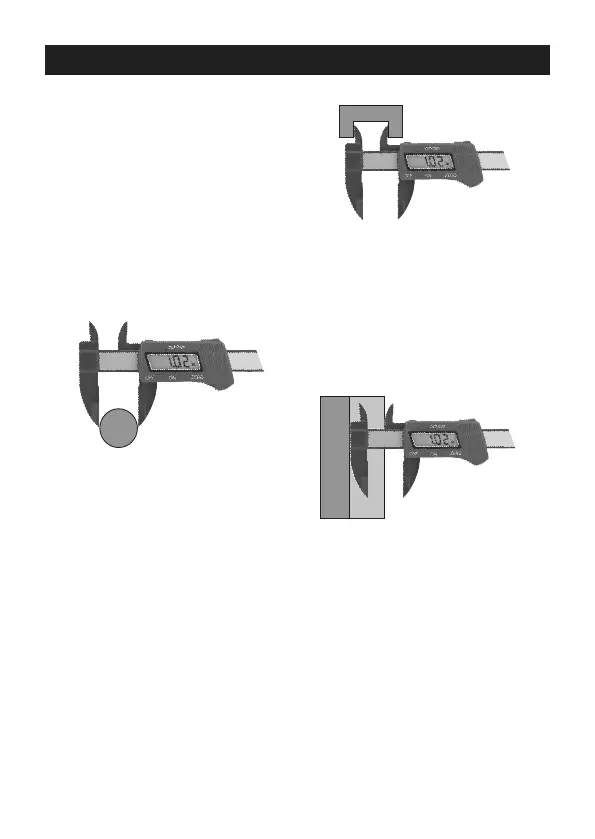
5. To measure outside of object,
set the bottom prongs outside
object being measured. Slide the jaws
together until they gently contact the item.
Figure A: Outer Measurement
6. To measure inside of object, set the
top prongs inside object being measured.
Spread prongs apart until they
touch surface of object.
Figure B: Inner Measurement
7. To measure an object’s step, place the
sliding jaw on the upper step of the
workpiece, then spread the prongs apart
until the fixed jaw contacts the lower step.
Figure C: Step Measurement
8. When finished, press OFF ON
button to turn off Caliper.
9. To replace battery, remove screw(s) and
open battery compartment. Install new
LR44 battery in correct polarity, close
compartment and replace screw(s).


 To Next Page