EasyManua.ls Logo

Pittsburgh 63586 - User Manual

Pittsburgh 63586
8 pages
Print Icon
To Next Page IconTo Next Page
Loading...
63586
Visit our website at: http://www.harborfreight.com
Email our technical support at: productsupport@harborfreight.com
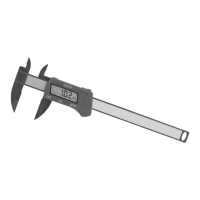
6" Composite Digital Caliper
Owner’s Manual & Safety Instructions
Save This Manual Keep this manual for the safety warnings and precautions, assembly,
operating, inspection, maintenance and cleaning procedures. Write the product’s serial number in the
back of the manual near the assembly diagram (or month and year of purchase if product has no number).
Keep this manual and the receipt in a safe and dry place for future reference. 23e
When unpacking, make sure that the product is intact
and undamaged. If any parts are missing or broken,
please call 1-888-866-5797 as soon as possible.
Copyright
©
2023 by Harbor Freight Tools
®
. All rights reserved.
No portion of this manual or any artwork contained herein may be reproduced in
any shape or form without the express written consent of Harbor Freight Tools.
Diagrams within this manual may not be drawn proportionally. Due to continuing
improvements, actual product may differ slightly from the product
described herein. Tools required for assembly and service may not be included.
Read this material before using this
product. Failure to do so can result in
serious injury. SAVE THIS MANUAL.
Question and Answer IconNeed help?

Do you have a question about the Pittsburgh 63586 and is the answer not in the manual?

Summary

Owners Manual & Safety Instructions

Save This Manual

Instructions on keeping the manual safe for future reference, including recording the serial number.

Product Safety Warning

Crucial safety warning to read material before use to prevent serious injury.

Specifications

Safety Information

General Safety Precautions

Key safety precautions to follow during operation, including eye protection and avoiding distractions.

Battery Safety Warnings

Critical safety warnings regarding button/coin batteries, including ingestion hazards and proper disposal.

Operation and Components

Components and Controls

Identifies and labels the main parts and controls of the digital caliper for user understanding.

Operating Instructions

Step-by-step guide on how to operate the digital caliper for various measurement types.

Limited 90 Day Warranty

Summary

Owners Manual & Safety Instructions

Save This Manual

Instructions on keeping the manual safe for future reference, including recording the serial number.

Product Safety Warning

Crucial safety warning to read material before use to prevent serious injury.

Specifications

Safety Information

General Safety Precautions

Key safety precautions to follow during operation, including eye protection and avoiding distractions.

Battery Safety Warnings

Critical safety warnings regarding button/coin batteries, including ingestion hazards and proper disposal.

Operation and Components

Components and Controls

Identifies and labels the main parts and controls of the digital caliper for user understanding.

Operating Instructions

Step-by-step guide on how to operate the digital caliper for various measurement types.

Limited 90 Day Warranty

Overview

The Pittsburgh 6" Composite Digital Caliper is a precision measuring instrument designed for various applications requiring accurate dimensional readings. This device allows users to measure in both inches and millimeters, providing versatility for different measurement standards.

Function Description:

The primary function of the digital caliper is to provide precise measurements of an object's external dimensions (outer measurement), internal dimensions (inner measurement), and step dimensions. It features a digital display that shows the measurement readings, eliminating the need for manual scale interpretation and reducing potential errors. The caliper is equipped with prongs for gripping objects, an ON/OFF button for power control, an in/mm button for switching between measurement units, and a ZERO button for setting the display to zero at any point, allowing for differential measurements. The composite construction ensures durability while maintaining a lightweight design.

Important Technical Specifications:

  • Display Units: Inches & Millimeters
  • Accuracy: ±0.01" (0.2mm)
  • Display Resolution: 0.01" (0.3mm)
  • Power Supply: 1.5V LR44 battery (Included)

Usage Features:

  1. Power On/Off: The caliper is turned on by pressing the ON/OFF button. To conserve battery life, it should be turned off after use by pressing the same button.
  2. Unit Conversion: Users can easily switch between inch and millimeter measurements by pressing the in/mm button, making it suitable for international standards or mixed-unit projects.
  3. Zero Setting: The ZERO button allows the user to set the display to zero at any position. This feature is particularly useful for relative measurements or for measuring differences between two points without having to calculate the difference manually. To ensure accurate absolute measurements, the jaws should be closed, and the ZERO button pressed to calibrate the device to zero before starting.
  4. Outer Measurement: To measure the outside dimensions of an object, the bottom prongs of the caliper are placed around the object. The jaws are then slid together until they gently contact the item, and the measurement is read from the digital display.
  5. Inner Measurement: For internal measurements, the top prongs are inserted into the object (e.g., a hole or groove). The prongs are then spread apart until they touch the inner surfaces of the object, and the reading is taken from the display.
  6. Step Measurement: To measure the step height or depth of an object, the sliding jaw is positioned on the upper step of the workpiece. The prongs are then spread until the fixed jaw contacts the lower step, and the measurement is displayed.
  7. Battery Management: The caliper operates on a 1.5V LR44 battery. A pull tab is present in the battery compartment upon initial use, which must be removed to activate the battery. The manual provides instructions for battery replacement, emphasizing correct polarity.

Maintenance Features:

  • Inspection Before Use: It is crucial to inspect the caliper before each use to ensure that no parts are loose or damaged. Any issues should be addressed before operation to maintain accuracy and safety.
  • Work Area: The work area should be kept clean and well-lit to prevent errors and ensure safe operation.
  • Product Labels and Nameplates: The product labels and nameplates contain important safety information and should be maintained in a readable condition. If they become unreadable or missing, replacements should be sought from Harbor Freight Tools.
  • Battery Replacement: When the battery needs replacement, the screw(s) on the battery compartment should be removed, the compartment opened, and a new LR44 battery installed with correct polarity. The compartment should then be closed, and the screw(s) replaced.
  • General Care: The manual advises against operating the caliper when tired or under the influence of alcohol, drugs, or medication. It also stresses using the device only as intended.
  • Button/Coin Battery Warnings: The manual includes specific warnings regarding button/coin batteries, highlighting the ingestion hazard. It advises immediate disposal of used batteries, keeping them away from children, and not disposing of them in household trash. Users are instructed to call a local poison control center for treatment information if ingestion occurs. It also warns against mixing old and new batteries, different brands, or types of batteries. Furthermore, it states that non-rechargeable batteries are not to be recharged and advises against force discharging, disassembling, heating above 122°F, or incinerating batteries, as these actions can lead to injury, leakage, or explosion.

Pittsburgh 63586 Specifications

General IconGeneral
BrandPittsburgh
Model63586
CategoryMeasuring Instruments
LanguageEnglish

Related product manuals