TX
MUTE
B
U
CH01 573 15 MHz 13dB
RX
Get to Know
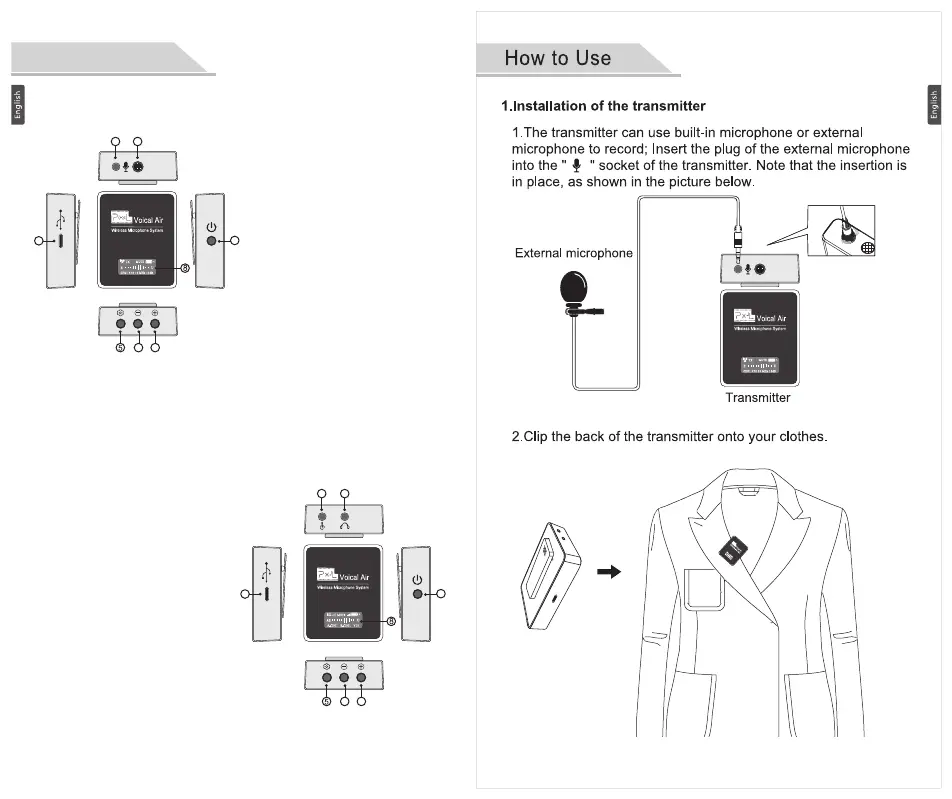
1. Built-in microphone
2. External microphone port
3. USB-C charging port
4. Power button: long press 2
seconds to turn on/off; shot press
to turn On/Off mute mode
5. Set button: select the function to
set
6. “-”is DB sensitivity down button
by default, “-” can change the
channel after short press set
button
7. “+”is DB sensitivity up button by
default, “+” can change the
channel after short press set
button
8. OLED screen
1. Headphone output: connect
headphones for real time monitor
2. Recording output: connect to
recording device by using audio
cable
3. USB-C charging port
4. Power button: long press 2
seconds to turn on/off; shot press
to turn On/Off mute mode
5. Set button: select the function to
set
6. Monitor volume down button
7. Monitor volume up button
8. OLED screen
receiver
TX transmitter
2 3
TX
MUTE
B
U
CH01 573 15 MHz 13dB
RX
MUTE
AB
U
A-CH01 B-CH01 V15
6 7
1
2
4
3
1
2
4
3
6 7
TX
MUTE
B
U
CH01 573 15 MHz 13dB



 To Next Page